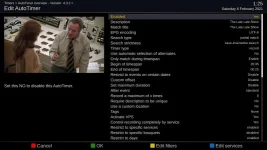
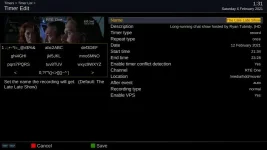
No channel change capability even though the eit remains constant :-(Programmes tend to start later than scheduled or are switched to a different channel, can VPS cope with a channel change?
Sent from my IN2013 using Tapatalk


No channel change capability even though the eit remains constant :-(Programmes tend to start later than scheduled or are switched to a different channel, can VPS cope with a channel change?

You should no longer see a crash when trying to enable VPS on an AutoTimer (which my previous Modifications.py had let creep in).Hi birdman. I've installed the .py files in the zip plus the plugin.py file from earlier. What differences should I see?
Haven't looked at that yet. Should be able to have a poke around this evening.Still working on AutoTimers but setting reverts to no when I enable it on manual timer (EPG GREEN) same as before.
Why can't it determine whether the channel supports VPS?You can ignore that.
Even if VPS could, I doubt that AutoTimer would like it.Programmes tend to start later than scheduled or are switched to a different channel, can VPS cope with a channel change?

Why can't it determine whether the channel supports VPS?
Surely if it can't work that out then VPS isn't going to work well?
Even if VPS could, I doubt that AutoTimer would like it.
and enigma2 is non-responsive....< 4600.0235> 19:05:00.0023 [RecordTimer] stop recording on tuner: A
< 4600.0238> 19:05:00.0025 [eDVBServiceRecord] stop recording!
< 4600.0293> 19:05:00.0081 [eFilePushThreadRecorder] stopping thread: 100
< 4600.1297> 19:05:00.1084 [eFilePushThreadRecorder] stopping thread: 99
...
< 4602.5343> 19:05:02.5131 [eFilePushThreadRecorder] stopping thread: 75
< 4602.6345> 19:05:02.6133 [eFilePushThreadRecorder] stopping thread: 74
< 4602.7221> 19:05:02.7009 [gRC] main thread is non-idle! display spinner!
< 4602.7347> 19:05:02.7135 [eFilePushThreadRecorder] stopping thread: 73
< 4602.8350> 19:05:02.8138 [eFilePushThreadRecorder] stopping thread: 72
...
< 4609.8494> 19:05:09.8282 [eFilePushThreadRecorder] stopping thread: 2
< 4609.9496> 19:05:09.9284 [eFilePushThreadRecorder] stopping thread: 1
< 4610.0498> 19:05:10.0286 [eFilePushThreadRecorder] thread could not be stopped!
< 4610.0504> 19:05:10.0292 [eDVBTSTools] setSource loading streaminfo for /media/hdd/movie/Radio/20210205 1827 - BBC Radio 4 - The News Quiz.ts
< 4610.1027> 19:05:10.0815 [eThread] Destroyed thread without joining it, this usually means your thread is now running with a halfway destroyed object
A quick check shows that for me.
Setting VPS to on in such an AutoTimer appears to work, but the value is never actually saved so if you look at it later it is unset again.
[/LIST]
So, as far as I can tell, this is currently never going to do anything?
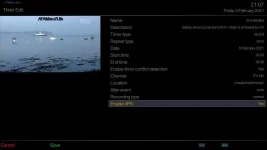
No idea whether this is anything to do with the VPS plugin but I've just got this:
and enigma2 is non-responsive....
EDIT: I suspect its not VPS related. I've had other recordings succeed with VPS in place, and this eFilePushThreadRecorder message reminds me of something else.
15:44:31.2451 [eDVBCAService] free slot 0 demux 1 for service 1:0:19:4484:4089:233A:EEEE0000:0:0:0:
15:44:31.2451 [eDVBCAService] don't build/send the same CA PMT twice
15:44:31.2467 [RecordTimer] [VPS] stop RecordService (simulation)
15:44:31.2470 [VPS-Plugin] next execution in 180 sec
15:45:00.1946 [RecordTimer] [VPS] RUNNING_STATUS 4 PRESENT
15:45:01.1951 [eDVBServiceRecord] pcr of eit change for event 19299: e317453
15:45:01.1952 [eDVBServiceRecord] now running: The Farmers' Country Showdown (2700 seconds)
15:45:01.1954 [eDVBDemux] open demux /dev/dvb/adapter0/demux1
15:45:01.1955 [eDVBSectionReader] DMX_SET_FILTER pid=18
15:45:01.1965 [RecordTimer] [VPS] EVENT_ENDED
15:45:01.1968 [RecordTimer] activating state 3
15:45:01.1970 [RecordTimer] stop recording on tuner: B
15:45:01.1971 [eDVBServiceRecord] stop recording!
15:45:01.1979 [eFilePushThreadRecorder] stopping thread.
15:45:01.1981 [eDVBRecordFileThread] waiting for aio to complete
15:45:01.1982 [eDVBRecordFileThread] buffer usage histogram (40 buffers of 188 kB)
15:45:01.1982 [eDVBRecordFileThread]   0:     25
15:45:01.1983 [eDVBRecordFileThread]   1:   3990
15:45:01.1983 [eDVBRecordFileThread]   2:   3981
15:45:01.8398 [eFilePushThreadRecorder] THREAD STOP
15:45:01.8418 [eDVBTSTools] setSource loading streaminfo for /media/hdd/movie/20210204 1500 - BBC ONE HD - Escape to the Country.ts
15:45:01.8462 [eDVBServiceRecord] fixed up 1ffc36953 to 20863 (offset 0)
15:45:01.8462 [eDVBServiceRecord] fixed up e317453 to e6e5163 (offset 0)
15:45:01.8474 [eDVBServiceRecord] saveCutlist 20863
15:45:01.8474 [eDVBServiceRecord] saveCutlist e6e5163
15:45:01.8489 [Trashcan] Recording(s) in progress: 1
15:45:01.8515 [eDVBCAService] free slot 1 demux 1 for service 1:0:19:4484:4089:233A:EEEE0000:0:0:0:
Should have been either that would crash, but you had to be doing a restore to get it (I think).@birdman. I have never had a crash when setting VPS on an AutoTimer (I'm using dev build), prior to your fixes. I think it was an issue on Release code.
That's a strange interpretation of "enabled by default". It's being taken as "forcibly on"; a very different thing.You don't see the VPS option on a manual (one-off) timer from the EPG, unless you set the "VPS enabled by default" option to off in the VPS setup menu.
As I noted earlier today (or rather yesterday evening) the TimerEntry code knows nothing about VPS.Even then, when you set VPS to yes in the manual timer edit, the setting just reverts to off after you save it. Only timers set by AutoTimer work.
Just to add, if you use the webif and "edit new timer" rather than simply "add new timer", then the webif correctly presents the VPS options and saves them to the new timer.Should have been either that would crash, but you had to be doing a restore to get it (I think).
That's a strange interpretation of "enabled by default". It's being taken as "forcibly on"; a very different thing.
As I noted earlier today (or rather yesterday evening) the TimerEntry code knows nothing about VPS.
But I'd like to look at things one step at a time.
<?xml version="1.0" ?>
<timers>
<timer begin="1612610700" end="1612613100" serviceref="1:0:19:4484:4089:233A:EEEE0000:0:0:0:" repeated="0" rename_repeat="1" name="Rick Stein's Cornwall" description="9/15. Rick meets Dawn French at Golitha Falls, where the River Fowey tumbles down to the sea. [S,AD] [HD]" afterevent="auto" justplay="0" always_zap="0" pipzap="0" conflict_detection="1" descramble="1" record_ecm="0" isAutoTimer="0" eit="19429" tags="Rick_Stein's_Cornwall"/>
</timers><?xml version="1.0" ?>
<vps_timers>
</vps_timers><?xml version="1.0" ?>
<timers>
<timer begin="1612610700" end="1612613100" serviceref="1:0:19:4484:4089:233A:EEEE0000:0:0:0:" repeated="0" rename_repeat="1" name="Rick Stein's Cornwall" description="9/15. Rick meets Dawn French at Golitha Falls, where the River Fowey tumbles down to the sea. [S,AD] [HD]" afterevent="auto" justplay="0" always_zap="0" pipzap="0" conflict_detection="1" descramble="1" record_ecm="0" isAutoTimer="0" eit="19429" tags="Rick_Stein_s_Cornwall"/>
</timers><?xml version="1.0" ?>
<vps_timers>
<timer begin="1612610700" end="1612613100" serviceref="1:0:19:4484:4089:233A:EEEE0000:0:0:0:" vps_enabled="1" vps_overwrite="1" vps_time="0">
</timer>
</vps_timers>https://github.com/oe-alliance/enigma2-plugins/pull/407
https://github.com/oe-alliance/enigma2-plugins/pull/408
https://github.com/oe-alliance/enigma2-plugins/pull/409