Superb quality and spec AB-Com PULSe 4K SE. Crazy offer! Only £129! FREE UK DELIVERY! 4K UHD, Enigma 2, Multiboot 4 images & more!...
Superb quality and spec AB-Com PULSe 4K Rev II Twin Satellite tuner only £179! FREE UK DELIVERY! 4K UHD, Enigma 2, SATA HDD facility, Multiboot 4 images & more!...

EPG search

digitl

Forum Supporter
Donated Member
Joined
Sep 6, 2023
Messages
160
Reaction score
1
Points
18
Is it possible to restrict an EPG search to just one channel? Searching for something as common as 'New' pulls up a multitude of matches when I would like to see matches from only, say, BBC1.
 
I know this a different box, but, maybe, press info, then yellow button. That works on Gigablue and my Zgemma.
 
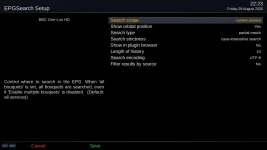
Once you are in EPG search, press menu, then select setup. In the search cope, the default is "all services". You can change it to several values including "current service". Service = Channel

EPG search menu_setup.webp

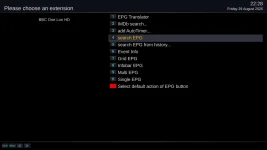
The EPG button works like Info button on most screens. However, that is not too important here as you access "EPG Search" by several methods. You have not mentioned which you are using. As well as pressing yellow on the Grid EPG, you can also do the following for reference purposes. From the live TV screen, i.e no menus showing, Long press of the EPG/INFO button, 4 (Search EPG),

EPG search.webp
 
Once you are in EPG search, press menu, then select setup. In the search cope, the default is "all services". You can change it to several values including "current service". Service = Channel

View attachment 67918

The EPG button works like Info button on most screens. However, that is not too important here as you access "EPG Search" by several methods. You have not mentioned which you are using. As well as pressing yellow on the Grid EPG, you can also do the following for reference purposes. From the live TV screen, i.e no menus showing, Long press of the EPG/INFO button, 4 (Search EPG),

View attachment 67919
Perfect, thank you. Every day is a school day!

I've been pressing EPG then yellow twice. I was unaware of the options if I was to press Menu after the first yellow (and there's probably still a multitude of options on the box that I've not found despite having had it for almost two years).
 

OpenViX Feeds Status

Back
Top