Superb quality and spec AB-Com PULSe 4K SE. Crazy offer! Only £99! FREE UK DELIVERY! 4K UHD, Enigma 2, Multiboot 4 images & more!...
Superb quality and spec AB-Com PULSe 4K Rev II Twin Satellite tuner only £149! FREE UK DELIVERY! 4K UHD, Enigma 2, SATA HDD facility, Multiboot 4 images & more!...

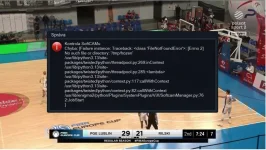
[DM920] Error message when checking the softcam

ROGIII

Forum Supporter
Donated Member
Joined
Sep 13, 2010
Messages
16
Reaction score
1
Points
3
Age
67
Location
Bratislava
What type of support thread are you creating?
Support question
What OpenViX Image build number are you using?
6.8.001
Have you tried re-flashing WITHOUT settings restore?
NO
Have you tried re-flashing WITH a settings restore?
NO
After switching from 6.7.20 to 6.8.001 everything went fine.
When turning on the receiver, a message appears as in the attachment.
By confirming the message with the OK button, the message will disappear.
Do I need to do a new clean installation without transferring settings, or can the message be removed?
Can anyone please advise? Thank you
 

Attachments

  • DM920hd.webp
    DM920hd.webp
    87 KB · Views: 17
Which softcam are you using please? And from where did you get it? Are you using softcam manager to control it or using the the script control method? If this is repeatable, can you enable debug logs and upload the debug logs. You must restart for setting to take effect.
 
Which softcam are you using please? And from where did you get it? Are you using softcam manager to control it or using the the script control method? If this is repeatable, can you enable debug logs and upload the debug logs. You must restart for setting to take effect.
With that error message it must be SoftcamManager.
 
I use softcam manager from image. I use oscam-latest with my configuration files to read the Antik card on 16est.
I uploaded a new setting and restarted the receiver several times.
The error message has not appeared since then.
Thanks for the advice.
 
The error message started appearing again.
I reinstalled a clean install to version VIX6.8.001, all settings and add-ons reinstalled.
The error message no longer appears.
 

OpenViX Feeds Status

Back
Top