Superb quality and spec AB-Com PULSe 4K SE. Crazy offer! Only £129! FREE UK DELIVERY! 4K UHD, Enigma 2, Multiboot 4 images & more!...
Superb quality and spec AB-Com PULSe 4K Rev II Twin Satellite tuner only £179! FREE UK DELIVERY! 4K UHD, Enigma 2, SATA HDD facility, Multiboot 4 images & more!...

[VU+ Duo2] fast forward changed on the remote (its changed in latest images)

manikm

Member
Joined
Jan 25, 2012
Messages
238
Reaction score
0
Points
16
hi guys,
after a recent update...ive got an issue with fast forward
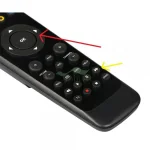
easiest way to describe this is, the button i used to use for fast forward (single arrow - marked red in pic) now brings up a time seek bar and doesn't fast forward the action, i am having to use the smaller fast forward button (double arrow - marked yellow in pic) - which I find fiddly as its at the bottom of the remote control
how can i configure it so it behaves like it used to? i.e using the button marked red in pic for fast forward
thanks!!
 

Attachments

  • remote.webp
    remote.webp
    17.4 KB · Views: 22
No problem with > for me on 5.0.024, (et10k).

Long press > gives the seek bar you're seeing.
 
Annoying problem. Long press gives me a time option. I.e skip 5 mins

Sent from my Hudl 2 using Tapatalk
 
Annoying problem. Long press gives me a time option. I.e skip 5 mins
That's what I see with long press FF.

Have you remapped the buttons somehow?
 
Maybe my 17 month old son has. [emoji16] where can I map buttons ?

Sent from my SM-G935F using Tapatalk
 
I have noticed it does that on my vu remote too. Also did on my xtrend too. I cant figure out if this was an intentional change or by accident. Anyhow, i have set up buttons to skip the desired seconds i like to use that to forward now and it is brilliant.
 
Thanks. I can't believe no one has chimed in with an answer. Is this how it should be now or has something changed. Is this a by duo2 image thing? I want it back the way it used to be. The bottom fast forwards are very annoying to use being at the bottom. Bad hand set design

Sent from my SM-G935F using Tapatalk
 
I've reflashed and it's back to normal. How annoying that was

Sent from my SM-G935F using Tapatalk
 
I got this same problem when I flashed from 5.0.xx to 5.1.027 without restoring settings. Tried to find mapping for fast forward with no luck. Also if I press the "help" button, there is guide where this FF action can be done, and it seems to work from there.
Any suggestions how can I get FF and rewind back to where it used to be??
 
Ok, @Samzam sorted this out. Go to setting - user interface - settings - "Infobars EPG state" (or something like that, I have GUI in Finnish). Change it to something else than "left/right" or "as plugin in extended bar" that I had after flashing.
 

OpenViX Feeds Status

Back
Top