Superb quality and spec AB-Com PULSe 4K SE. Crazy offer! Only £129! FREE UK DELIVERY! 4K UHD, Enigma 2, Multiboot 4 images & more!...
Superb quality and spec AB-Com PULSe 4K Rev II Twin Satellite tuner only £179! FREE UK DELIVERY! 4K UHD, Enigma 2, SATA HDD facility, Multiboot 4 images & more!...

FBC tuners: Diseqc switch with Universal LNB

Status
Not open for further replies.

goral

Member
Joined
May 8, 2017
Messages
77
Reaction score
0
Points
6
HI
I have 2 LNB different satellite.
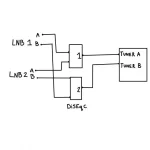
I use just ordinary dual LNB And connected to tuner as below:

image0.webp

How can I correctly configure tuner settings in VU+ Uno 4K SE with no unicable LNB.

Thanks.
 
Just like any other receiver.

simple, diseqc a/b for both tuner A and B. Select the correct satellite for each diseqc port. Tuners C-H are left in FBC-automatic.
 
Just like any other receiver.

simple, diseqc a/b for both tuner A and B. Select the correct satellite for each diseqc port. Tuners C-H are left in FBC-automatic.

Thanks.
Do you think, if I change LNB for unicable one, it will be better or in this case it will not change anything? I mean record and watch different channels.
And one more, if I use Unicable LNB it should be 4 canals or 8?
I not quite understand - I have two input but 8 tuners...

[sorry for my english]
 
please read the guides to unicable it will explain more.

For me, you are better off not using diseqc switch. universal to each tuner is better. unicable to each physical tuner is best.

Only you know how many devices will be connecting to LNB. If only this device, then twox 4 SCR unicable lnb will be fine. no harm in buying LNB with more SCR.
 
please read the guides to unicable it will explain more.

Yes, I read this, and is clear for me, when I use unicable LNB i could assign each tuner (A a to H) to different canal. If I understood correctly When is 2 LNB on different satellite, I should put to Tuner A one LNB and assign FBC from B to D, and for other satellite connect to tuner E and then FBC assing canal to F to H.

For me, you are better off not using diseqc switch. universal to each tuner is better. unicable to each physical tuner is best.

If I eliminate disecq I will lose the ability to watch and record different channels from one satellite (?).
Or FBC it will give me this opportunity without diseqc? - That what I don't understand.

To watch one chanel and record another you need dual LNB (for different polarisation - different voltage).
 
With an FBC capable box (your Vu+ Uno 4K SE has FBC) so a Unicable II LNB is all you need. 1 cable from the LNB to the Vu+ will give you 8 tuners if you get the correct LNB. The higher the LNB SCRs the better.


Sent from my iPhone using Tapatalk
 
You have used A & B to identify satellites, let's use numbers.

You would "hook up" Unicable LNB from 13e to Tuner A. You would "hook up" Unicable LNB from 28.2e to Tuner B.

You have 2 physical (root) tuners and 6 non-physical (leaf) tuners. You can split/use how you like. Let's describe 4+4.

Set A to 13e. Do not enable "connected".
Set C,D,E to 13e. They are connected/sharing wire/LNB to A. They must have 4 separate SCR on that LNB.

Set B to 28.2e. Do not enable "connected".
Set F,G,H to 28.2. They are connected/sharing wire/LNB to B. They must have have 4 a separate SCR on that LNB.

You therefore have 4 demodulator for 13e and 4 for 28.2. All 8 are independent.

"Hook up" = "physically connect" a wire to LNB.

In tuner configuration, "connected to" = which root tuner do you want to share.
 
Yes, but... I have only tuner A and B.
Tuners C, D, E, F, G, H is not possible to set as internal-loopthrough mode.
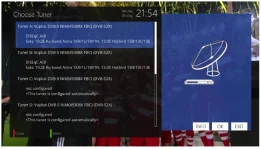
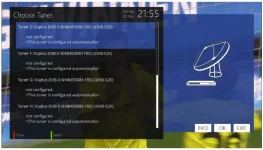
Look at this screenshot


Capture_001.webp:
Capture_002.webp
 
Tuners setup. VU+ Uno

FBC Automatic is internal loop through. It is done automatically.
 
Thread closed as OP is using a different setup. Posts referring to unicable moved to his other thread
 
Status
Not open for further replies.

OpenViX Feeds Status

Back
Top