Superb quality and spec AB-Com PULSe 4K SE. Crazy offer! Only £129! FREE UK DELIVERY! 4K UHD, Enigma 2, Multiboot 4 images & more!...
Superb quality and spec AB-Com PULSe 4K Rev II Twin Satellite tuner only £179! FREE UK DELIVERY! 4K UHD, Enigma 2, SATA HDD facility, Multiboot 4 images & more!...

[VU+ Duo2] Fix: [TimerList] move Orb position after Service Name.

2stein

ViX Beta Tester
Joined
Nov 6, 2010
Messages
1,108
Reaction score
47
Points
48
Website
github.com
I already tried this fix and found it better than before.
But now the beginning of the channel name is cut off. :-(
I'd rather prefer the end to be cut off.
Skin: standard (VIX HD Night)
Thanks.
 
If you are able to, disable overscan on your TV.

If not, you will have to edit the OSD position setup
Menu > Setup > System > User Interface > Position setup

Reduce the width and move right/left. Reduce height and move down/up. You should just about see the ends of the box.
 
now: i adjusted the osd but the beginning of the channel name in the timer list is still cut off.
 
did you turn off overscan on the TV ? 99.9% of these problems are caused by it
 
on my sony tv its called 1x1 pixel or something

in the settings where 16:9 is etc, its in there
 
i know, but in this mode the tv picture doesn't completely fill the screen and an ugly border is left.
 
Oh boy, finally I was able to turn off overscan. The TV setting is called "Full Pixels" or something like that.
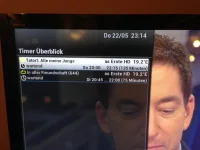
But: the beginning of the channel name in the timer list is still cut off.
2014-05-22 23.14.04.webp
Channel name is:"Das Erste HD"
 
Oh boy, finally I was able to turn off overscan. The TV setting is called "Full Pixels" or something like that.
But: the beginning of the channel name in the timer list is still cut off.
View attachment 34847
Channel name is:"Das Erste HD"

This is fixed in current test builds, so once Apollo is released, you'll have the fix.
 

OpenViX Feeds Status

Back
Top