Superb quality and spec AB-Com PULSe 4K SE. Crazy offer! Only £99! FREE UK DELIVERY! 4K UHD, Enigma 2, Multiboot 4 images & more!...
Superb quality and spec AB-Com PULSe 4K Rev II Twin Satellite tuner only £149! FREE UK DELIVERY! 4K UHD, Enigma 2, SATA HDD facility, Multiboot 4 images & more!...

force download/get epg

Alankellyeire

Member
Joined
Dec 27, 2012
Messages
205
Reaction score
1
Points
18
I am away for travel a bit so rely on stuff being recorded to watch.

I noticed a few times things never recorded and i can only assume its cause the EPG did not download since the box was not used in a while.

The EPG i am talking about is the one on latest openvix image under menu -> setup -> EPG which i assume is RyVIX XMLTV? I dont see an option to force download in standby mode. Can anyone advise what options I have here as a lot of stuff i watch can not be streamed from my country so if i miss it i never will get to see it again unless BBC replay it.

The stuff i am trying to record i mostly on DVB-S2 28.2 and some things on DVB-T2(Soarview)
 
If you use the built-in OpenEPG reader in Vix (which uses the over-the-air EPG from Sky), then you can download EPG updates daily by using the scheduler. You can keep the receiver mostly in deep standby and the scheduler will wake the box to run the download. You can schedule a zap or record for 5 minutes from Saorview daily which will refresh the terrestrial EPG.
 
If you use the built-in OpenEPG reader in Vix (which uses the over-the-air EPG from Sky), then you can download EPG updates daily by using the scheduler. You can keep the receiver mostly in deep standby and the scheduler will wake the box to run the download. You can schedule a zap or record for 5 minutes from Saorview daily which will refresh the terrestrial EPG.

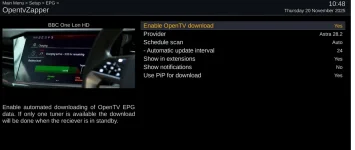
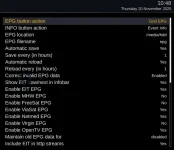
where exactly is that setting as i already have opentv epg downloader scheduled but it does not seem to work. here are my current setting.
Screenshot 2025-11-20 at 10.48.05 a.m..webpScreenshot 2025-11-20 at 10.49.02 a.m..webp
 
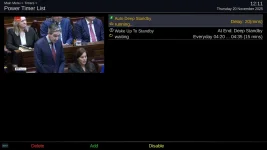
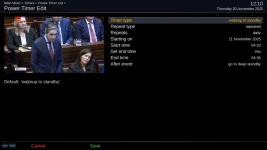
Remind me what receiver you have and I'll double check my settings. There's probably no need to auto-save/auto-reload the EPG. It is loaded from the file system at boot time and then maintained in memory. It is saved back to the file system at shutdown. Your schedule automatic update of 24 hours is dependent on the receiver being in standby depending on the number of tuners available. I use power timers to wake the box from deep into standby mode at a specific time each day and then run the EPG update and ABM etc. I will grab a couple of screenshots...
 
Remind me what receiver you have and I'll double check my settings. There's probably no need to auto-save/auto-reload the EPG. It is loaded from the file system at boot time and then maintained in memory. It is saved back to the file system at shutdown. Your schedule automatic update of 24 hours is dependent on the receiver being in standby depending on the number of tuners available. I use power timers to wake the box from deep into standby mode at a specific time each day and then run the EPG update and ABM etc. I will grab a couple of screenshots...
vu solo2

This box is not actually used per say as it is in the attic so always in standby mode. I stream recordings and live tv from this box using different apps on TVs/devices around the house.

I do manually configure the recordings using screen capture on the web ui as there is bugs around doing it otherways.
 
An attic is not the greatest place for running electronic kit unless the temperature is reasonably stable. Can get very hot in summer/cold in winter unless roof itself is insulated.
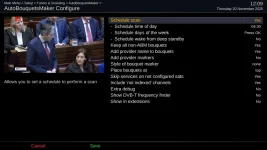
However, that said, if you are streaming live tv (or recording stuff on the actual receiver) then the tuners may be active and OpenTV may not run. What I do is schedule a specific time to boot my receivers from deep standby and run OpenTV and ABM during that window.
 

Attachments

  • power_timer_setting.webp
    power_timer_setting.webp
    42.7 KB · Views: 10
  • power_timer_sched.webp
    power_timer_sched.webp
    46.6 KB · Views: 10
  • ABM_schedule.webp
    ABM_schedule.webp
    68.3 KB · Views: 10
  • Opentv_schedule.webp
    Opentv_schedule.webp
    57.7 KB · Views: 11
Remind me what receiver you have and I'll double check my settings. There's probably no need to auto-save/auto-reload the EPG. It is loaded from the file system at boot time and then maintained in memory. It is saved back to the file system at shutdown. Your schedule automatic update of 24 hours is dependent on the receiver being in standby depending on the number of tuners available. I use power timers to wake the box from deep into standby mode at a specific time each day and then run the EPG update and ABM etc. I will grab a couple of screenshots...
I seem to remember in the dim and distant past generic settings like 24hr or every day may not work when in deep standby

I too use ordinary timers to get over the air EPG for 28.2E every day it runs from deep standby and returns to deep standby (unless a recording is taking place).
I also have power timers to return to standby
 
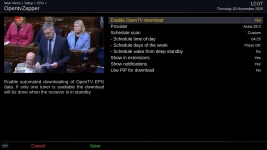
@Alankellyeire - Note my settings for OpenTV zapper - set to "custom" not "auto". Custom allows you to specify a time and day(s) of the week to run the zapper. I use 04:30 when nothing is being viewed or recorded. Your settings will download at 24 hour intervals unless tuners are busy. I strongly recommend you don't use multiple sources of EPG (like Rytec and also over-the air).
 
Fake recording works better than PIP. But, might as well as use EPG Importer and get data from the interWeb if your tuners are tied up.
 

OpenViX Feeds Status

Back
Top