Superb quality and spec AB-Com PULSe 4K SE. Crazy offer! Only £129! FREE UK DELIVERY! 4K UHD, Enigma 2, Multiboot 4 images & more!...
Superb quality and spec AB-Com PULSe 4K Rev II Twin Satellite tuner only £179! FREE UK DELIVERY! 4K UHD, Enigma 2, SATA HDD facility, Multiboot 4 images & more!...

GigaBlue UHD Trio 4K Pro not reading WLAN

Redvee

New member
Joined
Oct 4, 2026
Messages
7
Reaction score
0
Points
1
I have just got a GigaBlue UHD Trio 4K Pro & it is only showing me LAN option, it is not reading the WLAN so I thought i'd try flashing the OpenViX recovery.
There doesn't appear to by a section for the 'Pro' version only the Gigablu UHD Trio 4K (which I don't think has the internal WIFI).
Will the recovery emmc have the drivers to activate the wifi chip?
Is there another option I should be exploring?
Apologies if this is not clear, but I'm new to these boxes and trying to find my way.
Many thanks for any advice.
 
There is no openvix trio4k pro image, hence the issue.
Its buildable but not currently done.
 
There is no openvix trio4k pro image, hence the issue.
Its buildable but not currently done.
Thanks for the response - Do you know how I can get the the box to read the WLAN then? I've tried multiple installs & driver plug-ins but nothing seems to register
 
thats because the gbtrio4Kpro image contains an updated dvb module to handle WiFi.
1. stupid Q. but you are sure its a Pro, 2)how did you manage to flash the non Pro image onto the box?
 
thats because the gbtrio4Kpro image contains an updated dvb module to handle WiFi.
1. stupid Q. but you are sure its a Pro, 2)how did you manage to flash the non Pro image onto the box?
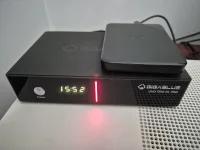
Not a stupid question but it was bought as such, and it has uhd trio 4k pro on the unit (see photo) I flashed a gigablue uhd trio 4k pro image from openatv to no avail. I think it must be a hardware problem as the Bluetooth is dead also. Running hciconfig -a returns a completely blank output, I'm thinking that the entire l combo module on the motherboard is dead or completely starved of power. Many thanks for your response, but it needs to go back for a replacement.
 

Attachments

  • 20261006_145206.webp
    20261006_145206.webp
    55.7 KB · Views: 4
On the gigablue UHD quad pro (out of the box) wlan would not connect properly. I use wifi 7 at home and when I changed it to wifi 5 all worked well. May be your problem.
 
On the gigablue UHD quad pro (out of the box) wlan would not connect properly. I use wifi 7 at home and when I changed it to wifi 5 all worked well. May be your problem.
Thanks for your comment - The issue i have is the box will not even display wlan only lan. It is not an issue of not being able to connect, I can't even see it. My router is running WiFi 5 & 6 and I have no option to disable 6 unfortunately. Your comment has given me food for thought. I might play around with security and settings. There might be something that the gigablue does not like.
 
thats because the gbtrio4Kpro image contains an updated dvb module to handle WiFi.
Does the kernel detect a Wifi chipset without this dvb module? (What does the message file show?).
(I assume it's not actually a dvb thing, just that Gigablue will provide a dvb module, and also might have put some Wifi driver magic into it.)
 
Does the kernel detect a Wifi chipset without this dvb module? (What does the message file show?).
(I assume it's not actually a dvb thing, just that Gigablue will provide a dvb module, and also might have put some Wifi driver magic into it.)
I tried a bit more poking around and I'm getting that the kernel seems to be sending a command to turn on the power to the wifi chip, but (to me) it looks like a hardware failure as the output only lists lo & etho, no wlano. I've attached the snip below in case you have a different interpretation. What further underlines my thinking is that the box is not receiving Bluetooth from the remote (only IR). I believe this box has a single combo chip that runs both the Wifi & Bluetooth. I'm thinking that this is the point of failure.
Today I've tried flashing the latest trio4kpro recovery_emmc and It's still not acknowledge the existence of the WLAN.
Thanks for your help - I'd be interested in your thoughts on this.
 

Attachments

  • 2026-10-07 18_48_42-BSSS layout by others  -  2 - Word.webp
    2026-10-07 18_48_42-BSSS layout by others - 2 - Word.webp
    25.8 KB · Views: 0
So just commenting on previous posts.
I have both gbquad4kpro (seamlessly links to wifi networks) and gbtrio4k.
If you have flashed a gbtrio4k pro image and it doesn,t show the wifi then there is in my opinion a hardwre issue,
There have been updates to fix wifi but everything should now work.
So you have a decision return or add wifi
 
So just commenting on previous posts.
I have both gbquad4kpro (seamlessly links to wifi networks) and gbtrio4k.
If you have flashed a gbtrio4k pro image and it doesn,t show the wifi then there is in my opinion a hardwre issue,
There have been updates to fix wifi but everything should now work.
So you have a decision return or add wifi
Thanks, that is my conclusion too after a rough few albeit educational days trawling through images and plug-ins and multiple reboots. Given that it's brand new, I'm going to return it - I might as well get what I paid for with the wifi and Bluetooth. On the whole, how do you rate these gigablue boxes? I'm hoping I was unlucky that this has taken a knock in transit and a new one will work fine out of the box.
 

OpenViX Feeds Status

Back
Top