

Hi there,
I recently purchased a GigaBlue UHD Trio 4K which arrived today and I attached the outdoor aerial to it for a scan. I did a complete scan for all regions just to be sure, it found around 110 UK channels (BBC, ITV, channel4 etc...) but none of the HD channels of this type or any type. I was previously just using my Samsung Smart TV which has HD channels with this aerial and they work fine but wanted more functionality hence buying this receiver, so it's unlikely to be my aerial or the area in which I am living which is at fault.
I contacted World of Satellite UK support who suggested I try using ABM to scan for the HD channels instead but it is failing each time, so they suggested I post my issue here in the hopes that somebody can help me resolve it.
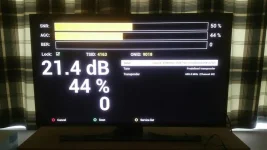
I chose the transmitter group that is closest to where I live based on the info from the Ofcom website (https://www.ofcom.org.uk/tv-radio-and-on-demand/information-for-industry/tv/tv-transmitter-maps) although I read in another post that this might not always be the correct thing to do but I'm not sure what one mine is pointing to, hopefully the below images are useful to somebody to help me.
Just to note, I am not an expert on Enigma2 or OpenVIX things so if there is something technical I need to do please explain in detail
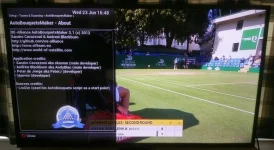
I read in the other post about an "expert mode" option in ABM version 3.1 to enable a frequency finder but I don't have this in the config options as you can see

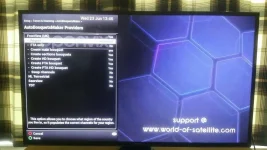
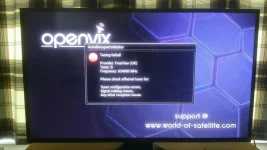
this is my config and the error I am getting when I try to scan
I recently purchased a GigaBlue UHD Trio 4K which arrived today and I attached the outdoor aerial to it for a scan. I did a complete scan for all regions just to be sure, it found around 110 UK channels (BBC, ITV, channel4 etc...) but none of the HD channels of this type or any type. I was previously just using my Samsung Smart TV which has HD channels with this aerial and they work fine but wanted more functionality hence buying this receiver, so it's unlikely to be my aerial or the area in which I am living which is at fault.
I contacted World of Satellite UK support who suggested I try using ABM to scan for the HD channels instead but it is failing each time, so they suggested I post my issue here in the hopes that somebody can help me resolve it.
I chose the transmitter group that is closest to where I live based on the info from the Ofcom website (https://www.ofcom.org.uk/tv-radio-and-on-demand/information-for-industry/tv/tv-transmitter-maps) although I read in another post that this might not always be the correct thing to do but I'm not sure what one mine is pointing to, hopefully the below images are useful to somebody to help me.
Just to note, I am not an expert on Enigma2 or OpenVIX things so if there is something technical I need to do please explain in detail
I read in the other post about an "expert mode" option in ABM version 3.1 to enable a frequency finder but I don't have this in the config options as you can see
this is my config and the error I am getting when I try to scan


