Superb quality and spec AB-Com PULSe 4K SE. Crazy offer! Only £129! FREE UK DELIVERY! 4K UHD, Enigma 2, Multiboot 4 images & more!...
Superb quality and spec AB-Com PULSe 4K Rev II Twin Satellite tuner only £179! FREE UK DELIVERY! 4K UHD, Enigma 2, SATA HDD facility, Multiboot 4 images & more!...

[VU+ Solo] Green Screen with vix

  • Thread starter Thread starter tomcoleman
  • Start date Start date
T

tomcoleman

Guest
my friend box was turned on last night and now he gets the ViX logo in top left and screen is green

what does this mean?

can i fix remotely?
 
If it is indeed a green screen, that means he is running an old version. So first thing would be to update. That can indeed be done remote:
Code:
init 4
opkg update && opkg upgrade && init 6

Only: if his version is too old, a flash will be needed (and maybe also a bootloader update).
 
If it is indeed a green screen, that means he is running an old version. So first thing would be to update. That can indeed be done remote:
Code:
init 4
opkg update && opkg upgrade && init 6

Only: if his version is too old, a flash will be needed (and maybe also a bootloader update).

why would it go green though all of a sudden??

so i ssh into the box and issue those commands?
 
green screen is a crash

we need to see logs to say why


and i wouldnt send those commands although those commands are used to update

but seems yr image is so old that it needs a clean reflash using latest image

:)

update using commands above only valid if yr using a variend on VIX version 2.3
 
and i wouldnt send those commands although those commands are used to update
but seems yr image is so old that it needs a clean reflash using latest image
update using commands above only valid if yr using a variend on VIX version 2.3
Yep, you're right; this image must be too old to salvage........
 
Could have been anything. You should ask your friend how it was setup or if he'd changed any system settings or something.
 
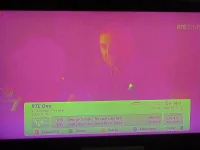
I have an idea this might not be a "greenscreen" (crash) but rather the normal TV screen with a green/purple colour (depending on the original colour) - this has happened on my box a few times recently (see attached).
P1030572.webp
This has happened a few times since upgrading to the lastest version - it seems to happen overnight when in standby.

I've done a complete reflash and set up manually rather than restoring settings - let you know how it gets on (if this is indeed the problem).
 
I have an idea this might not be a "greenscreen" (crash) but rather the normal TV screen with a green/purple colour (depending on the original colour) - this has happened on my box a few times recently (see attached)...
This is an indication that RGB/Component has not been set correctly.
 
I have an idea this might not be a "greenscreen" (crash) but rather the normal TV screen with a green/purple colour (depending on the original colour) - this has happened on my box a few times recently (see attached).
View attachment 14530
This has happened a few times since upgrading to the lastest version - it seems to happen overnight when in standby.

I've done a complete reflash and set up manually rather than restoring settings - let you know how it gets on (if this is indeed the problem).

What receiver is that on? Also by the looks of it you might be using a USB tuner. Test if fixed tuner does the same thing.
 
Setup is Vu+ connected to Onkyo amp via HDMI - Onky then connects to Samsung TV via HDMI, so no RGB/Component issues.

Problem only happens overnight - and a power cycle fixes it.
 
Setup is Vu+ connected to Onkyo amp via HDMI - Onky then connects to Samsung TV via HDMI, so no RGB/Component issues.

Problem only happens overnight - and a power cycle fixes it.

Which receiver model and confirm that you where using a USB tuner as your screenshot shows Tuner C.
 
What receiver is that on? Also by the looks of it you might be using a USB tuner. Test if fixed tuner does the same thing.

It is a Vu+ Duo with a Nova Win-T DTT tuner. However, last time it happened (yesterday morning) it just had the VIX startup screen showing, rather than any particular channel. Note that the system is set up with a DTT channel (RTE1) as the startup service (so that it will immediately populate the EPG on startup).

Note - I don't want to hijack the thread away from the OP's issue - just thought from what he said it might be a similar problem
 
It is a Vu+ Duo with a Nova Win-T DTT tuner. However, last time it happened (yesterday morning) it just had the VIX startup screen showing, rather than any particular channel. Note that the system is set up with a DTT channel (RTE1) as the startup service (so that it will immediately populate the EPG on startup).

Note - I don't want to hijack the thread away from the OP's issue - just thought from what he said it might be a similar problem

Thanks for being mindful regards the OP :) Maybe test on a fixed tuner see if it happens.
 
Thanks for being mindful regards the OP :) Maybe test on a fixed tuner see if it happens.


Will do - I'll set a fixed tuner channel as startup and see...if there are any further issues I'll open a new thread. Meanwhile it might help if the OP clarifies whether it is this problem or an actual "greenscreen of death" crash he is experiencing...
 
When my box is turned on or goes into standby it is green. When in standby the tv just displays loads of green lines on the screen - not sure if this is related to this issue.
 
If it is indeed a green screen, that means he is running an old version. So first thing would be to update. That can indeed be done remote:
Code:
init 4
opkg update && opkg upgrade && init 6

Only: if his version is too old, a flash will be needed (and maybe also a bootloader update).

says

the device cant make lock file as no space???
 
Last edited by a moderator:

OpenViX Feeds Status

Back
Top