Superb quality and spec AB-Com PULSe 4K SE. Crazy offer! Only £129! FREE UK DELIVERY! 4K UHD, Enigma 2, Multiboot 4 images & more!...
Superb quality and spec AB-Com PULSe 4K Rev II Twin Satellite tuner only £179! FREE UK DELIVERY! 4K UHD, Enigma 2, SATA HDD facility, Multiboot 4 images & more!...

[Mut@nt HD2400] HDD problem

rico_3000

Forum Supporter
Donated Member
Joined
Nov 30, 2010
Messages
112
Reaction score
0
Points
0
Hi guys i updated yesterday mu box to apollo 163 from the old apollo HD version
im now having a issue with the drive mounts
" remember im a knob at this "
im using interall HDD for recording and USB for Picons
on the old apollo version it was all setup correctly
the internal was /media/HDD
and usb /media/usb
now on this version its coming up has internal /media/sdb1 and usb /media/HDD
i already unpluged the usb and intialized the internal drive and it came up as /media/HDD and that was correct, but soon as i plug in the usb it changes back to
internal to /media/sdb1
usb /media/HDD

what am i doing wrong or missing here as i cant see nothing else on the setup menu to amend this

all the help is apreciated
regards and happy easter everyione
 
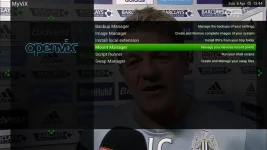
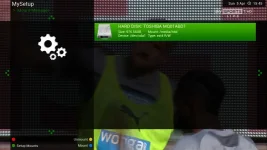
What version of Apollo did you upgrade from as I think any version before 150/155 needs a complete fresh flash with no backups due to new kernal updates,you might also need to re-mount your Hard Drive and USB settings with Mount Manager in the VIX menu press the Green Button to setup mounts then the Green Button again to Save

mount manager 1.webp mount manager 2.webp mount manager 3.webp mount manager 3.webp mount manager 5.webp
 
Just to add to the above, unmount both devices first. Then remount choosing your mount points.
 
I done a fresh flash yesterday
Before i was running Apollo HD till it wasn't supported anymore . But only yesterday done the fresh flash to the latest version because I was getting some freezes .
 
Hi guys i updated yesterday mu box to apollo 163 from the old apollo HD version
im now having a issue with the drive mounts
" remember im a knob at this "
im using interall HDD for recording and USB for Picons
on the old apollo version it was all setup correctly
the internal was /media/HDD
and usb /media/usb
now on this version its coming up has internal /media/sdb1 and usb /media/HDD
My box did the same, which I eventually spotted when recordings reported write errors (they'd filled the USB stick).
It's because the upgrade beyond 153+(?) needed an image update with no settings restore. The /etc/fstab file which worked was "lost" and the first-time configuration wizard doesn't query you for where you want disks to be mounted.
As has been noted - go to the ViX Mount Manager to sort out the locations.
 
What version of Apollo did you upgrade from as I think any version before 150/155 needs a complete fresh flash with no backups due to new kernal updates,you might also need to re-mount your Hard Drive and USB settings with Mount Manager in the VIX menu press the Green Button to setup mounts then the Green Button again to Save

View attachment 41597 View attachment 41598 View attachment 41599 View attachment 41599 View attachment 41600

thaks that sorted my issue out :)
now just going to find out what new since my last update :)
 

OpenViX Feeds Status

Back
Top