Superb quality and spec AB-Com PULSe 4K SE. Crazy offer! Only £129! FREE UK DELIVERY! 4K UHD, Enigma 2, Multiboot 4 images & more!...
Superb quality and spec AB-Com PULSe 4K Rev II Twin Satellite tuner only £179! FREE UK DELIVERY! 4K UHD, Enigma 2, SATA HDD facility, Multiboot 4 images & more!...

[ET8500] Help with CCCam 2.3 stopping and something iffy happening

Flyingpig

New member
Joined
Oct 18, 2011
Messages
521
Reaction score
0
Points
0
Hello All,

I have 2 issues that I need support with.

The first one is CCCam keep stopping for some reason? I am currently using CCcam 2.3 with an official card. I have gone into softcam manager and stopped it ding the restart check - but it is getting more often now and is getting almost unusable.

The other issues is to do with something happening that may or may not be connected. When I press the blue button I ofter get this screen - see attached screen shot - and CCCam will of stopped. When I then restart GUI it works okay again.

Updated, upgraded done all sorts of things but still happens.IMG_20161031_114317172.webp
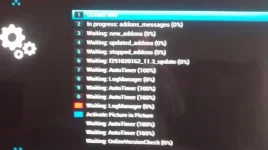
Hope you can help.

James.

EDIT - dont have any auto timers or cron thingies.
 
on CD NL ?? Use prio file or install and use oscam instead.
 
Not sure what CD NL is... But it is on 28 east if that is any help?

Thanks,

James.
 
Ah right - thanks.

I only use my card on 28 east. I done a reflash last night from fresh (again), and didnt do a settings restore - soeverything is from a fresh, and it is still happening today. Keep stopping every few minutes.

Any help?

Thanks,
 
go to ftp, delete the cam in etc restart box, go back to ftp and put cam back in.

check crash logs and upload here.

you may want to think about mgcamd or oscam setup.
 
Make sure you download CCcam from the ViX feeds:)
 
Done both of them. Will monitor over the nxt day or 2. But has anyone else had the same experience of the screen shot in post #1 when you press blue button.

I am not the best with Oscam and MGcamd - I have a legit card that in my downstairs machine which I can utilise in my front room and bedroom and I can do with the CCcam, but no idea on Oscam or MGcamd.
 
Done both of them. Will monitor over the nxt day or 2. But has anyone else had the same experience of the screen shot in post #1 when you press blue button.

I am not the best with Oscam and MGcamd - I have a legit card that in my downstairs machine which I can utilise in my front room and bedroom and I can do with the CCcam, but no idea on Oscam or MGcamd.

yes I tried 2.3.0 a few days back, and on my os mini the same image popped up. mgcamd or oscam are lot better than CCCam
 
It's a known fact that CCcam doesn't handle services with multiple encryptions and even crashes on them. CCcam is closed cource and hasn't been maintained for years. If you know what to do a 'prio-'file can help, but really your best option is to switch to Oscam. That's an open source softcam, still under daily development by a large community.
 
I best get reading then.

So I can do away with CCcam totally and just use oscam - a lot of things I had read ssem to use Oscam and Cccam..... Should I go for Oscam alone, or Oscam CCcam setup?

THanks,
 
Well I think I have got it working. Not sure if I have got it setup correctly as with CCcam I could see if my wife was watching in bedroom or the kids by just clicking in the cccam-info on the box - cant find anything like that on Oscam.

How can I tell if my card is being updated? Is there anything in one of the config files that I will have to do?

What frequency should the card be at. I have seen 2 posts online one saying

cardmhz = 2700
mhz = 450

and the oter just this with no mhz?

cardmhz = 357
 
Use the Web interface using ip address and the port specified in the config files 8080?
 
Ah thanks Twol, got that sorted now can see my front room and bedroom it says 2 connected 2 active. But then a load of zeros'.

Do you know what freq the card should be set at and will my card entitlements be updated using Oscam?

THanks,
 

OpenViX Feeds Status

Back
Top