Superb quality and spec AB-Com PULSe 4K SE. Crazy offer! Only £99! FREE UK DELIVERY! 4K UHD, Enigma 2, Multiboot 4 images & more!...
Superb quality and spec AB-Com PULSe 4K Rev II Twin Satellite tuner only £149! FREE UK DELIVERY! 4K UHD, Enigma 2, SATA HDD facility, Multiboot 4 images & more!...

[VU+ Solo2] HELP With HDD please!!

adamandvicci

New member
Joined
Jan 12, 2014
Messages
95
Reaction score
0
Points
0
I have tried version 69 / 70 and 71. Bought this for a mate. He had already bought an External HDD which I have formatted to Fat32.

Totally clean install on a new box. Once the HDD comes into use the box goes completely to cock. I am wanting to use it for recordings and timeshift only. Seperate USB for EPGs etc.

Has anyone any ideas? I am sat in a pile of my own hair.

HDD is Samsung D3 2TB USB3.0 Desktop External Hard Drive
New from CCL


((Apologies if I am not allowed to link a Hard Drive??))

Please someone help me:confused:
 
Last edited by a moderator:
Format the HDD to EXT4 format using the box.
Menu -> Setup -> System -> Storage devices -> Initialisation.
 
I found this thread. It is an old thread so it may not be necessary to do all that now. Maybe another forum member or mod/admin could clarify if this procedure is needed for external usb hdd's.

I have an internal HDD with my solo2 and don't have any issues so can't comment on whether there are problems with external usb hdd's.
 
I found this thread. It is an old thread so it may not be necessary to do all that now. Maybe another forum member or mod/admin could clarify if this procedure is needed for external usb hdd's.

I have an internal HDD with my solo2 and don't have any issues so can't comment on whether there are problems with external usb hdd's.


Thanks, tried this as soon as I change the mount path to Usb from Hdd, the box freezes and bootloops. :confused:
 
Dose the External HHD have a separate power supply or is it powered from the USB socket, as the USB sockets will not be powerful enough to run it
if you have followed the instructions like judge said it should work, I am using a 3.5" 1TB Samsung External Drive that I used to use in my old Solo2 without a problem Running alongside my internal 3TB Drive
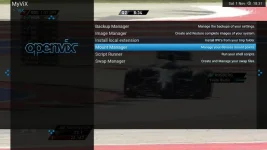
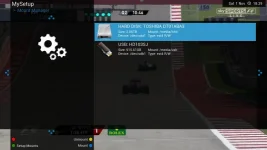
have you tried mounting it through the Vix menu with Mount Manager

Mount manager.webp mount manager 1.webp
 
I thought when you initialised a drive, it automatically mounted it?
 
Dose the External HHD have a separate power supply or is it powered from the USB socket, as the USB sockets will not be powerful enough to run it
if you have followed the instructions like judge said it should work, I am using a 3.5" 1TB Samsung External Drive that I used to use in my old Solo2 without a problem Running alongside my internal 3TB Drive
have you tried mounting it through the Vix menu with Mount Manager

View attachment 38135 View attachment 38136

Seperate power supply and still causes a bootloop.... Im losing the will to live
 
Have you checked to make sure that it will work with a PC as you might have s Dead Drive as NEW DRIVES can Fail I would try then that will eliminate the Hard Drive

you could also try and format it with MiniTool Partition Wizard in windows as that has the option to format in EXT3 and EXT4 formats it's worth a try :)
 
Last edited:

OpenViX Feeds Status

Back
Top