Superb quality and spec AB-Com PULSe 4K SE. Crazy offer! Only £99! FREE UK DELIVERY! 4K UHD, Enigma 2, Multiboot 4 images & more!...
Superb quality and spec AB-Com PULSe 4K Rev II Twin Satellite tuner only £149! FREE UK DELIVERY! 4K UHD, Enigma 2, SATA HDD facility, Multiboot 4 images & more!...

[VU+ Duo2] Help with OpenVix DVB-T2 re-tune / possible hardware fault?

Jonathan-In-London

New member
Joined
Mar 4, 2024
Messages
7
Reaction score
1
Points
3
What type of support thread are you creating?
Support question
What OpenViX Image build number are you using?
6.8.001
Have you tried re-flashing WITHOUT settings restore?
NO
Have you tried re-flashing WITH a settings restore?
NO
Hi

I asked this question directly to World of Satellite support, and they directed me here...

My VU+ Duo2 has started to have failed recordings. It has 2 X Twin Hybrid DVB-C/T/T2 tuners, and I believe when there is a recording clash, and it tries to record from tuner B, it fails.

My first attempt was to re-tune all the tuners. It's a long time since I bought the machine, and I've forgotten how to do it. I have tried: Menu > Setup > Tuners & Scanning > Automatic Scan which defaults to Scan Tuner A. I cannot see how to scan the other tuners (unless it applies the same tuning to all tuners, which seems unlikely). I tried in the Tuner Setup menu to disable Tuner A but that led to a world of pain, with the Duo2 complaining it couldn't timeshift on power-up (presumably because Tuner B isn't tuned), and a couple of crashes (see attached, as the logs will contain useful config data). I also tried Menu > Setup > Tuners & Scanning > AutoBouquetsMaker > Start scan which seems more promising but only tunes Tuner A.

It's possible that Tuner B has failed, I guess. But I suspect it's user error.

If there is a fault on Tuner B, I guess I could swap A/B with tuner card C/D, but I don't know whether OpenVix numbers tuners by where they are plugged in, or by device ID, etc.

Thanks for your assistance. Error logs attached.
 

Attachments

Tuning data is collective, it is not tuner specific. If you have 4 tuners, you only need to scan on one of them. Which tuner to use is chosen afterwards.

It's most likely a tuner hardware fault. As with all Vu+ receivers, please be explicit when referring to "tuner", "tuner cards", "tuner slots". You have 2 tuner cards. You have 4 tuners. The tuner letters are assigned by the tuner slots and cards.

Start off with labelling the cards so you can identify them. As you suspect it is Tuner B, i.e first card, I would remove that card and work on one card for a short while. (You may need to move card 2 into slot 1). You can record all the HD channels on one tuner anyway, so you won't miss other tuner card while you test.
 
It's most likely a tuner hardware fault. As with all Vu+ receivers, please be explicit when referring to "tuner", "tuner cards", "tuner slots". You have 2 tuner cards. You have 4 tuners. The tuner letters are assigned by the tuner slots and cards.

Thank you for your suggestion. I'll check out the cards, and look for any obvious signs of failed caps, etc.

After removing the first tuner card, and putting the second card in the first slot, do I want

Menu > Setup > Tuners & Scanning > Automatic Scan

or

Menu > Setup > Tuners & Scanning > AutoBouquetsMaker > Start scan
 
You don't need to scan again, unless you were having issues scanning before. Whether you scanned on A, B C, or D the channels saved are on "the system". If you scan on all 4 tuners, the channel data is all going to be the same for you. It is all saved in one file. It is not tuner specific. If you are determined to scan, please use manual scan. You can the select the tuner to use. Make sure you select complete. Use the up/down/left right to change selection.

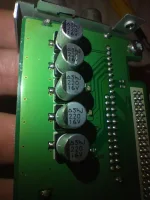
With regards to the capacitors, you probably won't see any bulging caps. Might be an idea to change them all anyway.

See this thread if it helps:
Code:
https://world-of-satellite.com/threads/dying-dvb-t-dual-tuner-module.67329/

IMG_20251206_000026.webp
 
You don't need to scan again, unless you were having issues scanning before. Whether you scanned on A, B C, or D the channels saved are on "the system". If you scan on all 4 tuners, the channel data is all going to be the same for you. It is all saved in one file. It is not tuner specific. If you are determined to scan, please use manual scan. You can the select the tuner to use. Make sure you select complete. Use the up/down/left right to change selection.
Very many thanks for your advice. I have swapped the two tuner modules, and the fault moved to tuner D, i.e. it moved with the module, so it's a module fault. Previously I hadn't checked C and D, I only got as far as B, and assumed B thru' D hadn't tuned. I have disabled tuner D and now everything is working fine.

Are failing caps a known problem on the tuner module? I can see they are not the sort to bulge.

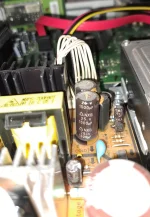
I did note that C9 on the main PSU has definitely bulged and will look to replacing C8/C9.

Jonathan.
 

Attachments

  • Cap.webp
    Cap.webp
    141.5 KB · Views: 13
I wouldn't say it was common. But, there were about 3 threads by different people on different forums a few months ago. All turned out to be faulty tuners. Considering how long the have been going, its not surprising. Have a look on the internet for a thread called "Vu Ultimo 4k Tuner broken - attempted repair to follow". Its on another forum and repair is on a Satellite tuner.
 
I wouldn't say it was common. But, there were about 3 threads by different people on different forums a few months ago. All turned out to be faulty tuners. Considering how long the have been going, its not surprising. Have a look on the internet for a thread called "Vu Ultimo 4k Tuner broken - attempted repair to follow". Its on another forum and repair is on a Satellite tuner.
That's very helpful, thank you.
 
I repaired several duo2 with better capacitors and all working fine.I took caps for 35 volt and very good quality (purper colored ones) .For a few bob the box works again for long time.
 
Just to wrap this one up...

Since three out of four tuners are working, I'm not going to mess with the 2x DVB-T tuner modules, unless another tuner fails.

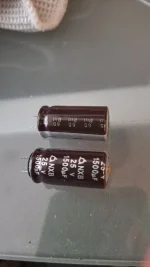
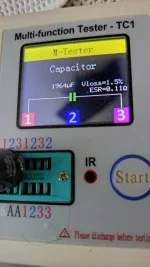
I struggled (and failed) to find a reputable source of high quality electrolytics available in the UK to re-cap the entire PSU, so I just went for C8/C9 which I replaced with Panasonic EEUFM1E152 1500uF 25V 105°c Low Impedance Radial Alum Electrolytic from Rapid Electronics.

Having chipped away the brown cement, it was easy enough to replace the caps. The one that had blown its top, had also burst out the bottom. A dab of electronics-grade silicone goo on the replacement caps and the adjacent inductor, and it was job done.

Thanks for your help with this!
 

Attachments

  • 20260617_181655.webp
    20260617_181655.webp
    24.2 KB · Views: 10
  • 20260617_181436.webp
    20260617_181436.webp
    35.2 KB · Views: 10
  • 20260617_181213.webp
    20260617_181213.webp
    30 KB · Views: 10

OpenViX Feeds Status

Back
Top