Superb quality and spec AB-Com PULSe 4K SE. Crazy offer! Only £99! FREE UK DELIVERY! 4K UHD, Enigma 2, Multiboot 4 images & more!...
Superb quality and spec AB-Com PULSe 4K Rev II Twin Satellite tuner only £149! FREE UK DELIVERY! 4K UHD, Enigma 2, SATA HDD facility, Multiboot 4 images & more!...

Help with Picon installation

The majority of picons on the plugin download server are built from Ocram sources. Unless, someone else with a Duo2 confirms that ocram's picons work with LCD4Linux, I once again repeat my advice to not not use Ocram's picons. This is while you are investigating your issue.

MK's picons are here:
https://www.openvix.co.uk/index.php/downloads/picons-channel-icons/mk-400x240-snp-picons/
https://www.openvix.co.uk/index.php/downloads/picons-channel-icons/mk-220x132-snp-picons/

They have not been updated for a long time, but let's start off with confirming if those work.
 
The majority of picons on the plugin download server are built from Ocram sources. Unless, someone else with a Duo2 confirms that ocram's picons work with LCD4Linux, I once again repeat my advice to not not use Ocram's picons. This is while you are investigating your issue.

MK's picons are here:
https://www.openvix.co.uk/index.php/downloads/picons-channel-icons/mk-400x240-snp-picons/
https://www.openvix.co.uk/index.php/downloads/picons-channel-icons/mk-220x132-snp-picons/

They have not been updated for a long time, but let's start off with confirming if those work.

Downloaded MK 400X240 installed in media/usb/picon, removed previous picons via downloads. New picons showing on EPG but still not showing on the VU Duo 2 screen.
 
maybe read and do what was said in #40. No is is pure gambling.
 
This has been done, if you check back on the comments, happy to do it again if it would help.
 
the only image I see is with the directory.No images about settings as I showed.The problem is probably in there. Maybe copy a setting from LCD4 examples to your box and see if it works then.

Ps : do you see anything on the LCD4 screen ?
 
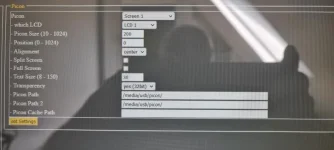
Attached settings

See attached, taken via Openweb
 

Attachments

  • 20220617_122353.webp
    20220617_122353.webp
    21 KB · Views: 15
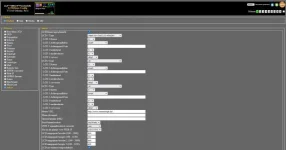
Settings

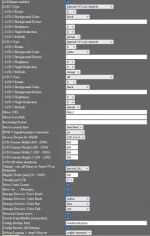
Sorry was unable to read your setting file to do a comparison, please find attached mine.
 

Attachments

  • Screenshot 2022-06-18 at 08-33-57 LCD4linux.webp
    Screenshot 2022-06-18 at 08-33-57 LCD4linux.webp
    25.7 KB · Views: 10
setting must be internal VU+ duo 2 LCD 400x240
 
setting must be internal VU+ duo 2 LCD 400x240

That did it, many thanks. I wonder if using the picons from downloads was the main issue, where do you get your picons from for your Vu Duo2 ?
 
The majority of picons on the plugin download server are built from Ocram sources. Unless, someone else with a Duo2 confirms that ocram's picons work with LCD4Linux, I once again repeat my advice to not not use Ocram's picons. This is while you are investigating your issue.

MK's picons are here:
https://www.openvix.co.uk/index.php/downloads/picons-channel-icons/mk-400x240-snp-picons/
https://www.openvix.co.uk/index.php/downloads/picons-channel-icons/mk-220x132-snp-picons/

They have not been updated for a long time, but let's start off with confirming if those work.

Pleased to report that the MK picons are working. all though are limited to freesat, but certainly better than a blank screen.
 
@Psionguy
You have changed two things and it now works. After you changed the settings it worked. So the picons may not be the issue.

@Bellejt
Can you please try the picons from the plugin server.
 
@abo ; will try the both sets picons tomorrow if possible and come back with FB.
 
just tested the picons MK and working fine on my LCD4
 
@Bellejt
Can you please test the Ocram picons. They are on the plugin server. Thank you.
 

Attachments

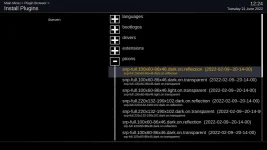
  • picons-on feeds.webp
    picons-on feeds.webp
    35 KB · Views: 7
installed from feed in internal flash and working immediatly
 
yes duo2 has enough space for them.only teh ones I need are copied. I safekeep them on HDD and transfer via FTP on box after flashing image
 

OpenViX Feeds Status

Back
Top