Superb quality and spec AB-Com PULSe 4K SE. Crazy offer! Only £129! FREE UK DELIVERY! 4K UHD, Enigma 2, Multiboot 4 images & more!...
Superb quality and spec AB-Com PULSe 4K Rev II Twin Satellite tuner only £179! FREE UK DELIVERY! 4K UHD, Enigma 2, SATA HDD facility, Multiboot 4 images & more!...

[VU+ Duo] High Upload Bandwith - 60GB Daily!

  • Thread starter Thread starter Cem
  • Start date Start date
Have you set the OPENVPN up on the router and it has the green connected status?
 
Just a footnote to my above post.
When I'm trying to turn my openvpn on via my iPhone app it will not connect whilst your on you home network. If I turn my wifi off on my iPhone it will turn on via the 3g/4g or if i'm on wifi away from home it will work. There is something in the openvpn config telling it its not need on your home network.
So the openvpn is working correctly and protecting you devices as long as the green connected status is showing in the router menu.
 
Last edited:
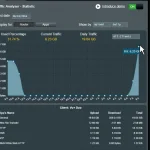
So after many hours of no uploading it started again at 6am.

image.webp

Any ideas?
 
If OPENVPN is set correctly and is showing as connected on the router than the only way anyone can access your box from outside is if they know your OPENVPN username and password. So we can rule this out.

Have you tried a complete reflash of your box without restoring your settings. Leave it running for a while. You can restore your settings at a later date.
 
You can eliminate the cams from the equation by disabling them all and leave the box on a FTA channel for the test.

I tried what Lincsat said and disabled mgmcamd and I was able to use my WiFi in straight away. It's defo something to do with this. It has to be. Can someone upload a mgmcamd that I can upload or I'll download the older version of mgmcamd and test that out.


Sent from my iPhone using Tapatalk
 
You can download mgcamd 138 or the old 135a from the plugins menu. This will not be the problem but its worth a try uninstalling them and re-installing. It still might be the mg_cfg file.
Have you ever looked into using oscam. ?
 
If your cam is disabled, it won't cause these issues.
If your cam is enabled but configured wrong, it will cause issues & more than likely DDOS your network.
Are you sure you have no open ports open for streaming?
 
B
Good stuff. Hope it works.
OPENVPN on the asus router is great. I can access my network from outside securely using the OPENVPN App on IOS or android.
Just have a quick periodic check that its got the green Connected status in the VPN menu.
View attachment 48546
Openvpn reduces my download speed by about 60%.
 
I was wondering that when I first set the router OPENVPN up. Made no difference with my speeds. Tested it with and without my router OPENVPN connected. Didn't change.
But if I activate my PIA vpn thats a different story.
 
I know you enabled openvpn, but did you also remove any forwarded ports, or check if any servers are in the DMZ, also check if your router settings are available over the internet. If your e2 box was compromised, it's also quite possible your router was also compromised and therefore someone could keep letting themselves back in and helping themselves.
 
Good point pembo. I would reflash/Factory reset the router. Change user name and passwords for everything.
 
You can download mgcamd 138 or the old 135a from the plugins menu. This will not be the problem but its worth a try uninstalling them and re-installing. It still might be the mg_cfg file.
Have you ever looked into using oscam. ?

Both were originally downloaded from the Plugins menu however it could have been that the original mgcamd file was changed from 138.

After 22 hours of changing to 135a from the plugins menu I have had no upload speed on the box! Last night while searching the forums I obtained a working version of 138 and I will upload another version of 138.
 
Both were originally downloaded from the Plugins menu however it could have been that the original mgcamd file was changed from 138.

After 22 hours of changing to 135a from the plugins menu I have had no upload from the box and it's working the way it should be! Last night while searching the forums I obtained a working version of 138 and I will upload another version of 138.


Sent from my iPhone using Tapatalk
 
Cem. The mgcamd is unlikely to be the problem.They must be thousands using the one download from the plugins without an issue. It's the config file that is likely to be the problem if it is indeed this. Have you read post 31 and 32 from pembo and myself?
 
I agree it's highly unlikely to be due to version of mgcamd.

If it's not your mg_cfg file then are you sure you don't have another tuner in use (ie streaming) during the same time you have high usage of upload?
 
Ever since the mgmcamd change the box hasn't been uploading data it's only minimal like a few kbs which is normal.

Another tuner isn't in use and isn't streaming at the same time.

There is no unusual behaviour from any of my devices on the network which is good.


Sent from my iPhone using Tapatalk
 

OpenViX Feeds Status

Back
Top