Superb quality and spec AB-Com PULSe 4K SE. Crazy offer! Only £129! FREE UK DELIVERY! 4K UHD, Enigma 2, Multiboot 4 images & more!...
Superb quality and spec AB-Com PULSe 4K Rev II Twin Satellite tuner only £179! FREE UK DELIVERY! 4K UHD, Enigma 2, SATA HDD facility, Multiboot 4 images & more!...

[VU+ Solo2] How do I make the Infobar/graphics fit my screen

whatsat

New member
Joined
Sep 6, 2013
Messages
81
Reaction score
0
Points
0
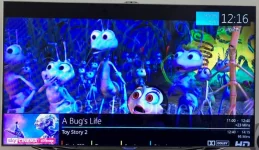
As title, How do I make the Infobar/graphics fit my screen. They are cut off at the bottom. Thanks


inforbar1.webp
 
Turn your "Overscan" feature off on your TV. What TV do you have?


Sent from my iPhone using Tapatalk
 
In your display settings you will see something like either; Screen Fit, Just Scan, Just Scale etc, select that.


Sent from my iPhone using Tapatalk
 
I had screen problems and always people on here said it was the tv/overscan. I couldn't find the answer at first but eventually changed the name of HDMI input to PC and it worked but I then had a sparkly border. I changed my tv from Screen Fit to 16:9 and border was gone. (Vix 5.1 was ok with Screen Fit, 5.2 needed 16:9.)
It is not intuitive on the tv. On a Samsung tv, select Source, relevant HDMI, press Tools, choose Edit Name, choose PC, done. (When I chose DVI PC, I lost sound.)
 
Hi,
the sparkling border is because you had played with OSD powition where you can make the GUI smaller. If you disable overscan AND change OSD position to full size again you do not need PC mode.

ciao
 
Hello.
I have been struggling with a Solo2 for several days. (many hours per day) I have amongst other problems, the OSD being too far to the left. I believe I have cancelled overscan on my Samsung tv by setting the source as PC. It worked at first, then I changed my image for another reason and now the problem is back even though the tv settings have not been changed. I found that image 5.2.13 had blank pages in certain menu options so I was unable to follow instructions posted by members trying to help other users .I have tried 5.1 (original image when I got the box which I changed to 5.2 as it could not do an online software update) , 5.2.11, .12, and .13. I'm finding problems in all of them. At first I thought it was me, being new to all this but am now sure it's the images. I do not have software knowledge so cannot pinpoint anything. I am merely trying to program the Vu+ machine as per the instructions but failing. I will now try 5.2.15. Wish me luck.
 
Defo not image and defo a user error (meaning you).
Setting as PC mode is totally wrong.
You need to make sure the “overscan” feature is off on your Samsung, this is most likely called “Screen Fit” in your tv display settings. If not called that, it could be “Just Scan”.
Also if you have messed about with OSD settings in User Interface, you need to reset back to Default settings.


Sent from my iPhone using Tapatalk
 

OpenViX Feeds Status

Back
Top