Superb quality and spec AB-Com PULSe 4K SE. Crazy offer! Only £129! FREE UK DELIVERY! 4K UHD, Enigma 2, Multiboot 4 images & more!...
Superb quality and spec AB-Com PULSe 4K Rev II Twin Satellite tuner only £179! FREE UK DELIVERY! 4K UHD, Enigma 2, SATA HDD facility, Multiboot 4 images & more!...

How to flash a VU+ Duo using a USB stick

Sorry if this the wrong thread to ask this, but how do I keep all my current settings and try out a new image?
Since receiving the box a week ago the only thing I have done is flash it with the latest Pli image.
This morning I thought I would try the latest official image Ver4.8 which I got from your link and flashed, but of course it just effectively starts from the beginning asking for language, tuner settings etc.
Fortunately I had followed your guide to taking a backup so was able to flash back and everything was as before.
Having spent ages setting up different satellites for the positioner is there a way to save some settings files first, flash with the official image, then apply the saved settings on top?
Thanks
 
Hi,

I downloaded the VIX image but there is two files in the section:
(1) VIX_V1.0_Team_Image.nfi
(2) VIX_V1.0_Team_Image.zip

What is the purpose of the .nfi things?

Am I right in thinking that I need to extract the .zip folder on the USB Stick duo??

Thanks
 
Hi,

I downloaded the VIX image but there is two files in the section:
(1) VIX_V1.0_Team_Image.nfi
(2) VIX_V1.0_Team_Image.zip

What is the purpose of the .nfi things?

Am I right in thinking that I need to extract the .zip folder on the USB Stick duo??

Thanks

The nfi is used if you are doing a multi-boot by using something like barry allen.

Just extract the .zip file, and use that :)
 
Sorry if this the wrong thread to ask this, but how do I keep all my current settings and try out a new image?
Since receiving the box a week ago the only thing I have done is flash it with the latest Pli image.
This morning I thought I would try the latest official image Ver4.8 which I got from your link and flashed, but of course it just effectively starts from the beginning asking for language, tuner settings etc.
Fortunately I had followed your guide to taking a backup so was able to flash back and everything was as before.
Having spent ages setting up different satellites for the positioner is there a way to save some settings files first, flash with the official image, then apply the saved settings on top?
Thanks

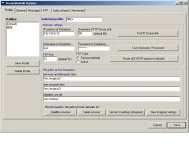
For the channelsettings you can use dreamboxedit
Code:
http://dreambox.happyllama.com/
With it you can transfer files between your Vu+ and your PC back and forth as many times u wish.
 

Attachments

  • dbedit_options.webp
    dbedit_options.webp
    28.8 KB · Views: 87
  • dbedit_ftpsettings.webp
    dbedit_ftpsettings.webp
    20.6 KB · Views: 50
Last edited by a moderator:
hi shawi plz help me with vu+duo.i try to do flash with nfi image but no luck.so plz can u tell me total method.very thankfull.or my yahoo id han_par
i m avilable on yahoo 24/7 so plz help me for this.
 
You have to put the vuplus map on your usb stick, not the nfi image for flashing!!
 
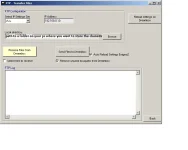
You can do that with VuUtil, power of the box on the rear, choose the right comport, fill in the ip of your pc, fill in the ip of the vu or choose dhcp, then press connect if the connection is ok, you see the message Serial port open success. Please turn on your box.
Then switch it on at back and got to the place where the nfi file is located and flash.
 

Attachments

Last edited:
i m doing exactly what u said but it says continu and after exit vuutil program nothing happend bro.
 
After flashing you get the message Complete flashing all, now first click on disconnect en then press exit, turn the box off and on.
 
no still no luck bro and i also try with usb flash file with usb but no no luck ither.i dont know what to do?
 
Then you`ve another problem, which image was on the box and where did it go wrong?
 
Have you done these steps in the correct order?

1. Format your memory stick on your PC to be FAT32.
2. Unzip the USB upgrade files into memorystick, leaving you with the following folderstructure on your memorystick
vuplus---
--duo---
--and here you should have three files.
3. Power off your VU+ Duo.
4. Insert memory stick into front USB slot on the Vu+ Duo.
5. Power on your VU+ Duo and follow the on screen instructions.

This works for me everytime and should do so for you to. If it doesn´t then we have another problem.
 
thanks i try that but dont boot. i try nfi via nulcable but no luck so please help friend for something else.
 
any help for vu+duo please badly need help.not booting atall.try everything but no luck.
 
when you give no more info as asked before, no one can help you and you have to send the box in for repair.
 
ok i try puting image with usb ,image going in but when i power off at back and back on its say starting and not going further,also i try with null cable and same thing.
 
after u turn power off, remove the usb from front slot, turn power on and wait for a while with it displaying "starting"
 

OpenViX Feeds Status

Back
Top