Superb quality and spec AB-Com PULSe 4K SE. Crazy offer! Only £129! FREE UK DELIVERY! 4K UHD, Enigma 2, Multiboot 4 images & more!...
Superb quality and spec AB-Com PULSe 4K Rev II Twin Satellite tuner only £179! FREE UK DELIVERY! 4K UHD, Enigma 2, SATA HDD facility, Multiboot 4 images & more!...

How to put the preview channel in the window

  • Thread starter Thread starter gigino1971
  • Start date Start date
G

gigino1971

Guest
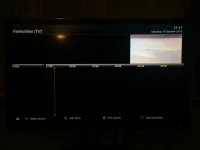
Hi guys, just recently I bought the Edision OS Mini + and I hope someone can help me to find out how I could put the preview channel in the little window at the right side of the bouquet channel section and the EPG like it shows in the picture of openvix website.
http://www.openvix.co.uk/index.php/screenshots/
Sorry for question but this is my first Linux dvb-t2/s2 decoder.
Thank you in advance for your assistance.
Regards
Luigi
 
Hi guys, just recently I bought the Edision OS Mini + and I hope someone can help me to find out how I could put the preview channel in the little window at the right side of the bouquet channel section and the EPG

Try
Menu -> Set-up ->System -> EPG -> Graphical EPG Settings -> Picture in Graphics = yes
Press the green button on the remote to save
 
Post a picture of what you are seeing.

say exactly what buttons you are pressing
 
My preview screen only shows what's behind it, like a little window, showing only the top right portion of the screen behind it. On my old box it would show the whole screen shrunk into that little box. Is there a setting that would enable this? I'm on Vix btw.
 
Still haven't found a fix to this issue. I hope someone here can help. I believe the issue is that the 'picture in graphics' is not scaling down to fit the the small tv screen. Any help would be greatly appreciated.
 
Still haven't found a fix to this issue. I hope someone here can help. I believe the issue is that the 'picture in graphics' is not scaling down to fit the the small tv screen. Any help would be greatly appreciated.

You need to post a picture explaining it. Use Webif to grab a picture and explain. Also it will be skin related, I.e. Depends what skin you have installed.


Sent from my iPhone using Tapatalk
 
When I press the Menu button, EPG, or channel list, the channel I was watching does not shrink to fit into the small preview screen in the top right corner. It's the same with the 'default' skin. IMG_8165.webpIMG_8166.webp
 
have you replaced any converters/renderers to get the skin working?
 
Not sure what you mean, but I installed the skin by uploading an ipk file to the temp folder and that's about it. Anyhow, I don't think it's to do with the skin because I tested it after a fresh reflash a couple of days ago and still had the same prob.
 
Not sure what you mean, but I installed the skin by uploading an ipk file to the temp folder and that's about it. Anyhow, I don't think it's to do with the skin because I tested it after a fresh reflash a couple of days ago and still had the same prob.

Not possible. When you fresh flash the ViX image the preview picture will be correct. I have recently setup a box for a friend with the SkyQ Skin v1.6, and that worked fine. I would advise to reflash your receiver without any restores, so basically setting up from scratch.


Sent from my iPhone using Tapatalk
 
Right, I've managed to eliminate it down to the 'position setup' in user interface. It appears that if I change these settings during the setup wizard, I get the problem. But if I skip this stage at setup or restore to defaults, there's no problem. So for a fix, I have to leave the position settings as default, which is not ideal.
 
A 2011 LG. Not sure about exact model. Just figured it's something to do with overscan as I seem to be getting a grey test image when I change the position settings. I've looked through the tv menu and don't see anything to do with overscan. Is it called something else?
 
On my LG OLED TV its called "Just Scan" in the Aspect Ratio settings. Other names are Just Scale, Screen Fit etc.


Sent from my iPhone using Tapatalk
 
Spot on mate! It's called just scale on mine, and that has sorted it. Thanks for all your help!
 

OpenViX Feeds Status

Back
Top