Superb quality and spec AB-Com PULSe 4K SE. Crazy offer! Only £99! FREE UK DELIVERY! 4K UHD, Enigma 2, Multiboot 4 images & more!...
Superb quality and spec AB-Com PULSe 4K Rev II Twin Satellite tuner only £149! FREE UK DELIVERY! 4K UHD, Enigma 2, SATA HDD facility, Multiboot 4 images & more!...

[VU+ Duo] How to turn Off subtitles

  • Thread starter Thread starter garyblas
  • Start date Start date
G

garyblas

Guest
I turned on subtitles, Now i cant get rid of them

In Auto language section turned on "Allow subtitle language equal audio language"

Have put back to None and restarted wont go away

Help before i go mad
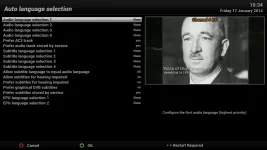
 
Default settings, if that helps...

grab.webp
 
i did reset back to default settings, does not take off subs.

Only way i got them back off was to reflash from backup

It looks to be a bug in the software. Try it yourself turn them on but make a back up first
 
Yeah, just tried & get the same results.
Thanks for pointing it out, I'll open a bug report for Andy to have a look at.

You could also press the Audio buton twice & turn them off there, but a pain to do on each channel.
 
This is no bug.
The system remembers previously activated subtitles, simple as that. So what you can do is
1- Turn off the 'remember me' setting (not recommended)
2- Reboot the box
3- Turn off subtitles on a channel that shows them via the subtitle button.
 
This is no bug.
The system remembers previously activated subtitles, simple as that. So what you can do is
1- Turn off the 'remember me' setting (not recommended)
2- Reboot the box
3- Turn off subtitles on a channel that shows them via the subtitle button.

Were is the remember me setting ?
 
Kids pressed subtitle button.. stuck with them again Another reflash.
Cant find the remember me setting. Its not in auto language. Anyone?

Hope this fixed in new image
 
im having the same problem on my vu+uno using zeus build 18

subs are on and I carnt get them off.my audio settings are all on default
 
The option is "Prefer Subtitles stored by service"

I got them to turn off by setting "Prefer Subtitles stored by service" to no. then reboot, turn off subtitles on a channel then they are off on every channel
 
same problem here on VU+ DUO2 on BBC.Latest image.
 
As posted earlier in thread you need to press audio twice to get into the subtitle menu for the channel you are tuned to. Then you can turn off subtitles.
 
works for all channels separate.You need to do that again on every channel.Anoying.Setting Prefer Subtitles stored by service and rebootings doesn't change that.It is well rememberd but a lot off channels to do that for.
 

OpenViX Feeds Status

Back
Top