

Alankellyeire
Member
- Joined
- Dec 27, 2012
- Messages
- 205
- Reaction score
- 1
- Points
- 18
I got a IP camera model dahua PC-HDW4431C-A but should work with any camera that supports RTSP.
This a guide how to add the feed to an Enigma2 device. I will be adding the stream to the Favourites Bouquets, but you can add it to whatever bouquet you want.
1. first of all find the RTSP port that your IP camera uses. On Dahua cameras go to network connection.
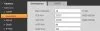
The RTSP port my camera uses is 554.
2. test the RTSP stream. Open VLC player. Media>Open Network Stream...
enter the line below replacing username, password, ipcameraIP and RTSP-PORT with your own..
rtsp://username assword@cameraIP:RTSP-PORT/cam/realmonitor?channel=1&subtype=1
you can also just enter rtsp://cameraIP and it will ask you for your camera credentials if you have default RTSP settings.
here is my line
rtsp://admin:[email protected]:554/cam/realmonitor?channel=1&subtype=1
now if the stream doesnt work go back and confirm you entered everything correctly and try another stream. i was unable to get the main stream 0 to work.
URL Syntax
rtsp://IDASS@IP:RTSP/cam/realmonitor?channel=&subtype=*
ID: a valid user?s username.
PASS:user?s password. (Cannot contain #)
IP:the IP address of the IP Camera.
RTSP:the default port is 554. It can be omitted.
&:the channel number. It starts from 1.
*:the stream type. The of main stream is 0, extra stream 1 is 1, extra stream 2 is 2.
if you can view the live stream then continue to the next step.
3.NOTE: I will be adding the stream to the Favourites Bouquets, but you can add it to whatever bouquet you want.
ftp into your enigma2 device and go to /etc/enigma2. find and open the file
userbouquet.favourites.tv
4. Now add your camera's RTSP stream like below to the "userbouquet.favourites.tv" file, again replacing username, password, ipcameraIP and RTSP-port with your own.. This time you also have to replace any colon “:” in the RTSP link you used in VLC player with %3a
Heres an example
Code:
#SERVICE 4097:0:0:0:0:0:0:0:0:0:rtsp%3a//username%3apassword@cameraIP%3aRTSP-PORT/cam/realmonitor?channel=1&subtype=1
#DESCRIPTION IPCAM
My link:
#SERVICE 4097:0:0:0:0:0:0:0:0:0:rtsp%3a//admin%[email protected]%3a554/cam/realmonitor?channel=1&subtype=1
#DESCRIPTION Secondary IPCAM
5. Reboot enigma on your device.
You can do this via CLI with the command below or via the GUI
Code:
killall -9 enigma2
6. Watch the live feed.
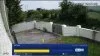
Please note you will not be able to record, Pan, tilt or zoom
I can confirm this will work remotely if you open the RTSP port and configure a DDNS such as NO-IP so instead of entering your IP address you must enter the domain name
also i can view the main channel now. using the code below
#SERVICE 4097:0:0:0:0:0:0:0:0:0:rtsp%3a//admin%[email protected]%3a554/cam/realmonitor?channel=1&subtype=0:
you can see all you have to do is change the subtype to 0.
This a guide how to add the feed to an Enigma2 device. I will be adding the stream to the Favourites Bouquets, but you can add it to whatever bouquet you want.
1. first of all find the RTSP port that your IP camera uses. On Dahua cameras go to network connection.
The RTSP port my camera uses is 554.
2. test the RTSP stream. Open VLC player. Media>Open Network Stream...
enter the line below replacing username, password, ipcameraIP and RTSP-PORT with your own..
rtsp://username
assword@cameraIP:RTSP-PORT/cam/realmonitor?channel=1&subtype=1you can also just enter rtsp://cameraIP and it will ask you for your camera credentials if you have default RTSP settings.
here is my line
rtsp://admin:[email protected]:554/cam/realmonitor?channel=1&subtype=1
now if the stream doesnt work go back and confirm you entered everything correctly and try another stream. i was unable to get the main stream 0 to work.
URL Syntax
rtsp://ID
ASS@IP:RTSP/cam/realmonitor?channel=&subtype=*ID: a valid user?s username.
PASS:user?s password. (Cannot contain #)
IP:the IP address of the IP Camera.
RTSP:the default port is 554. It can be omitted.
&:the channel number. It starts from 1.
*:the stream type. The of main stream is 0, extra stream 1 is 1, extra stream 2 is 2.
if you can view the live stream then continue to the next step.
3.NOTE: I will be adding the stream to the Favourites Bouquets, but you can add it to whatever bouquet you want.
ftp into your enigma2 device and go to /etc/enigma2. find and open the file
userbouquet.favourites.tv
4. Now add your camera's RTSP stream like below to the "userbouquet.favourites.tv" file, again replacing username, password, ipcameraIP and RTSP-port with your own.. This time you also have to replace any colon “:” in the RTSP link you used in VLC player with %3a
Heres an example
Code:
#SERVICE 4097:0:0:0:0:0:0:0:0:0:rtsp%3a//username%3apassword@cameraIP%3aRTSP-PORT/cam/realmonitor?channel=1&subtype=1
#DESCRIPTION IPCAM
My link:
#SERVICE 4097:0:0:0:0:0:0:0:0:0:rtsp%3a//admin%[email protected]%3a554/cam/realmonitor?channel=1&subtype=1
#DESCRIPTION Secondary IPCAM
5. Reboot enigma on your device.
You can do this via CLI with the command below or via the GUI
Code:
killall -9 enigma2
6. Watch the live feed.
Please note you will not be able to record, Pan, tilt or zoom
I can confirm this will work remotely if you open the RTSP port and configure a DDNS such as NO-IP so instead of entering your IP address you must enter the domain name
also i can view the main channel now. using the code below
#SERVICE 4097:0:0:0:0:0:0:0:0:0:rtsp%3a//admin%[email protected]%3a554/cam/realmonitor?channel=1&subtype=0:
you can see all you have to do is change the subtype to 0.
Last edited:

