Superb quality and spec AB-Com PULSe 4K SE. Crazy offer! Only £129! FREE UK DELIVERY! 4K UHD, Enigma 2, Multiboot 4 images & more!...
Superb quality and spec AB-Com PULSe 4K Rev II Twin Satellite tuner only £179! FREE UK DELIVERY! 4K UHD, Enigma 2, SATA HDD facility, Multiboot 4 images & more!...

Image distorted by OSD

  • Thread starter Thread starter Ezee
  • Start date Start date
E

Ezee

Guest
Image distorted by OSD ?

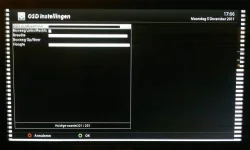
After I flashed my box with vix 2.3 I noticed that the edges of the picture generated in HD(1080i) are showing a 5mm kind of residue of the OSD menu (in horizontal white bars/stripes just on the edges). Switching on and off the image scan function of the TV is making that worse and extending that to few centimeters. I am using autoresolution and experimented with setting and also switched it of and re-booted but still no improvement apart from it moving the with of the distortion back to the original 5mm. A basically experimented with any setting that has influence on picture quality-resolution or size but no results. And what I also noticed is that when going into the OSD settings menu it suddenly resets the transparency by itself so that I have to set that back to the preferred setting. Anybody some idea what can be wrong? stuff like this did not occur with the factory image which I used for few months.
 
Last edited by a moderator:
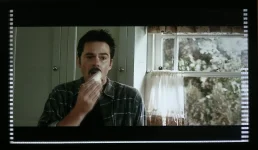
As this thread does not seem to be clear enough to get any reply I will add here some pictures that I've taken from the screen. Screen-shots are not registering the residue I am talking about so they are taken by hand in front the screen self.:

View attachment 12994
Here you can clearly see the white horizontal bars originating from the OSD

View attachment 12995
Here you can see that the OSD is not exactly set to the edges of the screen causing the rest to be smudged with the the white bars on the edges.
 
Last edited by a moderator:
As this thread does not seem to be clear enough to get any reply I will add here some pictures that I've taken from the screen. Screen-shots are not registering the residue I am talking about so they are taken by hand in front the screen self.:


Here you can clearly see the white horizontal bars originating from the OSD
05122011171.webp

Here you can see that the OSD is not exactly set to the edges of the screen causing the rest to be smudged with the the white bars on the edges.
05122011173.webp
 
Last edited by a moderator:
As this thread does not seem to be clear enough to get any reply I will add here some pictures that I've taken from the screen. Screen-shots are not registering the residue I am talking about so they are taken by hand in front the screen self.:


Here you can clearly see the white horizontal bars originating from the OSD
View attachment 13059

Here you can see that the OSD is not exactly set to the edges of the screen causing the rest to be smudged with the the white bars on the edges.
View attachment 13060

This happened me too today after I switched the VU from 760 to 1080i. A reboot of the box removed the white horizontal bars.
 
It stays there inconsiderate of the set aspect on the TV. Rebooting the box also does not have any effect. The only way to remove it is to exactly set the OSD to the edges of the screen, but it can return when I will enter the OSD settings menu, only by entering the menu it will spontaneously re-set the transparency without changing the values visibly and bring me back the bars....

Also the transparency setting in the OSD settings menu is not beeing saved properly because a 100% opaque menu I cannot set.
It is showing me the 100% opaque in the settings menu example but when I am saving and exiting the maximum what I am getting is (estimated)50%

I also switched off autoresolution to see if there was some conflict there but no change.

It really looks like a minor bug in the OSD settings.
 
Last edited by a moderator:

OpenViX Feeds Status

Back
Top