Superb quality and spec AB-Com PULSe 4K SE. Crazy offer! Only £129! FREE UK DELIVERY! 4K UHD, Enigma 2, Multiboot 4 images & more!...
Superb quality and spec AB-Com PULSe 4K Rev II Twin Satellite tuner only £179! FREE UK DELIVERY! 4K UHD, Enigma 2, SATA HDD facility, Multiboot 4 images & more!...

[VU+ Duo4K SE] In OpenWebif how do I move my custom bouquet to the top of the list?

SkyFan

New member
Joined
Dec 29, 2012
Messages
562
Reaction score
0
Points
0
In OpenWebif Bouquets tab, how do I move my custom bouquet to the top of the list?
 
Drag and drop.

Select the ☰ symbol, not the name of the bouquet.
 
Last edited:
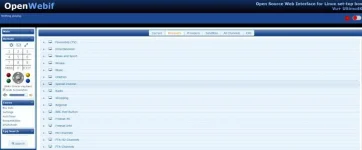
I don't see that symbol anywhere. This is what I see

OpenWebif.webp

If I drag the bouquet name I see the no entry mouse icon meaning drag and drop doesn't work.

My SkyFan custom bouquet is further down the list not shown in the screenshot. I want to move it to the top of the list.
 
Last edited:
Bottom left - BouquetEditor.
 
If your original bouquet was made by ABM, it will be moved again when ABM runs.

If it isn't made by ABM, and you are using ABM for other bouquets might be an idea to use your bouquet as the first one. You get the option in ABM where it asks you to create main bouquet.
 
My custom bouquet IS made by ABM. So how do I keep it from moving when I put it in the top of the list?
 
My custom bouquet IS made by ABM. So how do I keep it from moving when I put it in the top of the list?
It should be at the top. Every time I have run your xml file, it ha always been at the top.


Please attach your custom file (attach, not paste). Attach your debug log too showing ABM run. Delete any Wifi password, mac addresses or co-ordinates.
 
In answer to the original question, drag and drop the bouquet to where you want. It will be undone next time ABM runs.
 
Files attached. The debug log is mostly full of "NULL" words apart from the bottom of the file. It's laggy when I try to look at the bottom of the file. Do I need to run ABM then restart my box for the ABM stuff to be logged or can I do it without restarting my box and it will still appear in the log?
 

Attachments

Code:
<899685.9525> [ABM-config] level:  expert
<899685.9528> [ABM-config] providers:  sat_282_freesat:hd_freesat_110_1:158:userbouquet.favourites.tv|sat_282_sky_uk:hd_london:149:
<899685.9530> [ABM-config] keepbouquets: All
<899685.9533> [ABM-config] add provider prefix:  False
<899685.9535> [ABM-config] show in extensions menu:  False
<899685.9537> [ABM-config] placement:  top
<899685.9539> [ABM-config] skip services on non-configured satellites:  True
<899685.9542> [ABM-config] show non-indexed:  True
<899685.9545> [ABM-config] schedule:  True
<899685.9547> [ABM-config] schedule time:  [6, 20]
<899685.9553> [ABM-config] schedule days:  ['Monday', 'Tuesday', 'Wednesday', 'Thursday', 'Friday', 'Saturday', 'Sunday']

Is Freesat the first provider?
Are you also keeping a favourite (non-ABM bouquet) as the first bouquet in Sky bouquets?
 
Thanks. Problem was that I had freesat as my first provider. Fixed now.
 

OpenViX Feeds Status

Back
Top