Superb quality and spec AB-Com PULSe 4K SE. Crazy offer! Only £99! FREE UK DELIVERY! 4K UHD, Enigma 2, Multiboot 4 images & more!...
Superb quality and spec AB-Com PULSe 4K Rev II Twin Satellite tuner only £149! FREE UK DELIVERY! 4K UHD, Enigma 2, SATA HDD facility, Multiboot 4 images & more!...

[VU+ Duo4K] IPTV in bouquet

smp8

Member
Joined
Jul 9, 2014
Messages
49
Reaction score
0
Points
6
Age
58
Hi all

Just had a query regarding IPTV. When I play any channel through XStreamity the picture is perfect, but when I add the channels to a bouquet, the picture always breaks up every 20-30 seconds. I've had a look in the audio & video settings but there's nothing obvious. Any ideas?

Many thanks

IMG_20241211_134815_067.webp
 
did you save as dvb1 when converting to fit in channel list bouquet ?
 
Hi

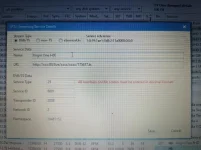
I had to add them individually because IPTV bouquet maker wouldn't accept the URL. So the details look like the attached.

IMG_20241211_140542_093.webp
 
i use jedimaker for creating.Then import in DBE and copy paste for channellist and bouquets.Even mixed here and see difference becuse extention before channel
 
Thanks. I'll have a play around with jedimaker.
 
Hi Orlandox

Thanks for the reply. Tried the new plugin, but couldn't get it to work. Actually, could you advise when adding the URL where do you add the Port number? Is it part of the URL separated by a colon i.e. IPTV.com:8080?

Thanks.
 
did try that in beginning but nowhere near the easy jedimaker .You have to do several more steps to have the same result in menus
 
I'll try jedimaker, then try M3UIPTV plugin again. Thanks all.
 
Jedi is no longer maintained. It has been replaced with BouquetMakerXstream. It is in the plugin feeds. Very similar anyway. IMO the best thing to use.
 
Jedi is no longer maintained. It has been replaced with BouquetMakerXstream. It is in the plugin feeds. Very similar anyway. IMO the best thing to use.

Well not if you want to use catchup/archive...For that purpose there are other better tools ;)
 
Maybe, but I couldn't get along with M3UIPTV at all, although I appreciate that it is in its early stage at the moment and will improve.
I like to keep all the non-live stuff (and most of the live stuff!) out of my bouquets. I use Xstreamity for vod and catchup. I download it first so I can easily watch it stages. Great to download an entire series at once too.
We all have different use cases, for me the combination of bmx and Xstreamity works much better than anything else I have tried, for others maybe not. It's great to have a few alternatives.
 
Tried BouquetMakerXstream, which got rid of the pixelation, which is great, unfortunately it didn't get the EPG. I know there's a 'Manual EPG Update' on the normal XStreamity. Wondered if I missed something?

Thanks
 
I use jediEPGXstream for that so I kan choose the channels from the corresponding provider (or another that has that channel) for my complete list
 
I'll have a play with that, Bellejt. Thanks, mate.
 
Maybe, but I couldn't get along with M3UIPTV at all, although I appreciate that it is in its early stage at the moment and will improve.

The plugin is completed. So is not at all at early stage...
Maybe your problem was misconfiguration or you wanted different setup.

But as you said everyone have their expectations so they can use what they see fit...
 
Tried BouquetMakerXstream, which got rid of the pixelation, which is great, unfortunately it didn't get the EPG. I know there's a 'Manual EPG Update' on the normal XStreamity. Wondered if I missed something?

Thanks

You need to use EPG-Importer to import the EPG. After BMX has built the bouquets, it automatically adds a 'source' to the list of sources in EPG-Importer, named after your iptv provider. This needs to be selected as a source, then do a manual update to bring it in. You can then set it to auto import. (Good idea to set it to a few minutes after the time you set BMX to daily update the bouquets)
 
Last edited:
If there is just a need for epg for UK channels using BouquetMakerXstream and you also have 28.2E Satellite, there may be no need to import epg. You can try using the AutoBouquets plugin to post convert the service references in your BMX bouquets to use the build-in OpenTV EPG reader.

run BMX, run AutoBouquets, run AutoBouquets IptvEPG Converter, use built-in stream epg.
 
Glenn2, that worked a treat. Thanks for the advice.
 

OpenViX Feeds Status

Back
Top