


grantdavey91
Forum Supporter

Hi, All.
I have been playing around with some settings on lcd4linux around the design on my duo2.
I have it how I want it for normal tv viewing, screen 1 as full mk picon and screen 2 as programme info, clock, tuner, small picon and background image
For media/hdd and movies, all I get is a black background with some white text that just says 'name of movie.m4v' in the middle.
I was playing around with how I can make this better on lcd4linux settings through openwebif, I have improved it a little; however
I am wondering if it's possible to display a movie backdrop or poster of the current movie playing, and then on lcd2 or screen 2, the name of the movie, progress bar, info etc..
I have designed what I want it to look like :
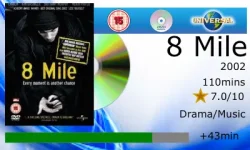
So I want the movie cover to display basically.
I know how to do the rest anyway, but just so it shows above what I have in mind.
I did notice on the lcd4linux settings that there is 'show cover' option, I did enable this but it didn't do nothing other than show a red screen.
There is also other settings like API keys etc but I have no idea how this works or how it is set up
I have quite a few movies and tv shows on my external drive that I am using on my duo 2 and just seeing if it's a possibility to have the look of the above picture when playing back those movies, or similar to the picture so it shows the movie cover at least.
I have read other posts about this being possible but I haven't found anything around how I go about making this possible.
Any help is appreciated,, many thanks in advance
I have been playing around with some settings on lcd4linux around the design on my duo2.
I have it how I want it for normal tv viewing, screen 1 as full mk picon and screen 2 as programme info, clock, tuner, small picon and background image
For media/hdd and movies, all I get is a black background with some white text that just says 'name of movie.m4v' in the middle.
I was playing around with how I can make this better on lcd4linux settings through openwebif, I have improved it a little; however
I am wondering if it's possible to display a movie backdrop or poster of the current movie playing, and then on lcd2 or screen 2, the name of the movie, progress bar, info etc..
I have designed what I want it to look like :
So I want the movie cover to display basically.
I know how to do the rest anyway, but just so it shows above what I have in mind.
I did notice on the lcd4linux settings that there is 'show cover' option, I did enable this but it didn't do nothing other than show a red screen.
There is also other settings like API keys etc but I have no idea how this works or how it is set up
I have quite a few movies and tv shows on my external drive that I am using on my duo 2 and just seeing if it's a possibility to have the look of the above picture when playing back those movies, or similar to the picture so it shows the movie cover at least.
I have read other posts about this being possible but I haven't found anything around how I go about making this possible.
Any help is appreciated,, many thanks in advance


