Superb quality and spec AB-Com PULSe 4K SE. Crazy offer! Only £99! FREE UK DELIVERY! 4K UHD, Enigma 2, Multiboot 4 images & more!...
Superb quality and spec AB-Com PULSe 4K Rev II Twin Satellite tuner only £149! FREE UK DELIVERY! 4K UHD, Enigma 2, SATA HDD facility, Multiboot 4 images & more!...

LCD screen not working anymore

  • Thread starter Thread starter XabiX
  • Start date Start date
X

XabiX

Guest
Hello,

I received a pop up saying that we were supposed to flash a recent image. Therefore I did reinstall yesterday R775 and since then I lost my LCD showing the clock and channel info when on.

I have shutdown and unplug the box but the screen is just black (with light on).

I checked serveral threads like:
http://www.world-of-satellite.com/showthread.php?31715-No-LCD-diplay-on-quad&highlight=QUAD+LCD
http://www.world-of-satellite.com/showthread.php?30347-lcd-picons&highlight=QUAD+LCD
http://www.world-of-satellite.com/showthread.php?29906-My-LCD-is-blank-!&highlight=QUAD+LCD
http://www.world-of-satellite.com/s...nu-and-Picon-LCD-BUILD-658&highlight=QUAD+LCD

it looks like people are having sometimes issues.

Are the picons supposed to be displayed by default now?
Is there a how to or some tips on how to troubleshoot/check what happens with the LCD screen?

I have manually installed: enigma2-plugin-picons-tv-ocram.hd.transparent-white, udev, usb-serial

Thanks
XabiX
 
Hi,

I noticed that doing a factory reset nothing changes. I noticed that lcd4linux was not installed but maybe this is of any use.
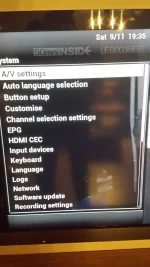
I am not sure why but the Display menu under menu -> system has disappeared :-(

thanks
 
any idea of what to do to troubleshoot? instead of always re flashing?
 
i have reinstalled and the LCD screen is back.
Shame we can't really troubleshoot easily when this does not work instead of reflashing :)

at least the Display menu is back now, not sure why it dissapeared!
 
Shit is gone again and the screen is blacklighted.

Please can someone tell me how to check why the display menu disappears? and if there is way to troubleshoot why the LCD screen disapear?

I don't know where to look and what to look :-(

i hadn't installed any picon yet, I just re upload my channels installed udev and usb-serial drivers.
 
Last edited by a moderator:
What have you set in Menu -> Setup -> System -> Display -> Skin Setup?
 
What have you set in Menu -> Setup -> System -> Display -> Skin Setup?

As I said part of the issue is that menu dissapear as well:
see attached screenshot
 

Attachments

  • 20131109_193548.webp
    20131109_193548.webp
    409 KB · Views: 26
As I said part of the issue is that menu dissapear as well:
see attached screenshot

In that case, I'd just reflash.
Something must be making it dissapear, a settings backup? a plugin?
 
I just reflashed today, it's my 3rd time.
So I can spend time reflashing, I have all configured manually without taking any backup therefore I don't understand where this comes from.
That's why I am asking for help to try to troubleshoot as no logs get generated and reflashing all the time doesn't help.

I added a terrestrial tuner 2 days ago but the issue started before so I don't think it s related.
What would be nice is to understand how can a menu item dissapear from the menu itself.
 
If I recall, the only parameter I changed on the Display menu was: light when standby to off

Maybe this triggers the issue. is there a way in a config file to put back the display default values?
 
Here are my settings, in case you see something weird:

config.av.videorate.1080p=60Hz
config.av.downmix_ac3=false
config.av.videomode.HDMI=1080p
config.av.videoport=HDMI
config.misc.lastrotorposition=130
config.misc.firstrun=false
config.misc.initialchannelselection=false
config.misc.startCounter=3
config.misc.useNTPminutes=1440
config.misc.languageselected=false
config.misc.videowizardenabled=false
config.misc.SyncTimeUsing=1
config.backupmanager.backupdirs=['/etc/enigma2/', '/etc/fstab', '/etc/hostname', '/etc/network/interfaces', '/etc/passwd', '/etc/shadow', '/etc/etc/shadow', '/etc/resolv.conf', '/etc/ushare.conf', '/etc/inadyn.conf', '/etc/tuxbox/config/', '/etc/wpa_supplicant.conf', '/usr/softcams/', '/usr/crossepg/providers', '/usr/keys']
config.plugins.VFD_Giga.ledSBY=0
config.timezone.val=(GMT+01:00) Brussels, Copenhagen, Madrid, Paris
config.Nims.0.diseqcA=282
config.Nims.0.diseqcMode=diseqc_a_b_c_d
config.Nims.0.diseqcC=130
config.Nims.0.diseqcD=3550
config.Nims.0.diseqcB=192
config.Nims.2.terrestrial=6
config.Nims.2.multiType=1
config.softcammanager.softcams_autostart=['/usr/softcams/Oscam.sh']
config.tv.lastroot=1:7:1:0:0:0:0:0:0:0:FROM BOUQUET "bouquets.tv" ORDER BY bouquet;1:7:1:0:0:0:0:0:0:0:FROM BOUQUET "userbouquet.dbe00.tv" ORDER BY bouquet;
config.tv.lastservice=1:0:1:502:5:20FA:EEEE0000:0:0:0:
config.usage.show_infobar_channel_number=true
config.usage.show_infobar_on_skip=false
config.usage.show_infobar_on_event_change=true
config.usage.service_icon_enable=true
config.usage.show_second_infobar=0
config.usage.show_bouquetalways=true
config.hdmicec.enabled=true
config.hdmicec.volume_forwarding=true
config.lcd.standby=0
config.lcd.bright=7
config.audio.volume=40
root@gbquad:/etc/enigma2# vi settings
config.av.videorate.1080p=60Hz
config.av.downmix_ac3=false
config.av.videomode.HDMI=1080p
config.av.videoport=HDMI
config.misc.lastrotorposition=130
config.misc.firstrun=false
config.misc.initialchannelselection=false
config.misc.startCounter=3
config.misc.useNTPminutes=1440
config.misc.languageselected=false
config.misc.videowizardenabled=false
config.misc.SyncTimeUsing=1
config.backupmanager.backupdirs=['/etc/enigma2/', '/etc/fstab', '/etc/hostname', '/etc/network/interfaces', '/etc/passwd', '/etc/sha
config.plugins.VFD_Giga.ledSBY=0
config.timezone.val=(GMT+01:00) Brussels, Copenhagen, Madrid, Paris
config.Nims.0.diseqcA=282
config.Nims.0.diseqcMode=diseqc_a_b_c_d
config.Nims.0.diseqcC=130
config.Nims.0.diseqcD=3550
config.Nims.0.diseqcB=192
config.Nims.2.terrestrial=6
config.Nims.2.multiType=1
config.softcammanager.softcams_autostart=['/usr/softcams/Oscam.sh']
config.tv.lastroot=1:7:1:0:0:0:0:0:0:0:FROM BOUQUET "bouquets.tv" ORDER BY bouquet;1:7:1:0:0:0:0:0:0:0:FROM BOUQUET "userbouquet.dbe
config.tv.lastservice=1:0:1:502:5:20FA:EEEE0000:0:0:0:
config.usage.show_infobar_channel_number=true
config.usage.show_infobar_on_skip=false
config.usage.show_infobar_on_event_change=true
config.usage.service_icon_enable=true
config.usage.show_second_infobar=0
config.usage.show_bouquetalways=true
config.hdmicec.enabled=true
config.hdmicec.volume_forwarding=true
config.lcd.standby=0
config.lcd.bright=7
config.audio.volume=40
 
Is this normal in the log/messages?

Code:
Nov 10 15:47:50 gbquad daemon.notice automount[546]: >> mount: mounting /dev/logs on /autofs/logs failed: No such file or directory
Nov 10 15:47:50 gbquad daemon.err automount[546]: mount(generic): failed to mount /dev/logs (type auto) on /autofs/logs
Nov 10 15:47:50 gbquad daemon.err automount[546]: failed to mount /autofs/logs
and directory can't be created:

Code:
root@gbquad:/autofs# mkdir logs
mkdir: can't create directory 'logs': Permission denied
 
Last edited by a moderator:
I found the BUG:
when you install udev and you reboot your screen goes black. You uninstall it and reboot and the screen is back!

FYI this was the only rule I had:
/etc/udev/rules.d/10-smargo.rules
SUBSYSTEMS=="usb", ATTRS{idVendor}=="0403", ATTRS{idProduct}=="6001", SYMLINK+="ttyUSB0"
 
Last edited by a moderator:
i didn't install udev and i got a black lcd screen too.

What to do?

Sent from my V972 Core4 using Tapatalk HD
 
tipical answers would be: re-install :D

Sorry I am just repeating what I have been told, I didn't find a way to reset or troubleshoot just the LCD screen mgt.
 
Mine has just done this, if anyone can help be much appreciated.
 
Fair play for searching and finding a thread with a similar issues but you're probably best starting a new one with box details/image version and a description of the issue.
 

OpenViX Feeds Status

Back
Top