Superb quality and spec AB-Com PULSe 4K SE. Crazy offer! Only £99! FREE UK DELIVERY! 4K UHD, Enigma 2, Multiboot 4 images & more!...
Superb quality and spec AB-Com PULSe 4K Rev II Twin Satellite tuner only £149! FREE UK DELIVERY! 4K UHD, Enigma 2, SATA HDD facility, Multiboot 4 images & more!...

[ET8500] Locked in a loop and will not boot. Tried to flash a new image and the same happens!

fowleronline

New member
Joined
Aug 8, 2016
Messages
12
Reaction score
0
Points
0
Please excuse my lack of correct terminology, I tried to get into VIX a couple of years ago when I got the box, but failed dismally.
For a long time my Xtrend ET8500 has failed to pause live TV from time to time and needed rebooting, Particularly if it had been on all day.
Although I put it into standby at night when I go to bed, recently it has come back on overnight and is running in the morning.
Today was the same and after watching the BBC news for a while I wanted to rewind the live TV. It refused me so I went to reboot it.
Hard boot, power off 10 seconds, and back on. Done this hundreds of times and normally puts everything right.
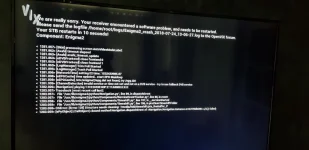
This time it would part boot, but then come up with a screen of text, apologise for a software error and try to reboot again. This then looped until I powered off again.
Tried rebooting a couple more times with the same looping result.
This afternoon I downloaded Openvix-5.1.032.release-et8500_usb.zip and installed it (I have done this a couple of times previously, so was easy to do).
Went through all the setup, even scanned for channels, then.... boot looping again.
I took a photo of the screen message, I will try and upload it.
Any suggestions as to how to fix it would be most welcome.
Thanks in advance.

PS I have an early start tomorrow so I won't see any replies until later tomorrow. Thanks.
 

Attachments

  • 2018-08-14 16.46.31.webp
    2018-08-14 16.46.31.webp
    40.2 KB · Views: 36
If box is on in the morning might suggest a bad epg download,where is it going to a mounted usb or hdd and not internal flash?
i would imagine crash logs would need to be uploaded to site for checking further.
 
Bright and early!!

Thanks, but should I remove the HDD to test for faults or is there another way please?

There is only the original HDD fitted, there is no external or attached storage, it is stock from the shop.

How do I get the crash log you mention please, as it doesn't boot into any menu?

Thanks again.
 
Disconnecting the HDD should bypass the problem.

You can actually stop the looping and perform a disk check by command line. I don't know the fsck commands so cannot help.
 
Looks like there is an error on the HDD.
That's my first thought.

Disconnecting the HDD should bypass the problem.

You can actually stop the looping and perform a disk check by command line. I don't know the fsck commands so cannot help.
Telnet/Putty command is something like :

e2fsck -p -c -f /dev/sda1

/dev/sda1 is mounted as /media/hdd on my system and you can use df -mh to check what yours is.

I suspect you would need to unmount first with umount /dev/sda1 (again location may differ on your system).

If you have any important things that you must keep, I would try and copy these elsewhere if possible.
 
Thanks for your replies. As I mentioned at the start my tech knowledge could be written on the back of a postage stamp with a hot poker (nice age related metaphors there lol).

I removed the HD and it booted without looping, into some menus. I'm afraid your command line stuff is over my head, and probably not much use if I have to remove the HDD to boot the thing.

What I plan to do when I get a few minutes is take out the HDD, put it in a caddy and reformat it on my laptop, then put it back. There is nothing special on it.

Unless there is a "simple" fix you can suggest?

Thanks
 
Thanks for your replies. As I mentioned at the start my tech knowledge could be written on the back of a postage stamp with a hot poker (nice age related metaphors there lol).

I removed the HD and it booted without looping, into some menus. I'm afraid your command line stuff is over my head, and probably not much use if I have to remove the HDD to boot the thing.

What I plan to do when I get a few minutes is take out the HDD, put it in a caddy and reformat it on my laptop, then put it back. There is nothing special on it.

Unless there is a "simple" fix you can suggest?

Thanks

To be honest its so easy and fast to remove the HDD from the ET8500 (you can probably leave it in the ET8500‘s HDD holder), I would probably do that and reformat on a PC ..... but format ext3/4 to save time later, and then stick back into the ET8500.
 
OK... life keeps getting in the way!

HDD removed and reformatted using diskmgmt.msc

Back into the ET8500 and rebooted... no looping :)

Now it feels like about years since I got this unit and I can't remember what I did with it at this point. There is no EPG or skin (im not sure if they are even the same thing!) so if there is a dummies guide from here, could someone please post the link. I have searched, but I don't think I am using the right terms to find what I want... In fact, I'm not sure what I want! I'm linked to a sat dish with 2 feeds and I would like my PVR function back, particularly to pause live TV.

Again your help is appreciated.

Cheers.
 
Best to start different threads for different topics instead of bundling all your questions into one thread.
 
Quick support menu above and vix manual in pdf to download to pc?
Even on ABU's link on thread.
 
Best to start different threads for different topics instead of bundling all your questions into one thread.

Thanks, but I wasn't aware I was asking about different topics!

I just wanted the unit to work again. As I have said several times, this is not a hobby or interest for me it is a tool that is broken and I want to fix it myself.

I followed the link in your sig (as recommended by Cactikid) and found the videos on how to do various things... I have now got it working again. Some of the things like the blue skin recommended did not work, the error said a letter was missing. I don't know if I am doing something wrong or the tutorial is now out of date.

Anyway, bottom line is that it is now up and running again. Probably at a fraction of it's potential, but it's doing the basics.

Thanks again
 

OpenViX Feeds Status

Back
Top