Superb quality and spec AB-Com PULSe 4K SE. Crazy offer! Only £99! FREE UK DELIVERY! 4K UHD, Enigma 2, Multiboot 4 images & more!...
Superb quality and spec AB-Com PULSe 4K Rev II Twin Satellite tuner only £149! FREE UK DELIVERY! 4K UHD, Enigma 2, SATA HDD facility, Multiboot 4 images & more!...

[GiGaBlue UHD UE 4K] Losing channels

I flashed the receiver without restoring any backup or plugins.

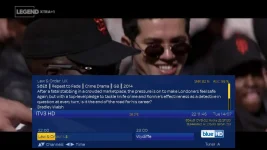
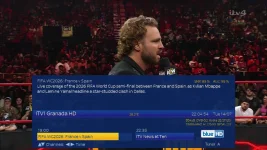
It happened again tonight. BBC1 went completely dark with SNR and AGG values of 0. ITV1 was broadcasting ITV4 without any audio. ITV3 was broadcasting Legend Xtra+1.

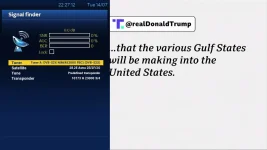
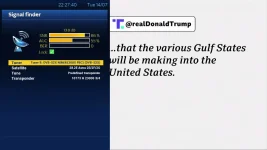
I have attached screenshots of ITV1 and ITV3 broadcasting the channels as described above, plus tuner A&B signal finder.
 

Attachments

  • ITV1 channel showing ITV4.webp
    ITV1 channel showing ITV4.webp
    92.2 KB · Views: 13
  • ITV3 showing Legend XTRA+1.webp
    ITV3 showing Legend XTRA+1.webp
    58.6 KB · Views: 14
  • BBC1 .webp
    BBC1 .webp
    77.9 KB · Views: 13
  • Tuner A.webp
    Tuner A.webp
    41.7 KB · Views: 12
  • Tuner B.webp
    Tuner B.webp
    42.5 KB · Views: 13
PS

Abu, no I don’t have any channel editor or script for updating channels or bouquets.
 
This has to be a hardware issue. Let's test the cables. Label the wires, perhaps "wire 1" and "wire 2".check the f-plugs on signal wires at receiver end. If the dish is easily accessible check that end too. Have a look at the LNB for damaged plastic covering. Check the cables for any splits/damage if possible.


Connect wire 1 to tuner A.
Leave wire 2 unconnected.

Set tuner A as simple, single 28.2.
Set tuner B as disabled.

Leave like this one night. Tomorrow, disconnect wire 1 and then connect wire 2 to tuner A. Test for a day.
 
If the dish is easily accessible check that end too. Have a look at the LNB for damaged plastic covering. Check the cables for any splits/damage if possible.

My LNB failure a few years back.........
1784141798145.webp

 
Last edited:
the fact that his channels are simply changing has to be something that is updating his channellist and would have nothing to do with the LNB's.
 
the fact that his channels are simply changing has to be something that is updating his channellist and would have nothing to do with the LNB's.
Yes - that is the puzzling aspect to this issue. However, the OP obviously has a cable/LNB/tuner issue also as one of his tuners is reporting 0% SNR at times, while the other is within acceptable limits. It's possible that the loss of one tuner is down to a shorted coax on one connection or a water ingress on the cable or indeed an issue with the plastic cover on the LNB as reported by @adm. I had a similar issue earlier this year - reasonable SNR figures while the weather was good, but loss of signal during rain - problem was a crack in the rain cover.
 
I have managed to get an Edison Mini.
I will connect the Edison later and see what happens with it this evening.
 
But you still haven't reported on whether you might have a cable/LNB or tuner problem using the method suggested by @abu baniaz . You are now going to introduce another receiver into the mix of this problem.
 
I forgot to give one of the usual pieces of advice...

Perform a manual scan. Ensure you select "single satellite". Report back how many channels you receive. Repeat with each signal wire.

(Unfortunately, this test won't find the issue when some LNBs exhibit a fault when two ports are used simultaneously.)

There is also a possibility that the PSU can no longer supply enough current under load. Some people check the 12v output, but you need to check that it can supply the required current under load. For most people, easier to test with a different PSU instead of getting the test equipment.

The visual checks could be.simplest.
 
But you still haven't reported on whether you might have a cable/LNB or tuner problem using the method suggested by @abu baniaz . You are now going to introduce another receiver into the mix of this problem.

But you still haven't reported on whether you might have a cable/LNB or tuner problem using the method suggested by @abu baniaz . You are now going to introduce another receiver into the mix of this problem.
My logic with a different receiver is if it is a cable/dish issue it will be replicated.
 
@abu baniaz I have disabled Tuner B. When I unscrewed cable 2 to Tuner B, I completely lost the signal.
I connected cable 2 to Tuner A and the signal returned.
 
... so it looks like cable 1 is faulty - shorted, water ingress or the LNB connection (or that particular side of the LNB) is faulty. Check the cable at the receiver end very carefully for any tiny wisps of the coax braid which might be shorting out cable 1.
 
the fact that his channels are simply changing has to be something that is updating his channellist and would have nothing to do with the LNB's.

Perhaps he has some zap timers set or recordings set to come on? The VPS plugin often results in a zap to the recording channel 10/15 minutes before the program is about to start
 
At 2:44 this morning the same thing happened, channel froze and shows zero SNR and AGC. I deliberately left the receiver on overnight to see what would happen.
I restarted the GUI only and the signal returned. This makes me think it is both a cable and receiver issue.
The issues started when I updated the image as I was getting a message ABM 3.4>3.5
 
You need to be methodical and systematic to identify the problem. Have you checked the other possibilities listed in this thread? Are you able to check? Sometimes the dish/LNB isn't easily accessible, people tend to say they can't check instead of not saying anything.

How many channels do you find on a manual scan (single satellite, not single transponder) with following hardware combinations, please answer back.

Tuner A with wire 1
Tuner A with wire 2
Tuner B with wire 1
Tuner B with wire 2
 
You need to be methodical and systematic to identify the problem. Have you checked the other possibilities listed in this thread? Are you able to check? Sometimes the dish/LNB isn't easily accessible, people tend to say they can't check instead of not saying anything.

How many channels do you find on a manual scan (single satellite, not single transponder) with following hardware combinations, please answer back.

Tuner A with wire 1
Tuner A with wire 2
Tuner B with wire 1
Tuner B with wire 2
Tuner A with wire 1 - zero channels.
Tuner A with wire 2 - 632 channels.
Tuner B with wire 1 - zero channels.
Tuner B with wire 2- 643 channels.

I can access the LNB, I will check today.
 
so wire 1 has the fault but that does not explain why you get other channels as itv 4 instead of itv 1 :)
 
A zap will not make the channel change names. Can we park that issue for now. Otherwise, we will go around in circles. We can return to it later.

OpenTV EPG downloader zaps to the Sky transponder, so that could account for the occasions when you encounter a signal failure.

Until you resolve the signal issue, please leave the wire 1 disconnected. Make sure that your tuner configuration matches the wires connected to them. I.e leave the tuner with no signal wire as "not configured".

Can you reach the dish/LNB safely? Issue may be f-plug, wire or LNB. Are the wires a shotgun cable or individual?
 
Last edited:

OpenViX Feeds Status

Back
Top