Superb quality and spec AB-Com PULSe 4K SE. Crazy offer! Only £129! FREE UK DELIVERY! 4K UHD, Enigma 2, Multiboot 4 images & more!...
Superb quality and spec AB-Com PULSe 4K Rev II Twin Satellite tuner only £179! FREE UK DELIVERY! 4K UHD, Enigma 2, SATA HDD facility, Multiboot 4 images & more!...

Magic-(E)HD (Lite) skins

I'll be glad to change the PLi-logo for a ViX-logo, if you can help me to a suitable one. It should have the same size as the attached PLi-logo (252 x 20, bitdepth 32).
If nobody is willing or able to provide a ViX-logo, it apparently isn't that important.
 
If nobody is willing or able to provide a ViX-logo, it apparently isn't that important.
You are the author of this skin so if you think the Pli logo shoud remain on a skin for a VIX image its your call
 
Of course it is, but Silverfox so desperately asked for a change. And I am quite willing to do that, but I do need a logo.
 
I will give it a go what font and what program did you use to create it??
 
To be honest: I don't know, as somebody supplied that logo to me. I think it might be pngquant or Paint.NET, but I am not familiar with any of them.
I would be happy if you give it a try. You'd best try the result by putting the logo in /usr/share/enigma2/Magic-HD-Common/logos , replacing the original one, and see how it looks in Magic-(E)HD.
 
Last edited:
Just a note mate i installed your magic ehd skin from the pluins menu but the menus were missing from the top i.e. It was too big for the screen. Is that normal or is it me? My menu overscan is set to 32 by default and other skins fit just fine
 
Magic-EHD is for TV's not set to overscan (as a HD-telly should be), thus using all the available pixels (especially useful on very crowded screens).
Magic-HD is essentially the same skin, but allowing for 5.5% overscan. Only for those having a TV on which overscan cannot be turned off.
The overscan setting in the ViX-menu does not affect these skins (I think it only affects the ViX-HD skin), as it is not a general feature.

Very strange that these day's all HD-TV's are still set to the old fashioned overscan by default; the setting being well hidden and having fancy names on many.

Most skinners don't care about that and leave an enormous amount of space free around all borders.

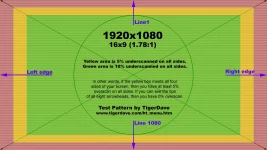
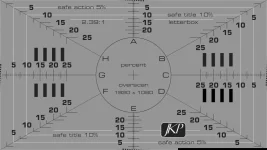
If you are interested to know how much space you are loosing, display the attached pictures via your box.

Overscan means that every pixel of your TV displays approx 0.95 pixel that the box provides........ Set the setting to "off" and be surprised by the real HD-quality you are looking at now!
 

Attachments

  • Overscan-1.webp
    Overscan-1.webp
    131 KB · Views: 18
  • Overscan-2.webp
    Overscan-2.webp
    58 KB · Views: 16
Last edited:
First Try at a VIX png

Had a go what do you think
 

Attachments

  • pli.webp
    pli.webp
    1.6 KB · Views: 84
Thanks for your effort, but personally I find the grey background not very nice fitting into the black screen. And besides: the grey letters in the grey background make them hard to read (of course: for a logo that's not so important, but still).
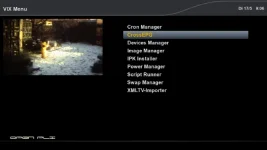
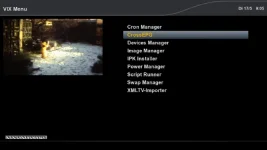
Attached the two logo's in their "natural" environment.
Would you, or somebody else, give it an other try please?
 

Attachments

  • PlI_logo.webp
    PlI_logo.webp
    15.3 KB · Views: 50
  • ViX_logo.webp
    ViX_logo.webp
    15.5 KB · Views: 52
How about this one

Pick any colour you want :)
 

Attachments

  • pli.webp
    pli.webp
    982 bytes · Views: 122
Looks like you're quite handy with logo's.
This one looks fine to me: what do you (and others??) think?
 

Attachments

  • ViX_logo2.webp
    ViX_logo2.webp
    15.6 KB · Views: 44
I spent all day learning how to make the backgroung transparent I notice on this one the last e in extreme is not quite right when other have their input I will finalise one.
I quite like the yellow it matches well
 
Just for me? Great!
Using which program?
Will come back to you with other "jobs" if I have one at hand......:cool:

Quick easy walkthrough using Paint.net

1. Create a jpg using the text you want in the logo and save as a jpg.
2. Use magic wand tool and click on white background, then press 'delete'. The background now becomes transparnet.
3. Now save as .gif.
4. To add this transparent logo to another image you need to add another layer prior to adding.

Anyways thats the way I know using paint.net
 
Hi

Wasnt happy with the last one the e at the end was not right so I fixed it :)
Also changed the colour slightly
 

Attachments

  • pli.webp
    pli.webp
    1.3 KB · Views: 86

OpenViX Feeds Status

Back
Top