Superb quality and spec AB-Com PULSe 4K SE. Crazy offer! Only £129! FREE UK DELIVERY! 4K UHD, Enigma 2, Multiboot 4 images & more!...
Superb quality and spec AB-Com PULSe 4K Rev II Twin Satellite tuner only £179! FREE UK DELIVERY! 4K UHD, Enigma 2, SATA HDD facility, Multiboot 4 images & more!...

[GI-XPEED LX3] Media button crash system

  • Thread starter Thread starter pantsman28
  • Start date Start date
P

pantsman28

Guest
Can anyone help?

Every time I press the button for media the box crashes

Using Xpeed LX2 with latest build. I can only assume its a mount media crash.

I did clear out the contents of /etc/auto.network and /etc/enigma2/automounts.xml? to remove any previous settings.

But I can't reach any recording stored on local usb and my NAS drive
Attached screen shot of the problem
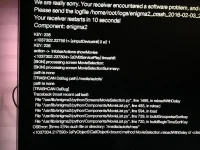
crash-log.webp
 
can you get a proper crash log upload. go into system and logs, if using ftp go in to home/logs
 
I Set The Blue Button In The Movie List To 'Home' So You Can Press It Quickly When Entering The Movie List...

I've Got A Few Different Boxes, Some Don't Mind The Path Being /media/autofs/ And Show All The Network Mounts, But Some Produce That Crash...
 
That log has the same error as your screen shot "OSError: [Errno 2] No such file or directory: '/media/autofs/NAS/'"

Did you look at or read my post above?
 
Thanks for the help. I have managed to stop it crashing although I can't get the NAS drive to mount again? any ideas?
 
couple of notes to fix this problem for anyone who has the same problem.

first clear out etc/auto.network and etc/enigma2/automounts.xml
remove any references to NAS drive in the etc/enigma2/settings

This solved the crashing but was unable to mount the NAS drive again properly of see any of the NAS Shares.
Samba had stopped working so had to switch this back on. but still was unable to see the mounted drive in view media locations.

Found out that auto.network was missing a space after # automounter configuration

this is how my working version looks.

# automounter configuration
NAS -fstype=cifs,user=****,pass=****,rw,iocharset=utf8 ://192.168.1.70/video

Not sure why it broke in the first place but ftp into the box and edit these files was the only way to resolve my problem
 
This solved the crashing but was unable to mount the NAS drive again properly of see any of the NAS Shares.
Samba had stopped working so had to switch this back on. but still was unable to see the mounted drive in view media locations.
Samba is the server side code. You're trying to use the client side code on the box, so Samba on the box doesn't apply here . (It is used to enable external client to access files which are on the E2 box.)
 

OpenViX Feeds Status

Back
Top