Superb quality and spec AB-Com PULSe 4K SE. Crazy offer! Only £99! FREE UK DELIVERY! 4K UHD, Enigma 2, Multiboot 4 images & more!...
Superb quality and spec AB-Com PULSe 4K Rev II Twin Satellite tuner only £149! FREE UK DELIVERY! 4K UHD, Enigma 2, SATA HDD facility, Multiboot 4 images & more!...

MetrixHD_MOD (Now includes a full 1080 HD version too)

hi can I down load this skin from the plugins /down load skins etc is it in the skin section I cant seem to find an ipk file in the skin down loads as well on the forum

Please break up your sentences so others can help you better.

Can I down load this skin from the plugins /down load skins etc?
Is it in the skin section?
I can't seem to find an ipk file in the skin down loads or on the forum.
Yes you can download from the plugin menu. That "download" text is wrong. It is actually install, not just download.
Yes it is in the skin section.
Why do you need the ipk? Just install it.
 
what dose the texs say in the down load menu thanks again
 
Can others using this skin advise if they are getting this issue please, I'm trying to figure out if there's a setting I can play with to change it:

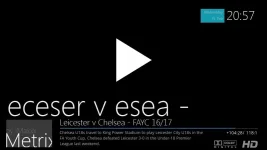
On playback of recorded media there's a line just above the now & next bar where it lists the name of the program playing.

This shows as left aligned and doesn't show any characters taller than small case, ie "Match of the Day" displays as "ac of he ay" "Game of Thrones" will show "ame o rones".
 
This is what I'm describing... (Should say "Leicester v Chelsea")

Screen2.webp
 
If only I hadn't been through and set all the fonts sizes I could find to zero already :(

No doubt I've missed one, anyone want to guess which?
 
Apologies if this has been asked already...I've been to the dark side for a while but have inevitably returned to Openvix :)

Anyway, I'm running my TM-Twin on a small TV so the FHD version of the skin just doesn't work for me. I've downloaded the 'regular' HD version of the skin from the feeds but it doesn't show up in the skin setup section for me to apply it. Has anyone else experienced this?

I've upgraded to Openvix v5 now but I seem to recall this happening previously when I was on V4 as well. I think I ended up FTPing an older version of the skin to my box. However, I'd like to get it working properly if possible, so any advice is much appreciated.
 
Just tested the skin on 5.2 and it now freezes on the boot screen. Reverting back to another skin fixed it. Anyone else noticed this?
 
Just tested the skin on 5.2 and it now freezes on the boot screen. Reverting back to another skin fixed it. Anyone else noticed this?

Hi folks,

Is there a command from the terminal to revert the skin?

Cheers,
mcquaim

##################################################

Sorry, forgot if you just deleted the offending skin folder it then reverted to the default skin....
 
Last edited:
Is there a command from the terminal to revert the skin?

stop E2 with "init 4" command
Edit settings file in /etc/enigma2/ and delete/edit line similar to this

Code:
config.skin.primary_skin=Simple_Ten_Eighty/skin.xml

Transfer back and issue "init 3" command to restart
 
Hi, Sorry for the thread bump, Just encountered this issue with multiboot on a Vu Uno.

The log just repeats this as enigma2 crashed and relaunches

Code:
<4>[VID]: VIDEO_SET_STREAMTYPE 0 
<4>[VID]: VIDEO_SELECT_SOURCE 1  
<4>[VID]: VIDEO_PLAY 1  2 0
<4>[VID]: VIDEO_CONTINUE 1  1 
<4>[VID]: VIDEO_CLEAR_BUFFER 1  1 0
<4>[VID]: VIDEO_STOP 0  1
<4>[VID]: VIDEO_SELECT_SOURCE 0  
<3>[LCD]: unknown cmd 0x1015
<4>[CI]:ci_dev_open
<4>
<4>[CI]:ci1_dev_open
<4>
<4>[VID]: VIDEO_SET_STREAMTYPE 0 
<4>[VID]: VIDEO_SELECT_SOURCE 1  
<4>[VID]: VIDEO_PLAY 1  2 0
<4>[VID]: VIDEO_CONTINUE 1  1 
<4>[VID]: VIDEO_CLEAR_BUFFER 1  1 0
<4>[VID]: VIDEO_STOP 0  1
<4>[VID]: VIDEO_SELECT_SOURCE 0  
<3>[LCD]: unknown cmd 0x1015
<4>[CI]:ci_dev_open
<4>
<4>[CI]:ci1_dev_open

I just end up deleting the /usr/share/enigma2/Metrix directory and letting the box fallback to default skin.
 
Does MetrixHD works for you guys with latest OpenViX image? I keep getting an error on my Solo2.
 

OpenViX Feeds Status

Back
Top