Superb quality and spec AB-Com PULSe 4K SE. Crazy offer! Only £99! FREE UK DELIVERY! 4K UHD, Enigma 2, Multiboot 4 images & more!...
Superb quality and spec AB-Com PULSe 4K Rev II Twin Satellite tuner only £149! FREE UK DELIVERY! 4K UHD, Enigma 2, SATA HDD facility, Multiboot 4 images & more!...

MetrixHD_MOD (Now includes a full 1080 HD version too)

If usb is mounted as hdd then path needs to be
/XPicons/picon

If it was mounted has usb just
/picon is ok

Cheers Buddy, I'll give this a go and create a /XPicons/picon folder on my USB thats mounted as a HDD and see if that does that job. Will report back if any issues.
 
Hi, Thanks for the great skin buddy, I love it.
Hope that it will be tweaked to the max ! :)
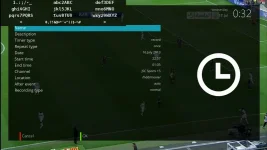
I just wonder why the keyboard is in the top left of the screen when you want to enter a timer name/description : See my screenshot.

screen_keyboard up.webp

Also another issue i had, is that it can not add a Text Marker when I edit my favorite TV list, it'is fixed to numerical format.

which you good luck and hope you can fix those two issues very soon!
 
awsome gush this skins looks like youview skins NO its better lol my box worth now 200pounds
 
Hi Sorine, thanks for the info. I will have a look at the keyboard over the weekend and sure it can be fixed. The text marker may be more difficult but i'll give it agop :eek:

Thanks Kiwiz :)
 
Hi
Still doing a debrief of the skin ! :) I've just wondered that i cannot do a service manual scan, because i canoot enter the TP frequency by the remote control.
Please Help!
BR
 
Hi Sorine, I can't replicate this. In setup >> Service Searching >> Manual Scan, all entries are editable. Is this the right place? Can you show a screenshot incase you have a different setup to me.
 
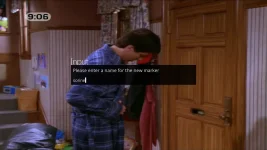
marker.webp

Is this the text marker screen? While not skinned nicely, text entry seems to work here.
 
Hi
great skin i have a couple of questions is it possible to have an indication of signal strength/quality if yes how?
In motor set up, labels for the buttons don't show up?
These things i can easily live with as the skin is very modern and fresh but using a motor it can make life easier to aid in setting up

regards
camshaft
 
Hi,

Thaks scwheeler fr your support. Can you provide me with the link to the latest version of the MetrixHD_MOD skin.

Does the 'MyMetrixMOD Configuration Plugin' supported by the OpenVIX image? if Yes, where i can found it?

BR
 
'ExtendedDescription' as vertically running text

I modified the /MyMetrix/data/default.xml All renderers of 'ExtendedDescription' was changed from "Label" to "RunningText". I enlarged the font size of ExtendedDescription too.

The content will scroll vertically only if the text length is greater than the window size.


How to apply:

- Made a backup of your actual /MyMetrix/data/default.xml (!!)
- Copy my RunningText.py to /usr/lib/enigma2/python/Components/Renderer/
- Copy my default.xml to /usr/lib/enigma2/python/Plugins/Extensions/MyMetrix/data/
- Restart Enima
- Generate MetrixHD with 'Save myMetrixHD'

I modified too (the same way) this ViX screens:

"Movie Selection With Picon"
"Graphical EPG for Vix"

Just install them and overwrite each data.xml in /skinparts/screens/active/... - then generate the skin again.

PS.
-Changes in /usr/lib/enigma2/python/Plugins/Extensions/MyMetrix/data/default.xml remain untouched after online modificatins and skin generating.
-tested on solo2
 

Attachments

For the manual scan, i've fixed it. i'ts related to the keyboard settings (I'am using Azerty). Now I Switch to Default one (USA) and it works fine.
 
Hi
great skin i have a couple of questions is it possible to have an indication of signal strength/quality if yes how?
In motor set up, labels for the buttons don't show up?
These things i can easily live with as the skin is very modern and fresh but using a motor it can make life easier to aid in setting up

regards
camshaft

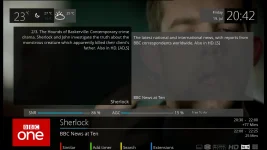
Hi Camshaft - for SNR/AGC there should be a skinpart installed by default for the second infobar, so pressing select twice should bring up this:

screenshot-4.webp

I'll have a look at the motor setup screen and see what i can do - sometimes difficult for me to check when I don't have this setup myself :)
 
For the manual scan, i've fixed it. i'ts related to the keyboard settings (I'am using Azerty). Now I Switch to Default one (USA) and it works fine.

Glad you got it fixed, sorry it doesn't work with Azerty.

Also the latest version is always in the feeds and will update automatically when the VIX image updates. You just have to remember to go into the plugin after an update and reselect save the skin to see the changes.
 
I modified the /MyMetrix/data/default.xml All renderers of 'ExtendedDescription' was changed from "Label" to "RunningText". I enlarged the font size of ExtendedDescription too.

Thanks for this ubisIst, I will have a look at this and may include in the main skin.
 
Thanks for this ubisIst, I will have a look at this and may include in the main skin.
@scwheeler
Here is the third adapted data.xml which belongs to screen "channel selection modified next event".
Same modificationas as described in post #471: ExtendedDescription will scroll vertically :)
 

Attachments

Where can i find your skin for offline installation because feeds seems to be down right now!!!
thanks
 
Where can i find your skin for offline installation because feeds seems to be down right now!!!
thanks

Feeds are not down but are in the unstable state so make sure you have allow unstable "untested" updates selected in Menu> setup> system> software update.
 
Hi. If I play a recording, it shows the correct picon. If I then go to my recording list and select another recording whilst the first one is still playing, the same picon sticks. Ie it doesn't update the picon to the channel of the second recording.
Is this a fault?
Gary
 

OpenViX Feeds Status

Back
Top