Superb quality and spec AB-Com PULSe 4K SE. Crazy offer! Only £129! FREE UK DELIVERY! 4K UHD, Enigma 2, Multiboot 4 images & more!...
Superb quality and spec AB-Com PULSe 4K Rev II Twin Satellite tuner only £179! FREE UK DELIVERY! 4K UHD, Enigma 2, SATA HDD facility, Multiboot 4 images & more!...

[ViX_Misc] Missing Program Description

ccs

ViX Beta Tester
Joined
Sep 6, 2014
Messages
5,836
Reaction score
5
Points
0
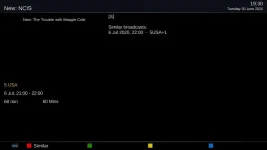
I noticed yesterday that New: NCIS, 5 USA, Freeview, 21:00-22:00 on Monday had no program description.

Next week's episode is the same, so I thought I'd mention it. Hardly earth shattering, I know. :)

My Freeview TV shows the description ok.

Another oddity.
When info has been selected for this program in Grid EPG, the left key gives info on the previous program (handy), but the right key just refreshes the 21:00-22:00 entry when selected, and another right key then moves to the next program.
EDIT: That last sentence doesn't happen anymore for some reason, I haven't yet worked out why.

(Also using latest EPG mods if that could be significant.)

Both my boxes show the same problem, I tried deleting the epg on one, but nothing changed.
 

Attachments
  • NCIS.webp
    NCIS.webp
    9 KB · Views: 12
Last edited:
This thread probably needs deleting, I've found other online guides which show the same symptoms, so it's just a data error, with fields missing.

I originally thought it might provide a clue regarding epg corruption, which happens from time to time.
 
Pinching an old thread, revised edition...

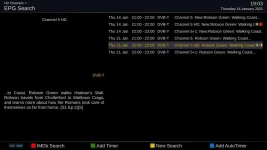
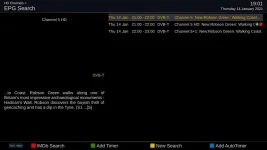
5.4.004, CH5 21:00, Robson Green,

EPG search on today's broadcast gives a different result to a search on next weeks broadcast.
The programme titles are a bit different (no New: in the 2nd), but next weeks epg search finds both broadcasts.

Autotimer doesn't find next week, which was the original issue, despite using a partial match.
 

Attachments

  • green_next_thursday.webp
    green_next_thursday.webp
    30.2 KB · Views: 5
  • green_today_thursday.webp
    green_today_thursday.webp
    22.4 KB · Views: 7
Last edited:
This thread probably needs deleting, I've found other online guides which show the same symptoms, so it's just a data error, with fields missing.

I originally thought it might provide a clue regarding epg corruption, which happens from time to time.

I'm not sure about this. I've seen the same but sometimes I can close down the grid EPG screen and the next time I go back the description data is populated.
 
I'm not sure about this. I've seen the same but sometimes I can close down the grid EPG screen and the next time I go back the description data is populated.

This particular problem went on for a number of weeks, and showed up on different guides.

Maybe I should have started a new thread, but time is running out to check my post #3.
 
Maybe the missing close bracket ")" in today's programme description is the problem?
 
This may all be obvious but AFAIK EPG Search will find any partial match so searching for "The Game" will find "New: The Game" and "The Game - 2020 retrospective", but searching for "New: The Game" will find "New: The Game" but not "The Game" or "The Game - 2020 retrospective".

The AutoTimer search is a bit weird and IMHO should really be changed, but I can't say for sure what it should be changed to. It uses a thing called SequenceMatcher
see: https://towardsdatascience.com/sequencematcher-in-python-6b1e6f3915fc
and looks for > 80% match in the titles but ignores all spaces.
I think maybe it should look for an exact match.
 
Last edited:
The AutoTimer search is a bit weird and IMHO should really be changed, but I can't say for sure what it should be changed to. It uses a thing called SequenceMatcher
see: https://towardsdatascience.com/sequencematcher-in-python-6b1e6f3915fc
and looks for > 80% match in the titles but ignores all spaces.
I think maybe it should look for an exact match.
It will search for an exact match if you ask it to do so.
If you don't ask for it then it's not reasonable to expect it to do it.

I always use case-insensitive, partial matches as that allows for broadcasters making changes (having/not having "New:" at the start...) from week to week. Adding time ranges and limiting which days to record filters out multiple matches of the same programme.
 
This may all be obvious but AFAIK EPG Search will find any partial match so searching for "The Game" will find "New: The Game" and "The Game - 2020 retrospective", but searching for "New: The Game" will find "New: The Game" but not "The Game" or "The Game - 2020 retrospective".

That's what I'm seeing, a new example:

(1) CH5 Today___ 21:00 New: Worlds Most Scenic Railway Journeys.
(1) CH5 Monday__19:00 Worlds Most Scenic Railway Journeys.

EPG search on (1) only finds programmes starting with New:
EPG search on (2) finds all programmes including those starting with New:

Autotimer is inconsistent as well.

Add autotimer on (1), any time, any day, partial match - only finds todays broadcast.
Add autotimer on (2), any time, any day, partial match - finds both broadcasts.

New: is getting in the way somehow.
 
If you ask it to search for "New: ..." then don't be surprised when it doesn't match something that doesn't contain "New".

I thought that was the reason for using a partial match.

I'm sure you've said in the past you always use partial match in autotimers to avoid this very issue?
 
The AutoTimer search is a bit weird and IMHO should really be changed, but I can't say for sure what it should be changed to. It uses a thing called SequenceMatcher
see: https://towardsdatascience.com/sequencematcher-in-python-6b1e6f3915fc
and looks for > 80% match in the titles but ignores all spaces.
I think maybe it should look for an exact match.

Actually I think this bit is wrong. I'm remembering how it compares with previous recordings if you select that option.
 
I thought that was the reason for using a partial match.

I'm sure you've said in the past you always use partial match in autotimers to avoid this very issue?

Presumably the correct way would be to edit the autotimer before saving it and remove the "New: " bit.
 
Presumably the correct way would be to edit the autotimer before saving it and remove the "New: " bit.

I guess so, but it doesn't make sense to me that a partial match fails when New: is in the title.

Dafter still, I only ever use exact match :), the example in post #3 had the wrong title for the 2nd episode, which set me off on a tangent.
 
Last edited:
I thought that was the reason for using a partial match.
A partial match means that what you search for is in, but may only be part of, what is looked at.

It does not mean that only part of what you are searching for is present.

So even in a partial match everything in your search string must be there (as a substring) but there may be more.
 
A partial match means that what you search for is in, but may only be part of, what is looked at.

It does not mean that only part of what you are searching for is present.

So even in a partial match everything in your search string must be there (as a substring) but there may be more.


Yes, I've just worked that out the hard way (by trying things out).

I always assumed that partial match meant "reasonable match", but, as you say, the string you define as partial must be somewhere within the whole title.
 
I thought that was the reason for using a partial match.

I'm sure you've said in the past you always use partial match in autotimers to avoid this very issue?
Reverse the logic. ‘New: Worlds Most Scenic Railway Journeys’ is the partial search string that you want a match in from a program with a longer (or same length) title containing all of those words in the same order.

I've always assumed that you have to edit out any unique words to use partial match.

In the two cases above I would have edited out "new:" before selecting partial match.
Possibly I would edit out everything but 'Scenic Railway'

I assume that that the PARTIAL search string is now 'scenic railway' and if that complete search string appears in the title of any other program (in the same word order) a match is indicated

In the case of 'New: Worlds Most Scenic Railway Journeys' this is the PARTIAL search sting, albeit the full title, and it doesn't match in Worlds Most Scenic Railway Journeys.
It would however partially match 'New: Worlds Most Scenic Railway Journeys, London to Southend Central'

Consider that the search is not taking each word in turn and then searching for a match for just that word. If it did any program title with the word “the” in it would possible match hundreds of other non-related programs with the word “the” somewhere in its title. It is taking the whole search sting as a single entity.

I’ve found that if I wanted all episodes of Dr Who but the BBC (and other channels that broadcast older series) will have titles such as

1) Dr Who death of the daleks
2) Dr Who rise of the cybermen
3) Dr Who
4) Doctor Who

The first 3 can be found with a partial match of “Dr Who” but would miss the 4 example
All 4 could be found with a partial match of “Who” but likely to also match many other non-related programs.
In this case I would set two autotimers, one partially match “Dr Who” and the other partially matching “Doctor Who”
 
Last edited:
I always assumed that partial match meant "reasonable match", but, as you say, the string you define as partial must be somewhere within the whole title.
I think "partial match" is, at least, rather ambiguous.

Is there help text? I can't remember.

Perhaps instead of "partial match" this option should be called something like "contains" or "includes".

A similar function in Thunderbird email/newsgroup filters calls it "contains".
Though they do present the options on screen in a order that makes it clearer what has to contain what.
 
Last edited:
I think "partial match" is, at least, rather ambiguous.

Is there help text? I can't remember.

Perhaps instead of "partial match" this option should be called something like "contains" or "includes".

A similar function in Thunderbird email/newsgroup filters calls it "contains".
Though they do present the options on screen in a order that makes it clearer what has to contain what.


I've never actually had a problem with autotimers, on the very rare occasion that they didn't work as expected, partial match sorted it out.

This may well have been by accident rather than design.

New: used to mean what it said, but now more and more repeats on different channels now claim them as "new".

And, to make it worse, channels which have spent the last 10 years broadcasting repeats, are now really showing "new" programmes.

I'm old enough to have seen everything that was ever broadcast :), so spotting repeats isn't as easy as it used to be.

Maybe New: should be treated as a configurable option (strip it off), both in autotimers and search.

I've recently discovered that epg search can be called from movielist, something I've found very useful, but now I'm not so sure (accuracy wise).
 
Last edited:

OpenViX Feeds Status

Back
Top