Superb quality and spec AB-Com PULSe 4K SE. Crazy offer! Only £129! FREE UK DELIVERY! 4K UHD, Enigma 2, Multiboot 4 images & more!...
Superb quality and spec AB-Com PULSe 4K Rev II Twin Satellite tuner only £179! FREE UK DELIVERY! 4K UHD, Enigma 2, SATA HDD facility, Multiboot 4 images & more!...

[AMKIO-VIPER-4K] missing viewing ecm time and key word on softcam info..???

giku

New member
Joined
Oct 19, 2011
Messages
12
Reaction score
0
Points
1
Age
75
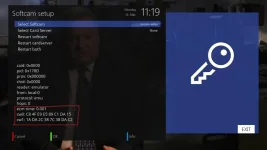
Hi,please solve this problem ... it looks like openatv.
1_0_1_A8C_2_5E_E08B00F_0_0_0_20200316111923.webp
 
If you want to see the ecm times on the card then use the web interface and you can monitor in real time
 
i want to see in the receiver (softcam info panel), not in the web interface.
 
Well, if you watching a channel and press enter (2x) you should see the ecm info) or press blue button and look at oscam info and ecm ...... or use the web interface
 
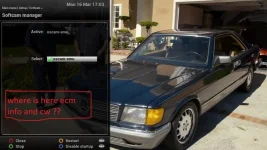
This picture is from 'openvix-5.3.019.release-viper4k_mmc' ... I did what you told me and it doesn't work.
This problem is old on openvix.
1_0_19_178E_AF6_BB_E080000_0_0_0_20200316170313.webp
 
this is the softcam menu and not oscam menu.Press 2 x enter and you should see epg and ECM info.
 
Read my first post ... you didn't understand anything ... i want to see 'key word' in softcam manager looks like openatv.
 
Read my first post ... you didn't understand anything ... i want to see 'key word' in softcam manager looks like openatv.

Then write the code, you don‘t like Vix thats your problem - the information is provided but in a different way
 
i just like vix ... that's why i opened this topic ... to solve this problem ... make cw display in softcam menu...just like openatv.
 
As far as I know, the PLI/ATV softcam manager only allows control of one softcam, so it is easy to do. Vix's one controls more than one.

It might be possible to edit the skin to show details, but it is not worth the effort. I don't think it is a good idea too as you have to select the service then go into softcam manager. Far better to see it in Second Infobar.
 

OpenViX Feeds Status

Back
Top