

P
paulsysp
Guest
Hi All
Apologies if the wrong place to post, I have searched this forum and my issue appears to have been resolved in build 021 but I think it may have been for a different video type
Eventually decided to upgrade yesterday from OpenVix Apollo build 160, on this build I have had no issues playing back virtually any type of video media such as .MKV, either by FTP the file to my Duo2 or by using Dreamplex.
Using Dreamplex I tried to play a video, the first 2 seconds I see a picture and then all of a sudden a blank screen but I have perfect sound. Thinking it was a Dreamplex issue I then FTP the same file to my Movies folder on the Duo and tried to play it back and had exactly the same result.
Can it be a codec issue? But then I think why would I only have 2 seconds of video and then only sound.
I can confirm the MKV plays perfectly fine on my PC, and I have also tested video that previously played flawlessly.
To resolve the issue I have only tried very basic steps such as removing the Dreamplex plugin and reinstalling and also restarting the box
Update - Also some but not all .mpg files also result in the above problems
Look forward to any help.
Sun
Apologies if the wrong place to post, I have searched this forum and my issue appears to have been resolved in build 021 but I think it may have been for a different video type
Eventually decided to upgrade yesterday from OpenVix Apollo build 160, on this build I have had no issues playing back virtually any type of video media such as .MKV, either by FTP the file to my Duo2 or by using Dreamplex.
Using Dreamplex I tried to play a video, the first 2 seconds I see a picture and then all of a sudden a blank screen but I have perfect sound. Thinking it was a Dreamplex issue I then FTP the same file to my Movies folder on the Duo and tried to play it back and had exactly the same result.
Can it be a codec issue? But then I think why would I only have 2 seconds of video and then only sound.
I can confirm the MKV plays perfectly fine on my PC, and I have also tested video that previously played flawlessly.
To resolve the issue I have only tried very basic steps such as removing the Dreamplex plugin and reinstalling and also restarting the box
Update - Also some but not all .mpg files also result in the above problems
Look forward to any help.
Sun
Last edited by a moderator:


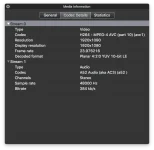
 Is it possible to get a sample? ViX uses normally to ways to find the size: 1. ask the hardware and 2. ask gstreamer.

