Superb quality and spec AB-Com PULSe 4K SE. Crazy offer! Only £99! FREE UK DELIVERY! 4K UHD, Enigma 2, Multiboot 4 images & more!...
Superb quality and spec AB-Com PULSe 4K Rev II Twin Satellite tuner only £149! FREE UK DELIVERY! 4K UHD, Enigma 2, SATA HDD facility, Multiboot 4 images & more!...

MODIFIED - ViX Night HD Skin

  • Thread starter Thread starter Etk
  • Start date Start date
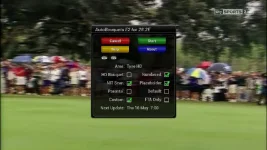
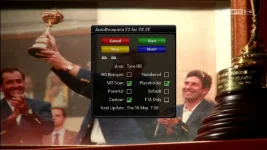
it doesn't matter whether the numbers are part of the channel name, "you are trying to split hairs." The question which got asked in a couple of threads was whether you could display the channel numbers in the info bar, and using lraizer ab you can have this feature turned on or off, depending on you're preference.

View attachment 25744


Sent from my GT-I9100 using Tapatalk 2

yes but that point is that it simply renames the channel name to include the number.
 
as I said earlier that doesn't matter. It answers the question posted by ch4ni earlier and in another thread. That you don't need skin change there is a bouquet plugin that already gives the channel number in the info bar and the vfd, exactly what he was asking. I'm not bothered how it does it, ...............It just does it.

Sent from my GT-I9100 using Tapatalk 2
 
it doesn't matter whether the numbers are part of the channel name, "you are trying to split hairs."
Nope, that's not splitting hairs: you simply don't get the point.

That's changing the channel name rather than displaying channel numbers though.
That's what I mean; renaming channels and displaying channel-numbers are two completely different things. As I said: this can be very misleading.

Maybe for someone who only uses the auto-generated bouquet it won't make much difference, but many users will have many more bouquets.
 
Maybe for someone who only uses the auto-generated bouquet it won't make much difference, but many users will have many more bouquets.

It would also make a difference to anyone trying different skins that do display this info as it would then be duplicated.
 
I completely understand that if you had multiple bouquets it may screw it up.
But that wasn't technically asked.

You can only give a possible solution to what is in fact asked.

And my answer which was given is a solution. If ch4ni decides to use it, well that is up to him.


Sent from my GT-I9100 using Tapatalk 2
 
It would also make a difference to anyone trying different skins that do display this info as it would then be duplicated.

That's why you have the option to turn the feature off, so that it is not duplicated.

Sent from my GT-I9100 using Tapatalk 2
 
That's why you have the option to turn the feature off, so that it is not duplicated.
There's no such option for the infobar.
And if it was, it would be of no use (as then no numbers at all would show if not embedded in the name).

So my message is: do it properly (i.e. modify the info bar to show real channel numbers) or do it not at all.
 
No you misunderstand this time, you have the option to turn the number off in the plugin, not the info bar.

Easiest thing.....try the plugin....experience it...then delete it, at least then you can have an accurate opinion on what it can and can't do. Instead of just trying to shoot one possible solution down in flames.
The facts are in my screen shots. One shows channel number with the feature turned on and one doesn't with it turned off.
uploadfromtaptalk1368116469754.webpuploadfromtaptalk1368116494674.webpuploadfromtaptalk1368116540960.webpuploadfromtaptalk1368116552392.webp


It has always got to be, you're way or the highway. Is it inbuilt in you or something?

Sent from my GT-I9100 using Tapatalk 2
 
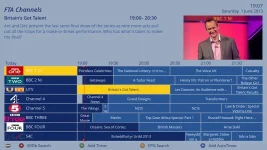
Here's my modded version of the ViX Night Skin, main changes are the EPG colours are now more like the sky ones and the font is different:


View attachment 18423

View attachment 18422


The files you need are the modded skin.xml (which goes in usr/share/enigma2/ViX_Night_HD/) and the fonts (ttf files which go in usr/share/enigma2/ViX_HD_Common/Fonts/)

Download here: View attachment 18424
Hallo,
in my box is not present the folder ViX_HD_Common/Fonts but only Vix-common and in this one there isn't n any folder "fonts".
Any suggestions?
Thanks
 
there is no download

Sent from my V972 Core4 using Tapatalk HD
 
Hallo,
I've insert your skin (not the fonts) but the box rest in booting...
Suggestions?
 
Folks,

I have updated this work so that it is compatible with Vix 3. I have created it as skin_user_{name of current skin}.xml to be saved to:

/etc/enigma2 - i.e. skin_user_ViX-Night-HD.xml

The Fonts are to be saved to following folder on Enigma 2 OpenVix 3.x Install: /usr/share/enigma2/ViX-Custom (which you need to create) or you can create your own folder, BUT you will need to MOD the attached .XML.

You must set the Graphic EPG "View Mode" option to "Text" from the menu when you are in the Graphic EPG

I have added the bouquetlist functionality also. Hope you like it!


skin_user_ViX-Night-HD.webp


View attachment skin_user_ViX-Night-HD.rar
 
Last edited:
And of course I should have said...

If you save the skin_user_{name of current skin}.xm file as skin_user_Magic-HD-Noire.xml in folder /etc/enigma2 you will get the EPG for the Magic-HD-Noire skin also, and the same for other generally compatible skins

ALSO please save the fonts folder to /usr/share/enigma2/ViX-Custom. Watch the spelling: the folder name is ViX-Custom with sub folder of fonts. Do not go by the folder name in the .rar file that was attached - it was to show the structure only. Follow the instructions, and if you wish "mod" the .xml file for your own folder structure.

Note: OpenViX will hang on start-up if the /usr/share/enigma2/ViX-Custom/fonts folder containing the actual fonts does not exist - just ftp on and fix, and restart your box if you have an issue

Thanks
 
Hi this doesn't seams to work on vix 3.0.775 it keeps crashing my box when rebooting
 
Hi
I got it working can the channel list others background from black change to blue too
 
Hi
I got it working can the channel list others background from black change to blue too

how you make It to work and prevented crash at reboot
I ask because I will try to Install on other than Vix Image
 
be good if this would work and the instructions were a little clearer..no offence to OP
 
be good if this would work and the instructions were a little clearer..no offence to OP

look at the post date, ( 07-08-12, 10:23 ), so much has changed in the ViX skin engine since then that many skins and mods are no longer compatible unless updated to accommodate for these changes.
 
look at the post date, ( 07-08-12, 10:23 ), so much has changed in the ViX skin engine since then that many skins and mods are no longer compatible unless updated to accommodate for these changes.

thanks yes i sort of figured that.I dont know a great deal about modding and skinning but sure would like a bright EPG.
never mind im sure on will come along.
 

OpenViX Feeds Status

Back
Top