Superb quality and spec AB-Com PULSe 4K SE. Crazy offer! Only £129! FREE UK DELIVERY! 4K UHD, Enigma 2, Multiboot 4 images & more!...
Superb quality and spec AB-Com PULSe 4K Rev II Twin Satellite tuner only £179! FREE UK DELIVERY! 4K UHD, Enigma 2, SATA HDD facility, Multiboot 4 images & more!...

Most of my recordings dissapeared, then reappeared

  • Thread starter Thread starter forumid1
  • Start date Start date
F

forumid1

Guest
I am using latest Vix2.3, Kernel 3.1.1 build 161.

I have an internal HDD in my DUO. I had loads of recordings on it from the past several months up until as recently as last night. Upon going to bed last night, I put the box into deep standby as usual. Today when I got up, I noticed that almost all of my recordings on /hdd/movie are gone. All apart from two episodes of the Simpsons. I restarted the box, all my recordings are now back except I cannot find the two episodes of the Simpsons. It's wierd eratic behaviour, the klinda stuff that is troubling and worrying. (No I'm not crazy, this happened :))

Also noticed this morning that the remote would not start the box. It did make the small red led in the front of the box flash but would not start. I tried jigging the batteries incase of poor connection, but eventually did a hard power off/on via the switch, upon bootup, the remote worked fine.
 
Do you have the EMC media player installed ? I ask as i have seen reports on other forums of this being a cause of HDD's and recording vanishing when used with images that contain the 3.1.1 linux kernel.
 
Do you have any other media attached other than the HDD? Such as USB stick, if so log in via FTP and see if their is a movie folder on the root of the stick if so click in and see if the simpison episode is there.
 
@phoenix, no

@Stanman, yes, I do have a usb stick in the back of the unit. I use it for epg and used to use it for swap file. I notice now it has a movie folder and the 2 episodes of the simpsons are there. So it seems that the box lost sight of my hdd and switched to usb instead. A reboot sorted that out. But christ that is worrying, why would that happen? how to prevent it in future?
 
Last edited by a moderator:
Its probably a one of mate. Make sure you go into Mountmanager

blue button>vix>mountmanger and ensure the HDD is mounted as HDD and USB as USB and not SDA1 or SDB1.

To move the recordings to your HDD, go into filelist, press yellow and navigate to your USB and than use the move button to move it to the HDD movie folder.
 
Same thing happened again today. The box is not seeing the read hdd and sio is remapping the /hdd/movie mount to the usb device. This is only happening since the recent update. Its extra worrying cos when I programme a recording, it is being recorded to usb which is not where I expect it to be going. There are consequences to this inn terms of speed and capacity.
 
Last edited by a moderator:
Did you go into mount manager and mount the HDD as HDD?
 
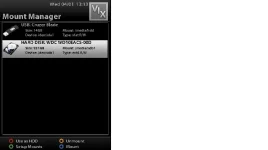
Mounts and mappings are as they always have been. HDD to HDD and USB to USB. Im guessing that at startup, the HDD disk is not being discovered in time so its unbelieveably changing mappings on the fly without telling anyone. Worrying to say the least. This screenshot taken just now
 
Mounts and mappings are as they always have been. HDD to HDD and USB to USB. Im guessing that at startup, the HDD disk is not being discovered in time so its unbelieveably changing mappings on the fly without telling anyone. Worrying to say the least. This screenshot taken just now

rather than using a external image host to upload your pictures please upload them to the forum by clicking the picture icon above the reply box.

like so

View attachment 13731
 
Mounts and mappings are as they always have been. HDD to HDD and USB to USB. Im guessing that at startup, the HDD disk is not being discovered in time so its unbelieveably changing mappings on the fly without telling anyone. Worrying to say the least. This screenshot taken just now

This may well be down to your HDD, I have an ex SKY HDD in my DUO and Seagate in an ET9K and it has never swapped them over since Andy did some coding.

I had same issue on the ET9K in the past but since above all have been fine, this is with a HDD and two usb sticks on each box.
 
I have been using the disk for the past year or so. In the early days of VIX, the box would often loose sight of it, but then after version 2, I think, it became stable as a house. It has been perfect for the past good few months since last summer I think. It's only since I ran the latest upgrade last week that this new issue has occured.

The disk is a Western Digital WD10EACS-00D. Has this disk a particularly bad reputation or something? I cannot see any evicence of this from web searches. Lets say I was to bin it, what replacement might you recommend?

EDIT:
Its happened again today. When I press the button just right of menu, I get this...
screenshot1.webp
You can see, the box has again defaulted and mapped to usb.
When I then go into mounts under the vix menu, I get this
screenshot2.webp
Here, you can see that the HDD disk is available and initialised, it's just that the mapping swapped at some point.

So I would suggest that the disk is good, but there is some shenanigans afoot with the software, what do you think?
 
Last edited by a moderator:

OpenViX Feeds Status

Back
Top