Superb quality and spec AB-Com PULSe 4K SE. Crazy offer! Only £99! FREE UK DELIVERY! 4K UHD, Enigma 2, Multiboot 4 images & more!...
Superb quality and spec AB-Com PULSe 4K Rev II Twin Satellite tuner only £149! FREE UK DELIVERY! 4K UHD, Enigma 2, SATA HDD facility, Multiboot 4 images & more!...

[SF8008] Movie list directory sort order

Is that DSM 7.0.1?

My recordings folder is on Volume 1 though :confused:

Yes, I included it the attachment.:)

As a matter of interest, what do you have Maximum NFS protocol: set to ??
 
Yes, I included it the attachment.:)

As a matter of interest, what do you have Maximum NFS protocol: set to ??

NFSv3, does it need to be 4? (bearing in mind everything works fine in ViX 5.4).

I've finally found Storage Manager and all drives are Ext4.

I also have no sub directories for my shared drives in /media/autofs/ although timer recordings are still working to my network mount okay.

This is the debug when enabling timeshift to the network:

View attachment Enigma2_debug_2021-11-19_18-05-41.log
 
I've had it set to NFSv3 for ages, but 2 days ago, after wasting hours trying to get nfs mounts to work again, I changed it to v4 and they immediately started working again.

One box stopped working a few hours later, but today they're both ok. I'd expect v3 to be the correct setting as ViX appears to be using v3, and so avoids any re-negotiating.

Answers on a postcard.....
 
I went to the file on github and switched to raw and copied and pasted the whole lot to MovieList.py

To avoid pasting I always switch to raw and right click and save page as...

How did you "pasted the whole lot to MovieList.py"?
 
To avoid pasting I always switch to raw and right click and save page as...

How did you "pasted the whole lot to MovieList.py"?

Opened MovieList.py in Notepad++ and CTRL A > DELETE then pasted the whole contents of the raw page.
Never thought of doing it your way. Will try it next time.
 
I have flashed ViX 6.0.022 with no settings backup.
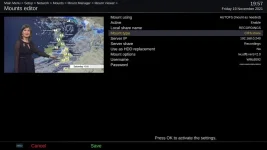
I've added one of my network shares as fstab rather than autofs and the sub-folder now appears in /media/net/ and I can access the files on it.
It still won't let me add the share as a recording or timeshift location and says that the directory is not valid. Partition must be ext of nfs.
I can however set it as the default autotimer recording location and it does record to it.
 
Debug log …… 18:06:14.5904 [Timeshift] TimeshiftPath: Current='/media/hdd/timeshift/', Default='/media/hdd/timeshift/', Choices='['/media/hdd/timeshift/', '/media/autofs/RECORDINGS/', '/media/autofs/SERIES-BACKUP/']'
 
I just ran Timeshift.py from ViX 5.4 through an online python 3 converter and that works.
It allows me to select the NAS as a timeshift location and I can see the timeshift files on the NAS. Rewinding live TV works.

Attached here:

View attachment Timeshift.py

Is it just a matter of comparing the 2 versions and seeing what is different or is it going to be totally different?
 
So why don't their NAS mounts show in "cat /proc/mounts"?
Because they aren't currently mounted.
autofs works by mounting it for you when you try to access it. It then tries to unmount it every 10 mins (default?) and doesn't worry if it fails - just means it's in use.
The object is to only have things mounted when they are in use, so as not to have too many mountpoints. The place I worked had (potentially) ~5000 automount points - you didn't (== couldn't) mount them all at the same time.
It worked OK.
 
So why don't their NAS mounts show in "cat /proc/mounts"?
The relevant thing is that "autofs" is not a valid file-system to record to, as it has no space. It just what the automount daemon controls to do actual mounting of real file-systems.
It should be "nfs" and "cifs".
 
Because they aren't currently mounted.
autofs works by mounting it for you when you try to access it. It then tries to unmount it every 10 mins (default?) and doesn't worry if it fails - just means it's in use.
The object is to only have things mounted when they are in use, so as not to have too many mountpoints. The place I worked had (potentially) ~5000 automount points - you didn't (== couldn't) mount them all at the same time.
It worked OK.

...I thought I'd got the NAS movielist open when I posted /proc/mounts earlier.

Anyway, now playing a recording....

Code:
root@vuultimo4k:~# cat /proc/mounts
rootfs / rootfs rw 0 0
/dev/root / ext4 rw,relatime,nodelalloc,data=journal 0 0
devtmpfs /dev devtmpfs rw,relatime,size=799672k,nr_inodes=85983,mode=755 0 0
proc /proc proc rw,relatime 0 0
sysfs /sys sysfs rw,relatime 0 0
debugfs /sys/kernel/debug debugfs rw,relatime 0 0
tmpfs /media tmpfs rw,relatime,size=64k 0 0
tmpfs /var/volatile tmpfs rw,relatime 0 0
/dev/sda1 /media/hdd ext4 rw,relatime,data=ordered 0 0
devpts /dev/pts devpts rw,relatime,gid=5,mode=620 0 0
fusectl /sys/fs/fuse/connections fusectl rw,relatime 0 0
nfsd /proc/fs/nfsd nfsd rw,relatime 0 0
/etc/auto.network /media/autofs autofs rw,relatime,fd=6,pgrp=1674,timeout=5,minproto=5,maxproto=5,indirect 0 0
[COLOR="#0000CD"]192.168.1.115:/volume1/ET10000 /media/autofs/SYNOLOGY nfs rw,relatime,vers=3,rsize=8192,wsize=8192,namlen=255,soft,nolock,proto=tcp,timeo=14,retrans=2,sec=sys,mountaddr=192.168.1.115,mountvers=3,mountproto=tcp,local_lock=all,addr=192.168.1.115 0 0[/COLOR]
root@vuultimo4k:~#
 
Last edited:
Actually this may be an issue depending on how the Synology is setup e.g. ext4 or btrfs file system. The latter doesn‘t support hardlinks which are needed by Timeshift. I guess its fine for Recording but ???
btrfs supports hardlinks.

[gmllaptop]: cd gml4410/
/media/gml4410/LocalBackup/gml4410
[gmllaptop]: touch FILE
[gmllaptop]: ln FILE LINK
[gmllaptop]: ls -l FILE LINK
-rw-r--r-- 2 gml4410 ukgcs 0 Nov 19 19:53 FILE
-rw-r--r-- 2 gml4410 ukgcs 0 Nov 19 19:53 LINK
[gmllaptop]: df -T /media/gml4410/LocalBackup/
Filesystem Type 1K-blocks Used Available Use% Mounted on
/dev/nvme0n1p12 btrfs 83007488 26018496 56695056 32% /media/gml4410/LocalBack
up
 
I'm certain that everything is Ext4. Trouble is there is no Storage Manager in the latest firmware and I cant find out where it would tell me.
Can you login to a command line there?
If so, type:
Code:
 df -T
 
I also have no sub directories for my shared drives in /media/autofs/ although timer recordings are still working to my network mount okay.
Unless you have ghosting configured they only appear as required (and disappear when not).
 
I've had it set to NFSv3 for ages, but 2 days ago, after wasting hours trying to get nfs mounts to work again, I changed it to v4 and they immediately started working again.
nfsv4 added id mapping between domains. Not really needed in this set-up.
 
I just ran Timeshift.py from ViX 5.4 through an online python 3 converter and that works.
....
Is it just a matter of comparing the 2 versions and seeing what is different or is it going to be totally different?
v6 does a file-system type check.
But if the location isn't isn't yet mounted (because it will be automounted) it might show up as an invalid filesystem?
 

OpenViX Feeds Status

Back
Top