Superb quality and spec AB-Com PULSe 4K SE. Crazy offer! Only £99! FREE UK DELIVERY! 4K UHD, Enigma 2, Multiboot 4 images & more!...
Superb quality and spec AB-Com PULSe 4K Rev II Twin Satellite tuner only £149! FREE UK DELIVERY! 4K UHD, Enigma 2, SATA HDD facility, Multiboot 4 images & more!...

[SF8008] Movie list directory sort order

I can now use the NAS share for timeshift and recordings and both confirmed working.
Is this with "unix_extensions" enabled or not. Please check timeshift actually works with no error messages in timeshift or permanent timeshift.
 
I haven't changed anything in smb-user.conf unless you want me to try it.

Timeshift and recordings are working fine to my NAS now and I have confirmed that both work okay.

This is by adding the cifs option to Timeshift.py and Recordings.py.

Will this be updated in the ViX image or will I need to include the files in my backup settings? I appreciate that very few people record to a NAS.
 
Unix extensions are off by default, the line unix extensions = Yes would need adding to /etc/samba/smb-user.conf.
This is something you'd need to do on the server, as well as the Vix box.

But it is on by default...

unix extensions (G)

This boolean parameter controls whether Samba implements the CIFS UNIX extensions, as defined by HP. These extensions enable Samba to better serve UNIX CIFS clients by supporting features such as symbolic links, hard links, etc... These extensions require a similarly enabled client, and are of no current use to Windows clients.
Note if this parameter is turned on, the wide links parameter will automatically be disabled.
See the parameter allow insecure wide links if you wish to change this coupling between the two parameters.
Default: unix extensions = yes
 
Last edited:
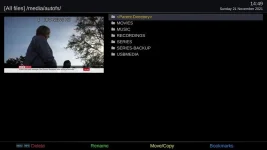
Does it only show when it's in use? It only appears in /media/autofs/ when I'm actually using it.
That's correct.
The whole point about automount is that it mounts on request. And unmounts when no longer in use.
 
This is something you'd need to do on the server, as well as the Vix box.

But it is on by default...

unix extensions (G)

This boolean parameter controls whether Samba implements the CIFS UNIX extensions, as defined by HP. These extensions enable Samba to better serve UNIX CIFS clients by supporting features such as symbolic links, hard links, etc... These extensions require a similarly enabled client, and are of no current use to Windows clients.
Note if this parameter is turned on, the wide links parameter will automatically be disabled.
See the parameter allow insecure wide links if you wish to change this coupling between the two parameters.
Default: unix extensions = yes
No, it's off by default on ViX, and my Synology Nas makes no reference to it, one way or the other in its configs or gui, so maybe it is on.

ViX default...
Code:
root@vuultimo4k:/etc/samba/distro# ls -l smb-global.conf
-rw-r--r--    1 root     root          1516 Nov  9 20:37 smb-global.conf
root@vuultimo4k:/etc/samba/distro#

Code:
[COLOR="#0000CD"]root@vuultimo4k:/etc/samba/distro# cat smb-global.conf[/COLOR]
[global]
        # CVE-1999-0519 and CVE-2000-1200
        access based share enum = yes
        restrict anonymous = 2

        disable netbios = Yes
        min protocol = SMB2_02
        smb ports = 445
        ntlm auth = yes

        workgroup = WORKGROUP
        security = USER
        guest account = nobody
        map to guest = Bad User
        username map = /etc/samba/private/users.map
        min receivefile size = 16384
        use sendfile = Yes
        aio read size = 16384
        aio write behind = true
        aio write size = 16384
        smb passwd file = /etc/samba/private/smbpasswd
        passdb backend = smbpasswd
        idmap config * : backend = tdb
        obey pam restrictions = Yes
        max stat cache size = 64
        unix password sync = Yes
        pam password change = Yes
        server multi channel support = Yes
        passwd program = /usr/bin/passwd %u
        passwd chat = *Enter\snew\s*\spassword:* %n\n *Retype\snew\s*\spassword:* %n\n *password\supdated\ssuccessfully* .

        # Disable printer support for now
        disable spoolss = Yes
        load printers = No
        printcap name = /dev/null

        [COLOR="#FF0000"]unix extensions = No[/COLOR]
        [COLOR="#FF0000"]allow insecure wide links = Yes[/COLOR]

        strict locking = no
        oplocks = yes
        kernel oplocks = yes

        include = /etc/samba/distro/smb-branding.conf
        include = /etc/samba/distro/smb-shares.conf
        include = /etc/samba/distro/smb-vmc.conf

        include = /etc/samba/smb-user.conf
root@vuultimo4k:/etc/samba/distro#
 
Last edited:
That's correct.
The whole point about automount is that it mounts on request. And unmounts when no longer in use.

Mine doesn't show when I change the location in movielist to the NAS. I see a listing, but it only shows in/proc/mounts when I start playing a recording.

EDIT: It shows for a second or so after a reboot and then disappears, so that probably sets up /media/autofs/SYNOLOGY, the movielist.
 
Last edited:
No, it's off by default on ViX,...
Perhaps that should be changed, given that it is needed?
Or, if it's felt that the default needs to be off (why?), there should be a menu item to toggle it.
 
Perhaps that should be changed, given that it is needed?
Or, if it's felt that the default needs to be off (why?), there should be a menu item to toggle it.

It's (unix extensions) been set to off for at least 4 years, maybe @Willo3092 can try it out? I'm setup differently (nfs) so can't oblige.
 
Last edited:
What do you need me to do?

Start at post #114.

Maybe add two lines rather than just the one mentioned earlier...

Code:
        unix extensions = Yes
        allow insecure wide links = No
 
Okay added both lines to the global section of smb-user.conf

Now all shares appear in /media/autofs/ using autofs CIFS

Is that what we're trying to achieve?

1_0_19_22D9_80D_2_11A0000_0_0_0_20211121144936.webp
 
Last edited:

OpenViX Feeds Status

Back
Top