Superb quality and spec AB-Com PULSe 4K SE. Crazy offer! Only £99! FREE UK DELIVERY! 4K UHD, Enigma 2, Multiboot 4 images & more!...
Superb quality and spec AB-Com PULSe 4K Rev II Twin Satellite tuner only £149! FREE UK DELIVERY! 4K UHD, Enigma 2, SATA HDD facility, Multiboot 4 images & more!...

[VU+ Duo2] mp4 playing as lusicfile

did that and seems to work but still playing on vu duo2 as musicfile and no image.

!!!! just tried something else : opened file (original and changed) trough ethernet connection on my octagon SF8008 and there the files are correctly playing as video.So must be something why vu duo2 playes as musicfile.

SF8008 is still on 6.0.2.11 so maybe something changed in 6.3
 
Last edited:
supp remark as i try other things : my second vu duo2 is also on 6.0.2.11 but also playing as musicfile there.Strange that both vu duo2 have the problem and octagon not. Must be something in differant setting maybe.

Checked new file in player on my PC and stream0 is now video , so allright but still playing on duo2 as audio
 
Last edited:
supp remark as i try other things : my second vu duo2 is also on 6.0.2.11 but also playing as musicfile there.Strange that both vu duo2 have the problem and octagon not. Must be something in differant setting maybe.

Checked new file in player on my PC and stream0 is now video , so allright but still playing on duo2 as audio
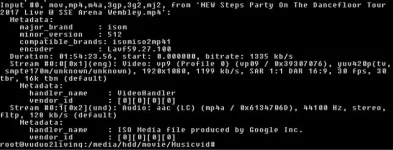
Try this command (part of ffmpeg) to find out audio & video components - looks like sf8008 has a codec not on the duo
ffprobe a.mp4
or run mediainfo
 
Last edited:
gave command and :

newsteps.webp
 
Last edited:
just uploaded bigger image as you answered
 
just tested with old technomate nano on vix 5.1.032 and also music only there. Strange fenomena
 
ffmpeg -i input.mp4 -map 0:1 -map 0:0 -c copy out.mp4 gives input.mp4: no such file or directory


when I give : ffmpeg -i "Steps Party On The Dancefloor Tour 2017 Live @ SSE Arena Wembley.mp4" -map 0:1 -map 0:0 -c copy "Steps Party On The Dancefloor Tour 2017 Live @ SSE Arena Wembley.mp4" in directory where file is I get :

output same as input : exiting
ffmpeg cannot edit existing files in-place.
Which sounds eminently reasonable.
So, make the output file something else (output.mp4) then overwrite the original with this when done.

Code:
ffmpeg -i "Steps Party On The Dancefloor Tour 2017 Live @ SSE Arena Wembley.mp4" -map 0:1 -map 0:0 -c copy output.mp4
mv output.mp4 "Steps Party On The Dancefloor Tour 2017 Live @ SSE Arena Wembley.mp4"

By the way (in case you don't know) you don't need to type all of the long file names. If you start typing, then press the <tab> key, bash will complete it for you, or at least fill in as much as it can before there is another choice - so you just type a bit more, press <tab> etc. until done.
<tab><tab> will display the choices.
 
download with youtube premium and settings tp convert to original mp4 does the trick. Strange because original file was in 1920 and converted also. Original playing on 4K box so that must be the differance maybe in not showing right format
 
It's not the resolution - 1920x1080, but more probably the video encoding format used in the youtube file. The codec may not be available on the older boxes and the video only shows when you re-encode the file.
 

OpenViX Feeds Status

Back
Top