Superb quality and spec AB-Com PULSe 4K SE. Crazy offer! Only £99! FREE UK DELIVERY! 4K UHD, Enigma 2, Multiboot 4 images & more!...
Superb quality and spec AB-Com PULSe 4K Rev II Twin Satellite tuner only £149! FREE UK DELIVERY! 4K UHD, Enigma 2, SATA HDD facility, Multiboot 4 images & more!...

[SF8008] mp4 video not displaying

Chrisbee1961

New member
Joined
Jun 15, 2025
Messages
9
Reaction score
0
Points
1
What type of support thread are you creating?
Support question
What OpenViX Image build number are you using?
6.7.017
Have you tried re-flashing WITHOUT settings restore?
NO
Have you tried re-flashing WITH a settings restore?
NO
I have many videos on my NAS. Some of them are recorded at 25 frames /second, others at 50 frames / second. When I try to play a 25 frames / second video, I get a black screen although I can hear the audio output. The length of the video is displayed incorrectly while playing.

I don't see any setting to resolve this issue.

I have downloaded the latest OpenVIX update to see whether this resolves the issue, but it hasn't.
 
so what are the settings in Menu/Setup/Audio & Video ?? (Video Output/Mode/Refresh rate ??)
 
It was set to 50Hz. I have set it to Auto (50Hz/60Hz/24Hz) but made no difference.
 
Encoding is also important. >FHD in h264 can only my VU+ Duo4K and perhaps boxes with HiSilicon can display it.

Ralf
 
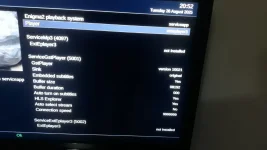
I've installed ServiceApp but when I come to select ExtEplayer3 it is showing the service "Not Installed". I have removed the plugin and reinstalled it and still get the same. I can see the plugin in the list.
 

Attachments

  • ExtEPlayer3.webp
    ExtEPlayer3.webp
    45.5 KB · Views: 3
I've installed ServiceApp but when I come to select ExtEplayer3 it is showing the service "Not Installed". I have removed the plugin and reinstalled it and still get the same. I can see the plugin in the list.
Terminal
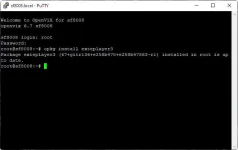
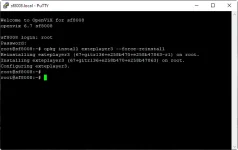
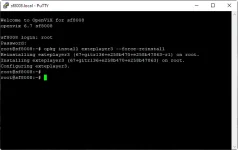
opkg install exteplayer3
 
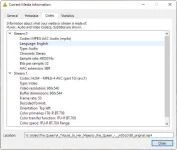
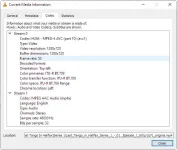
OK. more of an update. It is not the frame rate that is causing this. It is because the Codec stream has been swapped during recording. Videos that play OK have the video in Stream 0. Those that don't have the video in Stream 1
 

Attachments

  • Plays Not OK.webp
    Plays Not OK.webp
    35.3 KB · Views: 4
  • Plays OK.webp
    Plays OK.webp
    35.3 KB · Views: 4
opkg install exteplayer3 --force-reinstall

Thank you.

I tried this. It reports that exteplayer3 has been reinstalled, but it is sill showing "Not Installed" in ServiceApp

1756279593105.webp

What I have noticed is that there is a folder for the gstplayer under /usr/bin dated yesterday when I reinstalled it, but nothing for the exteplayer3 under the same folder. Not sure if this is normal ?

1756279593113.webp
 

Attachments

  • 1756279297536.webp
    1756279297536.webp
    17.2 KB · Views: 1
Videos that play OK have the video in Stream 0. Those that don't have the video in Stream 1 : happens with downloads from youtube offen.
 
Videos that play OK have the video in Stream 0. Those that don't have the video in Stream 1 : happens with downloads from youtube offen.
Yes, I think that is the case here. I am re-encoding the faulty files with Handbrake. Once done, they then play OK.

Thank you.
 
It seems that OpenVix built the image when there were problems with libbluray and ffmpeg.
That's why exteplayer3 doesn't work.
It was the same with OpenAtv. It looks like you have to wait for the next update of the OpenVix image,
yqF3sVc.png
 
It seems that OpenVix built the image when there were problems with libbluray and ffmpeg.
That's why exteplayer3 doesn't work.
It was the same with OpenAtv. It looks like you have to wait for the next update of the OpenVix image,
yqF3sVc.png
I thought it must be something like that.

Thanks for the update
 
I have run the script and exteplayer3 now installs. When playing the mp4 files with the swapped stream on exteplayer3, they now play OK.

Thanks to everyone for helping out with this issue (y)
 

OpenViX Feeds Status

Back
Top