Superb quality and spec AB-Com PULSe 4K SE. Crazy offer! Only £99! FREE UK DELIVERY! 4K UHD, Enigma 2, Multiboot 4 images & more!...
Superb quality and spec AB-Com PULSe 4K Rev II Twin Satellite tuner only £149! FREE UK DELIVERY! 4K UHD, Enigma 2, SATA HDD facility, Multiboot 4 images & more!...

My luck neever changes ......... HELP !

The ports are actually separate.

You are not getting anything from Unicable ouput when tuner is correctly configured
You are not getting anything output from universal output when tuner is correctly configured. I presume you have checked the F-plugs are still connected correctly. And that you are not mixing up the wires?

You said you cannot reach the other sky LNB. Are you able to test your box at another location (not with a wideband LNB for Sky Q)?
 
I switched cables around to make siure i had the correct one and nother from anything

I have just tried the wideband LNB (New one) on my sansung TV thorugh the sat ports on there and nothing works on that - assume Samsung TV not wideband compatible.

I cant reach the other dish it was to far up so I cant mess with that one.

I will refit the old LNB (Sky one but a 4 port legacy one). Works fibe with old LNB so assume cabling is ok.

Dave.
 
If old universal LNB on reachable dish (where the unicable one is/was) works with both cables, then safe to say unicable LNB is faulty.

The only devices that will work with wideband LNBs are the SkyQ boxes and Arris Freesat boxes. There are unicable switches that are compatible with wideband lnbs.
 
Yeh it has to be the LNB right ??

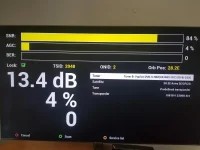
Re Fitted the old LNB , Shocking AGC but its working fine and picture is good and stable :-

20230503_152153.webp

I am tempted to get a sat engineer to go up on the peek of my roof and change the Wideband LNB with the unicable one (When i have it repleced !) Its a better signal as we have huge tree's out back.

Thanks for all your help all,

Dave.
 
Sent old one back , Ordered a new one. World of satalite still not got none sadly.

Dave.
 
Yeh it has to be the LNB right ??

Re Fitted the old LNB , Shocking AGC but its working fine and picture is good and stable :-

View attachment 65331

I am tempted to get a sat engineer to go up on the peek of my roof and change the Wideband LNB with the unicable one (When i have it repleced !) Its a better signal as we have huge tree's out back.

Thanks for all your help all,

Dave.

That's not necessarily a shocking AGC

AGC = Automatic Gain Control

In General
High signal input = low AGC value
Low signal input = high AGC value

Also check multiple transponders.

Huge trees out the back may not be a problem

Go to www.dishpointer.com
1) In one of the boxes select the satellite which is "28.2E Astra E, Astra F, Astra G"
2) Put your postcode in the other box and press GO
3) You will get a map of your location which has an option to change to an aerial photo. You can zoom into your house.
4) On the map/photo you get a green line pointing to the satellite. Click on the green blob at the end of the green line and drag it to the location where your dish is positioned
5) In the corner of the map/photo there should be a options tick box "Show obstacles line of sight checker"
6) This will put a red blob on the line which you can click on to move. This will show the height of the signal for which to get a for clear signal. Are the trees lower than this value?
 
Last edited:
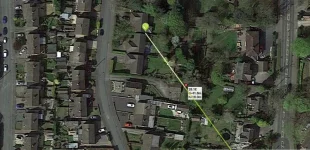
Brill thanks !!! Here is the image :-

myhouse.webp

Nice to know the AGC not shcoking as well. In all honesty whe they woman from sky said the signal was not good enough for sky so she put a new one on the peak of the roof , I didnt think it would make much differecne. I know there are trees and they are high but had no issues in the 8 years I been here.

Dave.

P.S If i can just stop the damn box from freezing I should be ok ! Help Needed :- https://www.world-of-satellite.com/showthread.php?66039-System-freeze-!/page2
 
Brill thanks !!! Here is the image :-

View attachment 65338

Nice to know the AGC not shcoking as well. In all honesty whe they woman from sky said the signal was not good enough for sky so she put a new one on the peak of the roof , I didnt think it would make much differecne. I know there are trees and they are high but had no issues in the 8 years I been here.

The red blob height is actually referenced to the bottom of your dish. If your dish is mounted 6 metres high then the red blob height shown in your photo is 6m + 18m from the ground
 
So the saga continues ............

I decided to get a satalite engineer out to do this as I am realy not well enought to be going up ladders and damn near killed me last time !!!

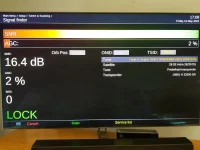
New LNB turned up and the guy came today to fit. He fitted the LNB and I said we would try the LEGACY first , He did use his meter and move the dish slightly but unlike before I got a signal on the legacy and programs workded !!!! Image below :-
20230512_170830.webp

I was excited now. Then he plugged the cable into the CSS bit and nothing at all again, we tried both cables and configured the same as to test everything and nothing. I tried to tune as well and zip :-(. The guy mention that the LNB was tuned to German and Italian the same as I mention above and said technically is should not work. I had said other had the same one and had no issues and the instructions says use (0975) for band 1 and I did. I am totally confused and frustrated to as why this does not work. I have left the LNB up and connected the 2 ports to the legacy for now. I did not take any pictutres of the signal tester screen when i has the CSS connected but I did take an image of the tuning screen that confused me even more. I had selected 28.2 (as above image, same as before) and the system keeps saying its 30.5 E Arabsat - What in gods name is this ?? The settings had 28 set so where is that even coming from ??? See image :-
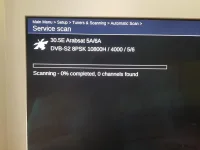
20230512_162117.webp

Ands then when I tried to change it back to simple after connecting the LEGACY again i get this :-
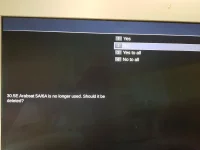
20230512_162354.webp

Select yes and it all works fine again through the Legacy.

I am litrelly in tears at the minute , I have been to the hardware store to get some rope !!!!

The only thing I notice is that on Willo's screen shot the make was different :-
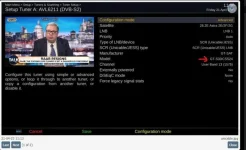
Screenshot 2023-05-12 173138.webp

And I am using ' DLNB Hello ' as per instructions - Will this make a differene ???

Any ideas what to do next ??? (Not with the rope with the LNb ! lol)

Dave.

P.S Cost me £45 for the satalite guy as well.......
 
Last edited:
You have messed up the tuner configuration. The factory reset has options to reset tuner settings, you can experiment with it. Aternatively, flash your image again, do not restore settings after it reboots. Download/Save the page with the tuner config advice just in case you have internet access issues.

Please transfer the file called "settings" located in /etc/enigma2 to your PC. Zip and upload it here. I am sure it has errors.
 
Is this LNB on a motorised dish?

My thoughts also. But I see on the settings screen some posts back that the setting are "Advanced", rather than "Simple". Do Unicable LNBs require "Advanced"? The OP selected "Automatic Scan" rather than "Single Satellite" in the first screenshot in post #29, so the system is presumably searching through multiple satellites.


EDIT - I thought the engineer was working on the roof dish? The dish in the photo in post #31 is on a gable wall. I'm confused:confused:
 
Last edited:
Unicable LNBs need to be in advanced. The tricky thing with advanced one is that you can configure an LNB incorrectly, change to a different satellite and configure it correctly. The incorrect one will still be there although not in plain sight. I suspect this is what has happened, he has set 30E by mistake.

Manual scan is more controlled than automatic scan.
 
Yeh call 999 !! lol , I am not hanging just yet.

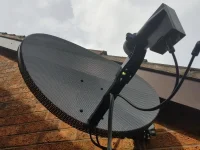
" EDIT - I thought the engineer was working on the roof dish? The dish in the photo in post #31 is on a gable wall. I'm confused " - Yes he wanted another £40 as the higher one would need to be removed to fit the LNB as it was too high. I will get a pick of that one.

Give me a minute I will get the settings.

" he has set 30E by mistake. " I did check this a few times and was always on 28.2 when i went back into settings.

Dave.

P.S I need to go up myself and plug cable into lnb so may be tomorrow.
 
Last edited:
I see you have several wires there, if they all come to same place, connect them up too so you don't have to keep going up/down.
 
You have this for tuner A, so box has been told there is a 30.5e LNB there too.

config.Nims.0.advanced.sat.305.lnb=1

Once you reconnect wire, go back in tuner A, where it says 28.2, scroll till it says 30.5. Disable 30.5, save. Go back to 28.2, save again. That will get rid of it.
 
Ye sadly the other 2 go into the conservatory , The nice sky lady cut the other 2 that used to go in there !!!! Didnt realise else I would have told her to leave them.

Let me know if you think i need to flash the image again.

Dave.
 

OpenViX Feeds Status

Back
Top