Superb quality and spec AB-Com PULSe 4K SE. Crazy offer! Only £99! FREE UK DELIVERY! 4K UHD, Enigma 2, Multiboot 4 images & more!...
Superb quality and spec AB-Com PULSe 4K Rev II Twin Satellite tuner only £149! FREE UK DELIVERY! 4K UHD, Enigma 2, SATA HDD facility, Multiboot 4 images & more!...

My luck neever changes ......... HELP !

Brill leave it with me and I will give it a crack tomorrow.

Dave.

Rope back it its box untill then. I did search for "How to tie a noose" and first in the list is samaritins number !! Should not joke to be fair I have lost a few people with suicide and mental health is a realy big thing and should be.
 
Yes, indeed.

If the wires leading to the conservatory that were cut can be extended, it might be worth your while connecting the other two cables while you are up the ladder.
 
Brill leave it with me and I will give it a crack tomorrow.

Dave.

Rope back it its box untill then. I did search for "How to tie a noose" and first in the list is samaritins number !! Should not joke to be fair I have lost a few people with suicide and mental health is a realy big thing and should be.

Yep, maybe not. Lost my wedding groomsman from 46 years ago to suicide last year.
 
Sorry to hear that mate , I lost a friend when he was just 18. All over a woman as well , Should never have happened.

Dave.
 
Once you reconnect wire, go back in tuner A, where it says 28.2, scroll till it says 30.5. Disable 30.5, save. Go back to 28.2, save again. That will get rid of it.
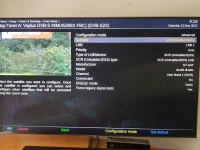
Where is disable ?? Not plugged cable in yet ( Will get ladders in an hour ) but just gone in , selected advance , scrolled to 30.5 Arabsat 5A/6A but cant see disbale ??? I cant see it

20230513_091949.webp

Can i just delete the line ' config.Nims.0.advanced.sat.305.lnb=1 ' from the config and upload it ??

Dave.
 
Last edited:
Keep the second line on 30.5. On the third line, where it says LNB1, press left till it says "not configured". Make sure you save the changes by pressing green when you finish.

If you want to manually edit the file called settings, you can do so. But enigma2 must be stopped by issuing an "init 4" command first with putty/terminal or similar. Then edit file, save, ensure transfer completes. Restart with an "init 3" command.

If you want to take clearer screenshots, see following thread:
https://www.world-of-satellite.com/showthread.php?44054-How-to-take-screen-shots-How-to-attach-files
 
Gotcha , done that now. It may be tomoz as the wife is forcing me to go shopping now so gowd nows when I will be back !

Dave.
 
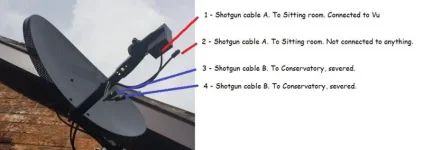
Just to query your cabling, is the following correct?

1 - Shotgun cable A. To Sitting room. Connected to Vu
2 - Shotgun cable A. To Sitting room. Not connected.
3 - Shotgun cable B. To Conservatory, severed.
4 - Shotgun cable B. To Conservatory, severed.
 

Attachments

  • realdanny_dish.webp
    realdanny_dish.webp
    24.8 KB · Views: 12
Sort of there is actually 6 cables they are :-

1) Cable A to living room (Currently connected to legacy on the new LNB & connected to VU+)
2) Cable A To living room (Currently connected to legacy on the new LNB & connected to VU+)
3) Cable B to conservatory (Not cut just connected)
4) Cable B to conservatory (Not cut just connected)
5) Cable C Another cable to living room - Servered (You cant see it in pictures its tied at the top out od the way, Cut before hole in the wall.)
6) Cable C Another cable to living room - Servered (You cant see it in pictures its tied at the top out od the way, Cut before hole in the wall.)

If they had not cut the other 2 - Cable C's (Unsure why they did, If i had seen her about to do it I would have stopped her !) then I would have used 1 for CSS and the other 2 for Legacy. Typical !

Oh there is another 2 connected to the other dish that has the Wideband LNB thats useless ! (Way to high for me to get too - WIll get pics)

WAY TO HIGH ! (I shat myself doing to the other !)

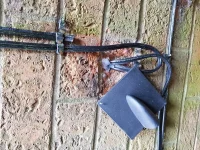
20230513_130443.webp

The Cut & Yes she left the gaurd like that , cracking job ??? :-

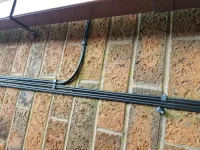
20230513_130459.webp

The split that goes to conservatory :-

20230513_130502.webp

Cheers ,

Dave.

Unsure why images have been rotated ?
 
Last edited:
Thanks for the pictures. There is a bit of disparity between your pictures and description. Your LNB has three outputs, you have stated that four wires are connected.

I will just repeat my golden rule of tuner configuration:
Tuner configuration for each tuner must match what is hooked up to it.
 
1) Cable A to living room (Currently connected to legacy on the new LNB & connected to VU+)
2) Cable A To living room (Currently connected to legacy on the new LNB & connected to VU+)
3) Cable B to conservatory (Not cut just connected) **** NOT CONNECTED *****
4) Cable B to conservatory (Not cut just connected) **** NOT CONNECTED *****
5) Cable C Another cable to living room - Servered (You cant see it in pictures its tied at the top out od the way, Cut before hole in the wall.) **** NOT CONNECTED *****
6) Cable C Another cable to living room - Servered (You cant see it in pictures its tied at the top out od the way, Cut before hole in the wall.) **** NOT CONNECTED *****

Yes 3 outputs on LNB but only A (1 & 2) is connected and connected to legacy until i go up and move one to CSS.

The picture was an old picture I originalg took to show the dish the LNB had not been fitted when that was took !! sorry for confusion.

Going up soon.
Dave.
 
Ok been up , Connected one of the cables to CSS connected (The cotrect one) toTuner A on Vu+. So there is only one cable connected to tuner A the other is not connected.

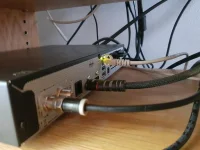
Rear of VU+ - I assume this is tuner A ?

20230513_163832.webp

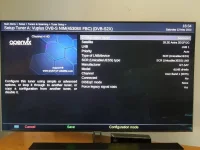
Settings :-

20230513_163419.webp

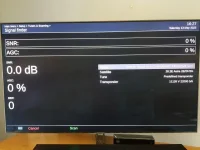
Signal Tester :-

20230513_162750.webp

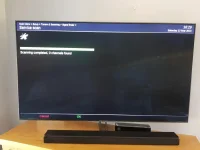
And a service scan (This took seconds to compete ??)

20230513_162928.webp

Still nothing !

EDIT :-

1) I have also changed the Model to GT-S2dCSS24 from the DLNB-Hello one just incase.
2) I confirmed that I am using the correct tuner (A)

I have a spare VU+ solo2 Does this have the ability to for CSS ?? If so I can plug that in and flash it with latest and try on there save cocking all my channels and settings up (Incase its not that)

Dave.

I have a small tree in the front garden .......

man-tied-with-rope-kill-me-2sul4zoc2basito4.webp
 
Last edited:
Your pictures does not reflect what you have said. Can you please state the current physical setup. Can you then state the current tuner setup (all 8) or attach the output of:
cat /etc/enigma2/settings | grep config.Nims > /tmp/mytunerconfig.txt ( a text file will be created in /tmp/ directory)

Please refrain from mentioning anything of the past, we need to talk about the current setup. Also, you mentioned that you had reception issues where the lower dish is. Surely it makes sense to scan the whole satellite and not just one transponder? Let me know if you want me to teamviewer across.

All Enigma2 receivers support unicable
 
Last edited:
Ok let me start a fresh so no confusion.

I have a sky dish with a Unicable LNB fitted and aligned by an engineer.

I have 2 Cable coming into the living room where the box VU+ Is.

I have connected one end of the cable to the DCSS on the LNB and the other to the VU+ box. The other cable is disocnnected, So just one is plugged into VU+.

So just to be clear there is one cable plugged into the LNB that goes into the VU+ box.

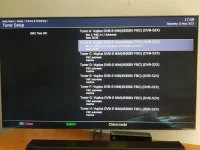
I have for now just configured Tuner A & B as follows.

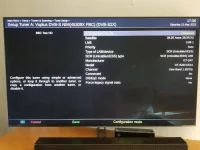
Tuner A :-

20230513_175622.webp

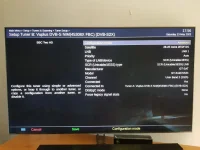
Tuner B :-

20230513_175629.webp

All the rest I have left Inactive. As you can see there is no preview at all as its not working. I can try the signal tester and also shows nothing.

20230513_175948.webp

If i change the cable to legacy on LNB and plug into tuner A it works fine, Signal test is 100%.

Hope this explains well enough.

Dave.
 
Last edited:
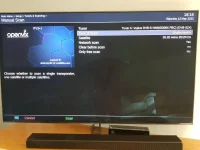
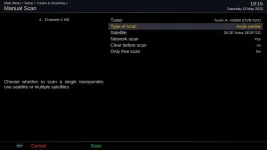
Do not use signal finder, use manual scan instead. In Manual scan, select single satellite, then scan.

Information, do not take action:
At dish end, I would have hooked up one cable to Unicable output and one cable to universal output. This would allow me option to swap cables and use different part of LNB while testing without having to go up/down the ladder.
 
This is a picture of manual scan. Please ensure that you select single satellite.
 

Attachments

  • manual scan single 28.2.webp
    manual scan single 28.2.webp
    14.7 KB · Views: 11
" At dish end, I would have hooked up one cable to Unicable output and one cable to universal output " - I have I just didnt want to complicate things.
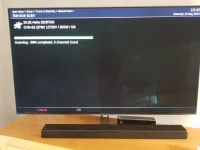
Ok Gone to manual scan here :-

20230513_181604.webp

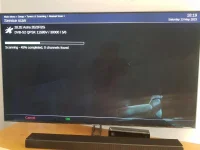
Scan taking a while - No channels found :-

20230513_181952.webp

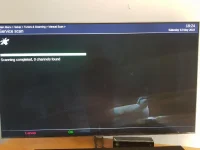
And scan finsihed with nothing found :-

20230513_182416.webp

Dave.
 
" At dish end, I would have hooked up one cable to Unicable output and one cable to universal output " - I have I just didnt want to complicate things.

Put receiver into deep standby and then swap the cables over at the beck of the receiver. You may have mixed up the cables. Do not touch tuner configuration. Then repeat the manual scan.
 

OpenViX Feeds Status

Back
Top