Superb quality and spec AB-Com PULSe 4K SE. Crazy offer! Only £129! FREE UK DELIVERY! 4K UHD, Enigma 2, Multiboot 4 images & more!...
Superb quality and spec AB-Com PULSe 4K Rev II Twin Satellite tuner only £179! FREE UK DELIVERY! 4K UHD, Enigma 2, SATA HDD facility, Multiboot 4 images & more!...

My VixBMC_1080 skin modification

thecaretaker

Forum Supporter
Donated Member
Joined
Apr 22, 2012
Messages
327
Reaction score
4
Points
18
Location
Southern UK
Website
www.thecaretakers.co.uk
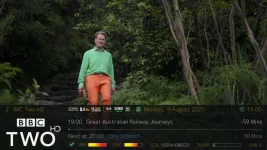
Thought I'd share the small modifications I've made to the VixBMC_1080 skin. The infobar show all tuners A up to H (red if in use) on my Ultimo4K and shows signal & screen resolution (See screenshot below).

I don't confess to be any programmer, but it works for me and thought others who use this great skin might find it useful.

Back up the original files (or rename them) and replace them with the 2 attachments.
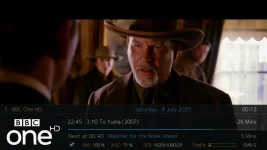
1_0_19_1B31_802_2_11A0000_0_0_0_20200704001400.webp

View attachment skin.xml
View attachment skin_ViXBMC_1080_Templates.xml
 
Last edited:
Did you know that you can make changes and modifications to a skin by creating a skin_user.xml file and saving it to /etc/enigma2/ ?
This will override the original skin files with your changes and it saves having to do it again if the skin is updated during a software update.

Because it's located in /etc/enigma2 it will be automatically included in a settings backup.
I've copied your mods into the attached example to give you an idea.
Nice job though, I like it :thumbsup: It's nice to have a faff with some of the older skins.

View attachment skin_user_ViXBMC_1080.xml
 
Well, I've been tweaking this skin for my own use for what seems like years now. I thought I'd share my final work with you.

This alters the infobar and second infobar layout. I also remove any PVR screens so that my music videos just play randomly without any details showing on screen. I've added a font replacement to ensure subtitles work correctly which didn't in the original ViXBMC_1080.

Add the ViXBMC_1080 from the plugin feeds, replace the files below and refresh the GUI.

Download the modifications needed HERE: View attachment ViXBMC_1080.zip

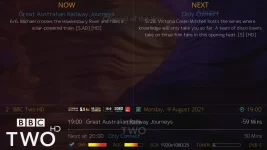
I've cleared the second infobar to just show the now and next programme information (Wife didn't want all the other clutter on that screen lol).

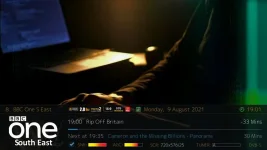
The main info bar shows SNR, AGC, SCR and Tuners in use. It also shows the sound type, 2.1 or 5.1 sound, the video codec, size 4:3 or 16:9, video size and a record/no record icon. I've also added a calendar and clock icon next to the date and time.

1_0_19_1B30_802_2_11A0000_0_0_0_20210809190005.webp

1_0_19_1B30_802_2_11A0000_0_0_0_20210809190040.webp

1_0_1_193D_7FF_2_11A0000_0_0_0_20210809190145.webp

1_0_19_1B30_802_2_11A0000_0_0_0_20210809190017.webp
 
Last edited:
It's been a while, but continued tweaking. Here is my current VixBMC_1080 skin modification.

View attachment ViXBMC_1080 (User Skin).zip

The display/skin display/skin_display_templates.xml file fixes an overscan issue on my VU+ Ultimo4k when displaying Picons in full screen. You might not need that file.

The ViXBMC_1080/fonts/Raleway-Channel.ttf fixes an issue with showing subtitles with the original skin.

I've included an alternative user file which adds a Openvix update icon which flashes if an update is available. As there is an issue with the latest update not working, my default user skin now replaces that with a freesat logo.

I've included the 400x200 picons that I use, many of which I have made myself. (I can't remember where I got the original picon set from).

All the changes just effect the infobar1 and 2 screens.

I hope you enjoy the changes. Just unzip the folder add or replace the existing files on your satellite box using ftp then do a GUI restart or reboot.

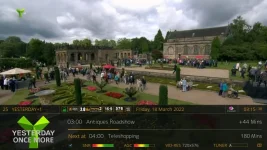
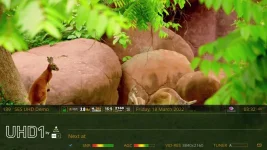
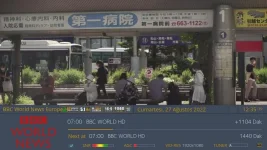
EDIT: The skin now shows 4K video resolutions (see image) and their associated 4K icons at the top of the infobar.
 

Attachments

  • 1_0_1_621C_7E6_2_11A0000_0_0_0_20220318031539.webp
    1_0_1_621C_7E6_2_11A0000_0_0_0_20220318031539.webp
    52.7 KB · Views: 37
  • 1_0_1F_1CEA_7F6_2_11A0000_0_0_0_20220318033247.webp
    1_0_1F_1CEA_7F6_2_11A0000_0_0_0_20220318033247.webp
    49.4 KB · Views: 32
Last edited:
@thecaretaker,

I deeply want to thank you and ask some questions

Can we squeeze channel name? I attached a picture that shows channel name is overflow and crushing
Meanwhile, I cant see Tuner signal bar as exact %percentage

Do you have any oher skin workshop?
For example; I like halo skin and Maybe We need some modification?

Greetings;
kamaxx
 

Attachments

  • 1_0_1_1389_3EA_1_C00000_0_0_0_20220827123540.webp
    1_0_1_1389_3EA_1_C00000_0_0_0_20220827123540.webp
    52.7 KB · Views: 28
Last edited:

OpenViX Feeds Status

Back
Top