Superb quality and spec AB-Com PULSe 4K SE. Crazy offer! Only £99! FREE UK DELIVERY! 4K UHD, Enigma 2, Multiboot 4 images & more!...
Superb quality and spec AB-Com PULSe 4K Rev II Twin Satellite tuner only £149! FREE UK DELIVERY! 4K UHD, Enigma 2, SATA HDD facility, Multiboot 4 images & more!...

Nameserver settings in Xtrend ET8500

I forgot to say that with regards to re-positioning the box nearer to the router, it would be awkward, and in any case, on test, I am getting 35Mb/s feeding to my Nvidia Shield fed from one of the other ports in the wired in ethernet hub so I wouldn't expect there should be any connection problems at all.
Thanks in advance of further help.
 
Hi guys,
Thanks to your help I think I am getting there. Did as twol suggested and i think for the first time there was evidence of flashing in that the 2 bar graphs appeared and competed successfully. I left the USB stick out and chose my last image backup from last week for flashing. This was on my caddied HDD. However on boot up it seems locked on the Please Wait screen. It has been sitting there for about 15 minutes. So still something not right. So I never got the wizard, (perhaps because I was re-flashing an image I had used before?). However, I pressed my remote, followed the rest of twol's instructions and got BBC1.
Please note that the LAN connection is not GREEN..
So I am now really intrigued -because as somebody pointed out my idea was pretty stupid - BUT you actually managed to use ImageManager to flash an image? (That was already there or downloaded?)
You didn‘t get the wizard because you restored an existing backup - I was suggesting that you say no to the restore and then you will get the wizard.
I am just wondering if you (somehow) have 2 boxes with the same mac address
 
Could everything I need to flash a saved image on my HDD be availble without the need to access the net?
I can confirm that according to my computer when accessing my hub info there is only one device with that MAC address. When I have tried (with 2 different USB sticks), this time with my internal caddied HD removed, I do not see any flashing bands, just the Xtrend start up logo followed by the VIX "please wait" screen but then i do get the wizard, but when I get to the Network section it tells me that I have no internet connection and to try to connect later. One thing I have noticed is that when I access Network Info, the LAN connection is lit GREEN for about 2 seconds and then goes GREY?
Also with regards to your point number 4) do not restore settings or plugins, I do not seem to see any mention of this as I work through it?
Also as I am having no success with USB stick, I take it that I will have to get this ethernet problem solved and then access the latest VIX update via the net using the machine?
Does anyone know if I could purchase a USB stick preloaded with the latest VIX software that would be guarranteed to work? I ask this because I have read that certain USB sticks do not work with the box and perhaps that could be part of my problem.
FYI the photo below shows the image, I have flashed back to, which is a few years old.
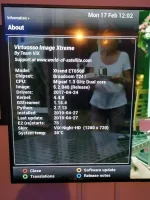
IMG_20200217_120207.webp
 
Last edited:
hi twol,
No I can't as when I choose download the window that comes up for me to select which update I want to download there is nothing in the list (again because i do not have a network connection).
Could the LAN section within the box be defective?
Within the box info if I choose Devices it stated Network servers - None, but yet there is a green light on my ethernet hub suggesting a 1000M connection is reaching the port in question. As stated before, i have tried 3 different ethernet cables between the hub and the box but no difference.
Thanks in advance for any further assistance.
 
Last edited:
So I guess we are going round in circles at the moment - so can you visit someone local where you can try the box on another lan? - just to prove if its a network issue or box isssue.
 
Thanks willo3092, I will try it.
May seem a stupid question at this stage but i do put the actual et8500 folder onto the stick not just the contents?
 
Last edited:
I have just used the BOOTice and transferred over my folder named et8500 which contains 5 files, activated the start button when it showed flashing blue/purple and it went solid blue/purple, but all I got was a re-boot after about a 90 secs and no progress bars to show any flashing. It has now come to a restore screen saying "A backup has been detected" and the option to accept RESTORE or Exit Restore Wizard.
Do not know what to do from here? If I choose EXIT will that be OK. Also if this is all OK do I need to remove the USB stick? Please advise.
 
Last edited:
Exit restore wizard
you only get the flashing bars with ImageManager
 
Had problem of cam not starting when changing boxes [have 2 with same line] had to bypass vpn-on seperate modem- to start cam then revert back to vpn and reboot box and all was ok,not very well up on this but worked for me,hope this has been of help.
 
Guys,
So I have gone through Basic settings and NETWORK wizard still says No Internet. Still does not seem to have found the USB flashing software as no bars and if I go into VIX the only thing it sees is the backup on my HDD.
 
Guys,
So I have gone through Basic settings and NETWORK wizard still says No Internet. Still does not seem to have found the USB flashing software as no bars and if I go into VIX the only thing it sees is the backup on my HDD.

So i think you need to find another location where you can test your box
 
Scratching my head here as how can box find a backup of a previous image if only storage device is the image which you are trying to flash.
What make and size are your usb sticks.
I presume you put usb stick in rear of box while powered off then switched it on.
 
Yes when I can locate a male to male lead. I have Filezilla on my computer. Could this help?

What is this lead your talking about and dont say Null modem as i think that had a special loader.
 

OpenViX Feeds Status

Back
Top