

leshay
New member
Hi
Bit of a problem here.
Using a Surface Pro 7 Tablet Computer with Windows 10 64bit (Home version), GigaBlueQuadPlus, GB Image 5.3.039
My internet provider sent me a new 'Smart Hub' (BT), which I installed yesterday.
The installation went very straightforwardly, and everything seemed fine. All devices were dicovered (DHCP), including the GigaBlueQuadPlus.
I can access the GB normally with WebIF (view/alter/set Timers etc) all fine. I can use my own EPG application, fetches EPG data, Timers etc all fine, can set Timers etc all fine.
The Windows File Explorer shows the GB (as \\GBQUADPLUS) in the Network list, but, when I try to open the GB to browse files - I get an error (see image).
One of the suggested possible fixes gleaned from a google search was to shorten the name of the computer - this I did but no fix.
It is a number of years since I first got the GB and after initial setup, I have never needed to change anything related to Network Settings on the GB. However, I seem to remember that when viewing the Mount Point Management list that there was more than the current 1 item (my NAS is listed, but also has issues to access from GB). I may be wrong, but I seem also to remember Root and HardDisc were listed (which I was expecting to see on the PC Network browser, but they are nowhere to be seen (am I right in thinking they should be listed somewhere?).
Any suggestions welcome.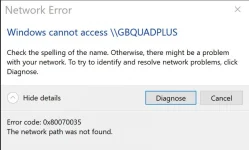
Bit of a problem here.
Using a Surface Pro 7 Tablet Computer with Windows 10 64bit (Home version), GigaBlueQuadPlus, GB Image 5.3.039
My internet provider sent me a new 'Smart Hub' (BT), which I installed yesterday.
The installation went very straightforwardly, and everything seemed fine. All devices were dicovered (DHCP), including the GigaBlueQuadPlus.
I can access the GB normally with WebIF (view/alter/set Timers etc) all fine. I can use my own EPG application, fetches EPG data, Timers etc all fine, can set Timers etc all fine.
The Windows File Explorer shows the GB (as \\GBQUADPLUS) in the Network list, but, when I try to open the GB to browse files - I get an error (see image).
One of the suggested possible fixes gleaned from a google search was to shorten the name of the computer - this I did but no fix.
It is a number of years since I first got the GB and after initial setup, I have never needed to change anything related to Network Settings on the GB. However, I seem to remember that when viewing the Mount Point Management list that there was more than the current 1 item (my NAS is listed, but also has issues to access from GB). I may be wrong, but I seem also to remember Root and HardDisc were listed (which I was expecting to see on the PC Network browser, but they are nowhere to be seen (am I right in thinking they should be listed somewhere?).
Any suggestions welcome.
Last edited:


