C
c1185750
Guest
Hi,
I have just received my Duo2, ordered from this site. It came pre set up with latest Vix, which is Hades 013, according to info>about. After adding a network mount and trying to browse the files via the recordings button (The R in a box with small lines) it keeps crashing the box and restarting.
I setup channels, autobouquet, internal HDD, timeshift etc. all fine with no issues.
I then went to add a network mount, so that I can watch the video files stores on my NAS (Synology diskstation) on mu Duo. The NAS is set up for sharing and I can see the files via an older Solo I am replacing.
I added the mount via setup>system>network>mounts>add mount
I selected the following:
Mount as: AUTOFS
Active: enable
Local share name: DS *just short for Diskstation
Mount type: NFS share *I have tried NFS & CIFS
Server IP: 192.16.0.x *my internal diskstation IP
Server share: video *The dir that is shared
Use as HDD replacement: no
Mount options: rw, nolock, tcp
When I went to view the network mount (via recordings button, yellow button to change location, select DS from the list), I got an error "media/autofs/DS does not exist" or similar. These settings are the same as I had on an old solo, but it was an old build so the share just used to mount on boot.
I can no longer get this message to replicate, as I went into recording then browsed media and up a folder to have a look. Then when I went into autofs folder, the box crashed. Again on the black crash screen it says "media/autofs/DS" does not exist.
I can no longer access recording, as soon as I hit that button it crashes and has to restart with the same message.
I tried resetting to factory settings, but these setting were somehow still maintained after I had been through the setup wizard. (it still had DS as a location on recording before I had even added it)
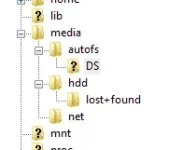
When I FTP to the box I can see the autofs folder is empty. Can anyone help me please? I can post a log file, but I do not know where to look for it.
Thanks
I have just received my Duo2, ordered from this site. It came pre set up with latest Vix, which is Hades 013, according to info>about. After adding a network mount and trying to browse the files via the recordings button (The R in a box with small lines) it keeps crashing the box and restarting.
I setup channels, autobouquet, internal HDD, timeshift etc. all fine with no issues.
I then went to add a network mount, so that I can watch the video files stores on my NAS (Synology diskstation) on mu Duo. The NAS is set up for sharing and I can see the files via an older Solo I am replacing.
I added the mount via setup>system>network>mounts>add mount
I selected the following:
Mount as: AUTOFS
Active: enable
Local share name: DS *just short for Diskstation
Mount type: NFS share *I have tried NFS & CIFS
Server IP: 192.16.0.x *my internal diskstation IP
Server share: video *The dir that is shared
Use as HDD replacement: no
Mount options: rw, nolock, tcp
When I went to view the network mount (via recordings button, yellow button to change location, select DS from the list), I got an error "media/autofs/DS does not exist" or similar. These settings are the same as I had on an old solo, but it was an old build so the share just used to mount on boot.
I can no longer get this message to replicate, as I went into recording then browsed media and up a folder to have a look. Then when I went into autofs folder, the box crashed. Again on the black crash screen it says "media/autofs/DS" does not exist.
I can no longer access recording, as soon as I hit that button it crashes and has to restart with the same message.
I tried resetting to factory settings, but these setting were somehow still maintained after I had been through the setup wizard. (it still had DS as a location on recording before I had even added it)
When I FTP to the box I can see the autofs folder is empty. Can anyone help me please? I can post a log file, but I do not know where to look for it.
Thanks
Last edited by a moderator: