Superb quality and spec AB-Com PULSe 4K SE. Crazy offer! Only £99! FREE UK DELIVERY! 4K UHD, Enigma 2, Multiboot 4 images & more!...
Superb quality and spec AB-Com PULSe 4K Rev II Twin Satellite tuner only £149! FREE UK DELIVERY! 4K UHD, Enigma 2, SATA HDD facility, Multiboot 4 images & more!...

Network port or box issue

cactikid

Forum Supporter
Donated Member
Joined
Jun 12, 2010
Messages
3,067
Reaction score
3
Points
38
Vu zero in use from my old Giga Quad in Client mode kinda worked for streaming to but epg was always slow to load as old image on Quad.

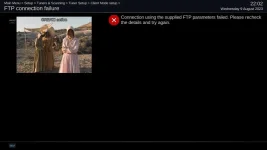
Replaced with Extrend 8000 and latest image but zero fails to connect to it and rechecked lan ip correct and Webif straight it.

I have reflashed via online but when box rebooted some channel list still showed ?

Moved Zero into another room and usb flashed but still throws up an error to connect to any box on my network.

Is it possible for a network port to half work even though its yellow and green?

Any ideas that i missed as i am trying to get a live cable to run to tuner also.
 
Has the server box got a fixed IP?

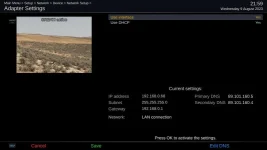
Please post a grab about-network from the server box and the client screen from the client box.
 
Yes all boxes have a fixed Ip.
Et 8000 with 3 feeds as want to use client on Zero.

Vu zero trying to connect via client to any box fails.

Is that what your looking for?
 

Attachments

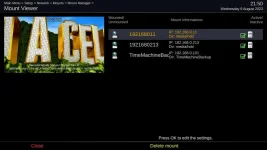
  • mount viewer.webp
    mount viewer.webp
    32.6 KB · Views: 6
  • adapter settings.webp
    adapter settings.webp
    22.8 KB · Views: 5
  • ftp error.webp
    ftp error.webp
    19.7 KB · Views: 5
Moved a solo2 into the room where zero was and get the FTP error also.

I can go into network and scan but it does now not show any of my boxes on the internet and add IP details in expert mode and save and can access Hdd recordings but cannot use client mode?

I did check Samba , Nfs and Ftp all in green.
 
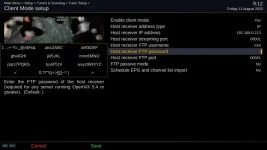
You didn't post a screengrab of your client mode setup.
 
OOps like this
 

Attachments

  • client.webp
    client.webp
    30.1 KB · Views: 9
So you have no password set. You need to use the network password of the server box.
 
I have never setup a password before for client .

I know with Filezilla you need to have a password setup on box first.

So i its user error with new images i need to setup a password on box first.

Thank you SIR as my brain did not think about password and has now connected as previous box was on older image and not needed it.
 
Last edited:

OpenViX Feeds Status

Back
Top