Superb quality and spec AB-Com PULSe 4K SE. Crazy offer! Only £129! FREE UK DELIVERY! 4K UHD, Enigma 2, Multiboot 4 images & more!...
Superb quality and spec AB-Com PULSe 4K Rev II Twin Satellite tuner only £179! FREE UK DELIVERY! 4K UHD, Enigma 2, SATA HDD facility, Multiboot 4 images & more!...

New skin: Simple Ten Eighty

<widget source="parent.ServiceEvent" render="Progress" pixmap="infobar/progressbar.png" position="20,170" size="440,10" borderWidth="0" foregroundColor="lcd_lightcyan" backgroundColor="3b3b3b" >
<convert type="EventTime">Progress</convert>
</widget>
Let's say I have the progress bar icon defined like this. How do I modify this line so that the sprogress icon is displayed? But it could be that I didn't write it down correctly. Please take a look
 
<widget source="parent.session.Event_Now" render="Sprogress" pixmap="infobar/progressbar.png" position="20,170" size="440,10" borderWidth="0" foregroundColor="lcd_lightcyan" backgroundColor="3b3b3b" >
<convert type="session.Event_Now">Sprogress</convert>
</widget>
If I write it this way with the Sprogress icon, will it be correct or not?
 
Please don't take this the wrong way I think I read it carefully a few times, but I guess there's something I didn't understand...Of course, there's something missing a lot of knowledge
 
Please tell me how to write this correctly. And from your world, I'll start drawing my own conclusions where can I find more information, Thank you in advance. Thank you
 
I hope I've got it right this time:) And if that's correct, I will can write the same Sprogress with icon?
<widget source="session.Event_Now" render="Progress" pixmap="infobar/progressbar.png" position="20,170" size="440,10" borderWidth="0" foregroundColor="lcd_lightcyan" backgroundColor="3b3b3b" >
<convert type="EventTime">Progress</convert>
</widget>
 
Last edited:
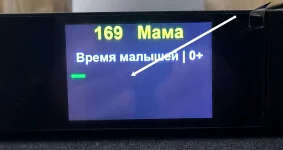
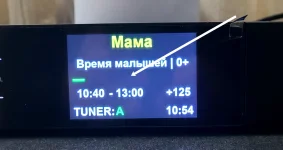
I tried running a test, but the sprogress.png bar isn't showing up. I configured the skin_display file like this even the clock is hidden on the LCD display but the sprogress.png bar still isn't showing up. Something must be wrong with my configuration
<widget source="session.Event_Now" render="Progress" pixmap="infobar/progressbar.png" position="20,170" size="440,10" borderWidth="0" foregroundColor="lcd_lightcyan" backgroundColor="lcd_darkgrey" >
<convert type="EventTime">Progress</convert>
</widget>
<widget source="session.Event_Now" render="Sprogress" pixmap="infobar/sprogress.png" position="20,170" size="440,10" borderWidth="0" foregroundColor="lcd_lightcyan" backgroundColor="lcd_darkgrey" >
<convert type="EventTime">Sprogress</convert>
</widget>
 

Attachments

  • 31.webp
    31.webp
    55.7 KB · Views: 5
  • 30.webp
    30.webp
    60.1 KB · Views: 3
I tried running a test, but the sprogress.png bar isn't showing up. I configured the skin_display file like this even the clock is hidden on the LCD display but the sprogress.png bar still isn't showing up. Something must be wrong with my configuration
What does the debug log say?
 
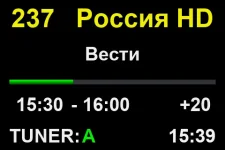
@Huevos, Thank you so much for your help with the skin_display file, I configured it like this and now everything is displaying perfectly (y)
<widget source="session.Event_Now" render="Pixmap" pixmap="infobar/sprogress.png" position="20,170" size="440,10" zPosition="1" alphatest="on" >
<convert type="EventTime">Progress</convert>
</widget>
<widget source="session.Event_Now" render="Progress" pixmap="infobar/progressbar.png" position="20,170" size="440,10" zPosition="2" transparent="1" >
<convert type="EventTime">Progress</convert>
</widget>
 
If I may, I'd like to ask you another question. I want to finish editing the skin_display file, so I'd like to ask you: if I want to change the font, color, and size of the title, the size of Tuner A, and things like that... should I do all of this in the skin_display file or in some other file do I need to do this as well? I'd really appreciate your answer!
 

Attachments

  • prev.webp
    prev.webp
    11.4 KB · Views: 10
There is no override for display skins. You could put the whole modified file in /etc/enigma2. That way it will be added to the backup and survive updates.
 

OpenViX Feeds Status

Back
Top