Hello All,
Downloaded and got the receiver set up and now just "fine tuning" the channels and things.
I must say that the new image is very refreshing!!
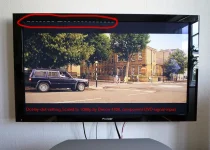
One slight problem I have is that when I go to the channel listings or the MENU, the top, the bottom and the left side of the menue and listings go off screen. I cannot see the headings or which colour button to press to navigate or store what I want to store, that is the Red, Green, Yellow and Blue Buttons that appear at the bottom, to do what I want to do.
On the Channel listings the first few letters go off the screen to the left hand side, this only happens when in the MENU or Channel listings. The picture on the channels is actually dead centre so I am not losing any channel picture.
I have changed the display settings to Just Scale and other options like it was on the previous Vix Image. I have also checked the TV settings and all these seem to be as they should be as the picture through the aerial is just fine.
As always, any comments or suggestions will be gratefully acknowledged.
Sanj
Downloaded and got the receiver set up and now just "fine tuning" the channels and things.
I must say that the new image is very refreshing!!
One slight problem I have is that when I go to the channel listings or the MENU, the top, the bottom and the left side of the menue and listings go off screen. I cannot see the headings or which colour button to press to navigate or store what I want to store, that is the Red, Green, Yellow and Blue Buttons that appear at the bottom, to do what I want to do.
On the Channel listings the first few letters go off the screen to the left hand side, this only happens when in the MENU or Channel listings. The picture on the channels is actually dead centre so I am not losing any channel picture.
I have changed the display settings to Just Scale and other options like it was on the previous Vix Image. I have also checked the TV settings and all these seem to be as they should be as the picture through the aerial is just fine.
As always, any comments or suggestions will be gratefully acknowledged.
Sanj